

March 6, 2019
Solved

Open Item Receipt with NO Bill Report

  • March 6, 2019
  • 3 replies
  • 0 views

We are trying to find a report to help us locate open item receipts with no Bills.  Anymore, we receive the items but we don't receive a bill, or it doesn't get entered. The ladies in accounting said it would be so helpful to point directly to those item receipts with no bill and we could call the vendor to get the bill for end of month closing.

Thanks Michael
Best answer by PreciousB

It's good to see you here in the Community, CSMG.


I can help you track the unbilled item receipts in QuickBooks Desktop.


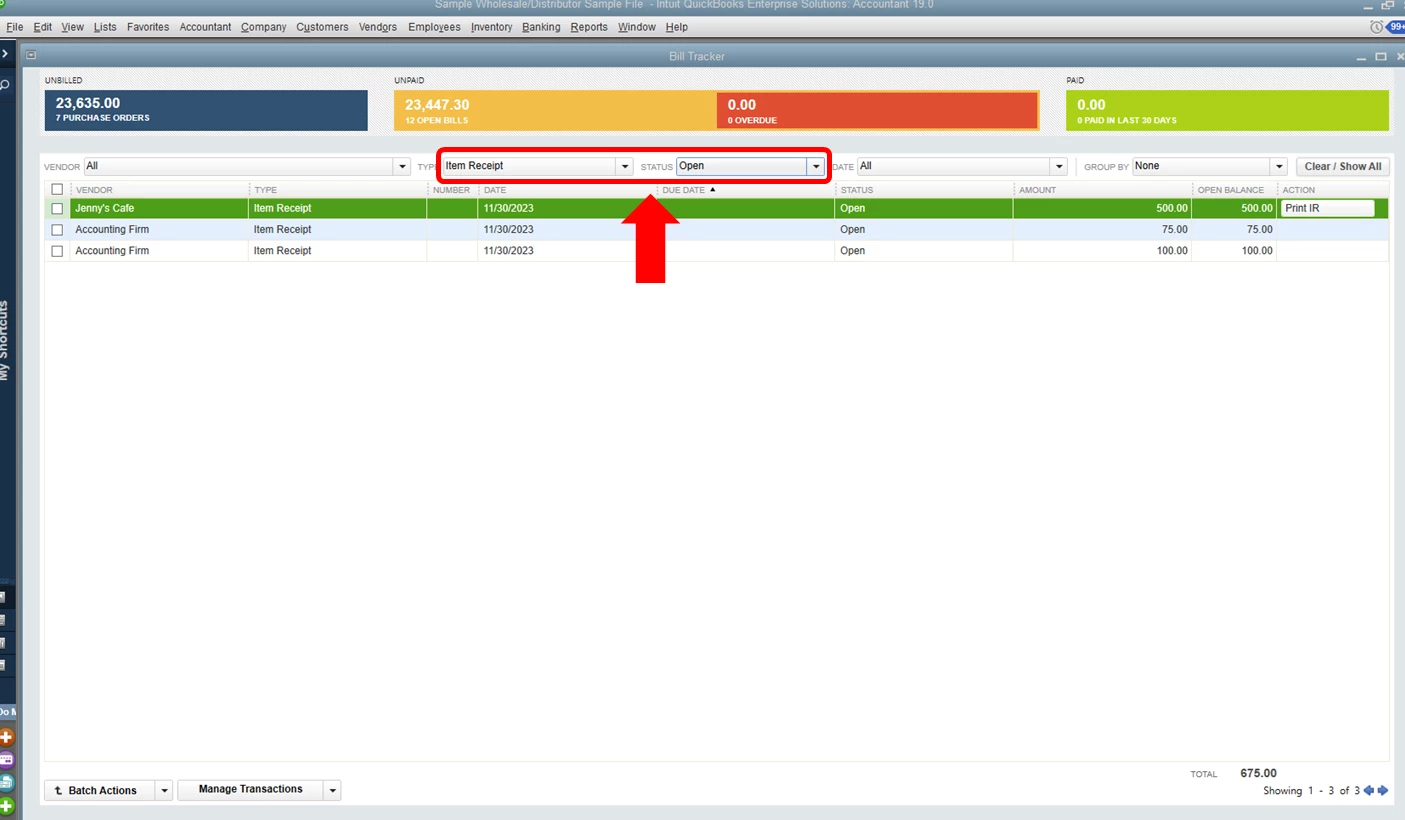
While we don't have a specific report to show you these details, you can use the Bill Tracker to see the open items with no bills. Let me show you how:

  1. Choose Vendors at the top, then select Bills Tracker.
  2. Select Item Receipt beside Type (check out the screenshot below).
  3. Status should be Open.


Here's an article that about entering bills: Enter bills.


You can also press F1 and enter Bill Tracker to lean more about using this tool.


That should help you track the unbilled items. I hope this response finds you with a smile. I'm glad to provide further assistance should you have any questions. Take care.

3 replies

PreciousB
PreciousBAnswer
March 7, 2019

It's good to see you here in the Community, CSMG.


I can help you track the unbilled item receipts in QuickBooks Desktop.


While we don't have a specific report to show you these details, you can use the Bill Tracker to see the open items with no bills. Let me show you how:

  1. Choose Vendors at the top, then select Bills Tracker.
  2. Select Item Receipt beside Type (check out the screenshot below).
  3. Status should be Open.


Here's an article that about entering bills: Enter bills.


You can also press F1 and enter Bill Tracker to lean more about using this tool.


That should help you track the unbilled items. I hope this response finds you with a smile. I'm glad to provide further assistance should you have any questions. Take care.

CSMGAuthor
March 8, 2019

This is perfect.  THank you

April 23, 2020

The best way to view open item receipts that need to be matched to the corresponding bill yet, is by going to Reports>Purchases>Purchase by Vendor Detail. You can then customize the report and filter it by Transaction Type in the filter tab and choose Item Receipt in the drop down. This will display all item receipts for your selected date range. These will all be open since they are converted to bills once they are matched and entered.

December 2, 2021

Personally I use purchases by Vendor Detail (Reports -> Purchases -> Purchases by Vendor Detail) and then filter Transaction Type to just Item Receipts and change the date to All (default is This Month-to-Date).


This allows me to see all item receipts that don't have bills associated with them. I try to check this regularly before we do our check runs so I can see if any bills were missed.

MonicaM3
December 2, 2021

Thanks for sharing your workflow @Operations_Monkey


We appreciate you taking the time to be a part of the Community! Please feel free to drop in any time if we can help with any questions or to provide answers for others. 


Take Care!