April 29, 2022
Solved

opening balance in customer ledger

  • April 29, 2022
  • 1 reply
  • 0 views

Failed to enter opening balances in supplier/ customer ledger . 

 

Best answer by Adrian_A

Hi there, pushpa1301.


I'm here to guide you to enter an opening balance on your customer's ledger.


If your customer has no transactions, you can enter the balance on the Customer information page.


Let me guide you with these steps:
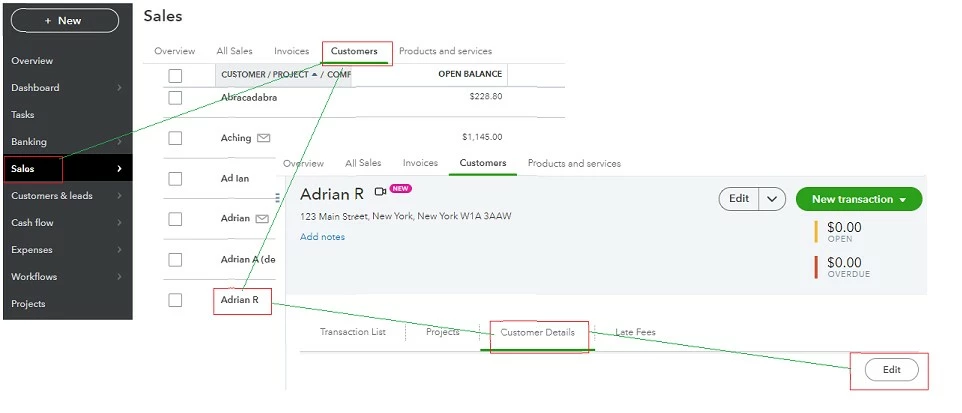
 

  1. From the Sales tab, select Customers.
  2. Click the customer's name.
  3. On the Customer details tab, click Edit
  4. Enter the Opening balance.
  5. Click Save.


If there's already a transaction, you can enter a Journal entry. Then, debit the Accounts Receivable account to increase the balance. Here's how:


  1. Click the + New button and select Journal Entry
  2. Enter the date when you want to record the opening balance in the Journal date field.
  3. Proceed to the Account column and select Accounts Receivable in the first line.
  4. Enter the amount in the Debits column.
  5. Go to the second and enter a second account to balance the entry. You'll want to reach out to your accountant if you're unsure which account to use. 
  6. Enter the name of the customer in the Name column.
  7. Click Save and close


Just in case you have not completed your year-end tasks, you can check out this article for additional guidance and reference: A year-end guide for QuickBooks Online.


I'd be glad to jump right back if you have follow-up questions. I'm always here to help.

1 reply

Adrian_A
Adrian_AAnswer
April 29, 2022

Hi there, pushpa1301.


I'm here to guide you to enter an opening balance on your customer's ledger.


If your customer has no transactions, you can enter the balance on the Customer information page.


Let me guide you with these steps:
 

  1. From the Sales tab, select Customers.
  2. Click the customer's name.
  3. On the Customer details tab, click Edit
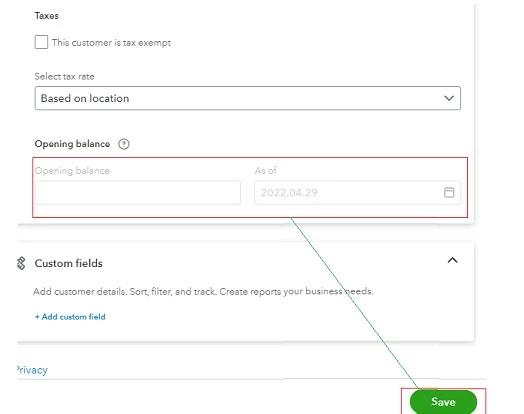
  4. Enter the Opening balance.
  5. Click Save.


If there's already a transaction, you can enter a Journal entry. Then, debit the Accounts Receivable account to increase the balance. Here's how:


  1. Click the + New button and select Journal Entry
  2. Enter the date when you want to record the opening balance in the Journal date field.
  3. Proceed to the Account column and select Accounts Receivable in the first line.
  4. Enter the amount in the Debits column.
  5. Go to the second and enter a second account to balance the entry. You'll want to reach out to your accountant if you're unsure which account to use. 
  6. Enter the name of the customer in the Name column.
  7. Click Save and close


Just in case you have not completed your year-end tasks, you can check out this article for additional guidance and reference: A year-end guide for QuickBooks Online.


I'd be glad to jump right back if you have follow-up questions. I'm always here to help.
