February 19, 2021
Solved

P&L , sales is showing both bills and invoices

  • February 19, 2021
  • 4 replies
  • 0 views

My P&L report shows bills and invoices in sales portion which distorts sales .  I can't see anything wrong in filters just as standard P&L report no customization... 

Best answer by BigRedConsulting

I assume you're not entering an income account - your "Sales" account - on your bills directly, or you'd know why they're showing up on the P&L using the account.


Bills will use income accounts in cases where you use items / are purchasing items that have only one account, an income account.


To avoid this, edit the items you're purchasing on your bills and enable the purchase option.  It'll have a different title depending on the type of item, and your QB version, but it'll always appear in the location seen here:
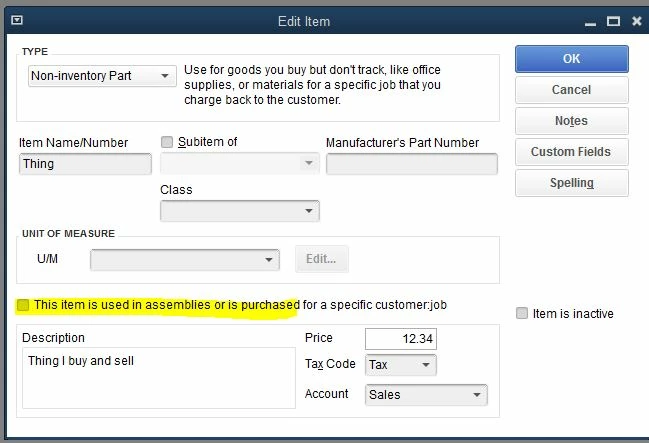
 

When you check the box, then you'll see options for values to use when you purchase the item:
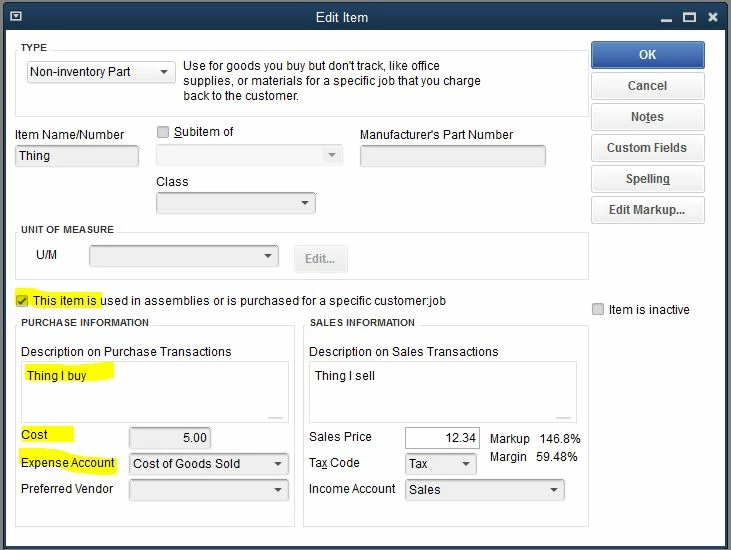
 

When you add the Expense account and then save the item, you'll get a prompt like this:
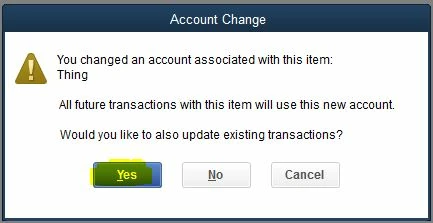
 

Answer Yes, and then all of your purchases that you don't want to use your sales account will be updated to use the new purchase/expense account.


4 replies

Rose-A
February 19, 2021

I appreciate the screenshot you've provided. Let me share some information on why invoices and bills are showing up on your Profit & Loss report in QuickBooks Desktop, ACE15.


I can see that you're looking at the Profit & Loss Detail report. You'll see the invoices and bills there because this statement provides a line item for every variable that affects profit, rather than combining income and expense items.

 
If you need to show the income and expense accounts only you can pull up and run the Profit & Loss Standard report. Here's how:


  1. Click Reports at the top menu bar.
  2. From the drop-down list, select Company & Financial and choose Profit & Loss Standard.
     
  3. This will show all your Income and Expense Accounts without the invoices and bills.


I recommend customizing the report to get the specific details you need. You can also memorize it to save its current customization settings. It serves as your record and helps you quickly access it for future use.


This should keep you moving today, ACE15. Don't hesitate to let me know if I can be of additional assistance while working in QuickBooks or need more help with your profit & loss report. I'm always here to keep helping. Have a good one!

ACE15Author
February 19, 2021

No that didn't  work either sales still contains bills

February 19, 2021

Thanks for coming back, @ACE15.


I have some information about the bills in our Profit and Loss report. These are transactions associated with your customers (For example an expense billable to a customer).


You can check the bills if they are billable or not by clicking the bill transaction itself. If these bills are not billable, you can delete the customer's name in the Customer:Job column.


Additionally, you can re-sort your master name list. Re-sorting will help you fix odd behavior in the program and makes your list go back to their default order. Please check out this guide for the detailed steps: Re-sort lists in QuickBooks Desktop.


In case you need help with other tasks in QBDT, browse this link here to go to our general topic with articles.


Keep me posted if you still have questions or concerns with reports. I'll be around to help. Take care and have a great day ahead.

BigRedConsulting
February 20, 2021

I assume you're not entering an income account - your "Sales" account - on your bills directly, or you'd know why they're showing up on the P&L using the account.


Bills will use income accounts in cases where you use items / are purchasing items that have only one account, an income account.


To avoid this, edit the items you're purchasing on your bills and enable the purchase option.  It'll have a different title depending on the type of item, and your QB version, but it'll always appear in the location seen here:


When you check the box, then you'll see options for values to use when you purchase the item:


When you add the Expense account and then save the item, you'll get a prompt like this:


Answer Yes, and then all of your purchases that you don't want to use your sales account will be updated to use the new purchase/expense account.


January 12, 2023

This is great info, however, in your example you used a "Non-Inventory Part". We only have Inventory Parts, and the "purchasing option" you highlighted is not showing in those Item set-ups. How can I get those Bills out of my P&L Sales?  Please advise.

April 24, 2021

This is not the impression we want you to experience when running the Profit and Loss report, WYO2021.


I appreciate you for performing the solutions provided by my colleagues. To better isolate this one, let's try opening another company file to check if you're having a problem with only one file and not the program itself. Let me show you how:

  1. In your QuickBooks, go to the File menu at the top left.
  2. Choose Close Company.
  3. In the No Company Open window, click the drop-down arrow in the Open a sample file icon.
  4. Choose a sample file and click on it.


Then, try running the report again to see if sales are showing both bills and invoices. If it works, it's possible there may be a damaged data on the company file you've been working with. We can run the Rebuild Data tool is built-in to fix any company file data issues. Just follow the steps and detail in the Fix data damage on your QuickBooks Desktop company file article. We can also repair your QuickBooks Desktop to fix any damaged components in the software. 


If the problem persists, I'd suggest contacting our Technical Support Team. They'll pull up your account in a secure environment and investigate what's causing this issue. You may send a message via chat, call us at a time convenient to you, or we’ll get in touch with you instead. To ensure we address your concern, our representatives are available from 6:00 AM to 6:00 PM on weekdays and 6:00 AM - 3:00 PM on Saturdays, PST. See our support hours and types for more details about this one.


Visit our Reports page for more insights about managing your reports in QuickBooks. 


Feel free to update us after contacting our support or performing the solutions, as I want to ensure this is resolved for you. Please reply to this post and I'll get back to you. Have a great weekend. 

February 19, 2022

Hello,

were you able to solve the issue when your P&L was showing both invoices and bills? I am having the exact same issue and I m lost.

i would appreciate if you share your tips.


February 19, 2022

It looks like this is a duplicate post, @Manizha1983.


My colleague GlinetteC already shared her answer about your concern regarding running the Profit and Loss report. You can check her response through this link: https://quickbooks.intuit.com/learn-support/en-us/other-questions/p-l-shows-both-invoices-and-bills/01/1039614#M95974


You might also want to learn how to memorize reports in QuickBooks Desktop. This allows you to save it with its current customization settings.


The QuickBooks Community team is always here to help if you have any other concerns or follow-up questions. Have a good one, @Manizha1983.

February 19, 2022

Thank you Mark, yes Glinette responded to my comment. I run the P&L exactly the same was but when I click on the sales account I see invoice and bills where I should only be seeing invoices.

thanks
