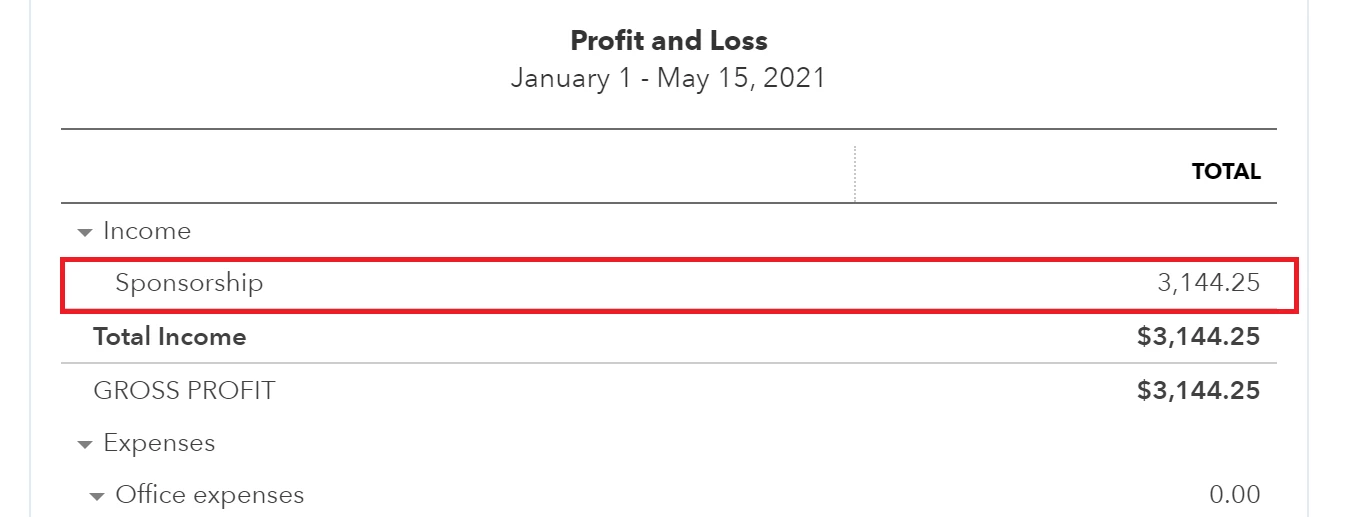
Hi JenoP. Thanks for reaching out and my apologies for the delayed reply. The placed I started with was the Sponsorship link on the P and L statement (box in red). From there it took me to the screen that has the breakdown I had in the first screenshot you saw in the initial post.
As for the Deposit that is a duplicate of the invoice transaction, I'm trying to figure that part out as well. I believe the deposit was received initially via invoice through Quickbooks and then auto-deposited into my checking account. I made no manual deposits for any transactions included. Once this happened, I had the option to match the transaction to a deposit that was in linked to my checking account so I selected that option. I did this for the remaining invoices that are also included in the first screenshot and it seems to have worked properly with none of those being duplicated. However, this single transaction has a duplicate for some reason. .
I do believe the deposit with tax is showing up accidentally but I'm not sure why. I have checked my categorized transactions but don't see a duplicate there so I'm not sure where it originates. However, I also followed the steps in the link you included about linking a deposit to an invoice (thank you for sharing that) and was able to see both transactions in the Chart of Accounts section (see screenshot below).

After seeing this, I was able to link the transaction to the deposit similar to how it shows up for the other sponsorships that were paid using the Quickbooks invoices. However, this still didn't completely fix the problem since that duplicate deposit remains (see screenshot below).

It looks like deleting the transaction on 04/28/21 would be the next logical step, but I'm not sure if that's best. Any other suggestions how to determine where the 04/28/21 deposit comes from and if it's able to be deleted for this issue?
I recognize the importance of having accurate books for your business, @bjazz.
I appreciate you for providing screenshots and all the steps you've done in resolving your duplicate transactions in QuickBooks Online. I'm here to help you determine where the 04/28/21 deposit comes from.
You'll want to access the Audit Log report to determine the transaction source. Let me guide you how:
- Go to the Gear icon, then choose Audit Log.
- Click the Filter drop-down arrow and select All user in the User box.
- Pick 04/28/21 in the date field.
- Choose Transactions in the Show only these events.
- Tap Apply.

Once you confirmed that the transaction is duplicate, then you'll want to delete it. Moreover, as my peer mentioned above, you can communicate with your account to check if you should be deleting the deposit. This way, your books are accurate.
If you're unable to delete it, please call our QuickBooks Specialist. They have can help you remove the transaction.
Here's how:
- Go to the Help menu, then click Contact Us.
- Type your concern in the box and tap Let's talk.
- Choose either Get a call or Start a chat.
- Complete the required data and submit the request.

Make sure to call them within business hours to ensure we can cater to your concern immediately.
Lastly, feel free to visit these articles below about how to reconcile accounts, handle your banking transactions, and other related topics.
Let me know in the comment section if you have a follow-up question about your transactions. I'm happy to serve you. Keep safe.


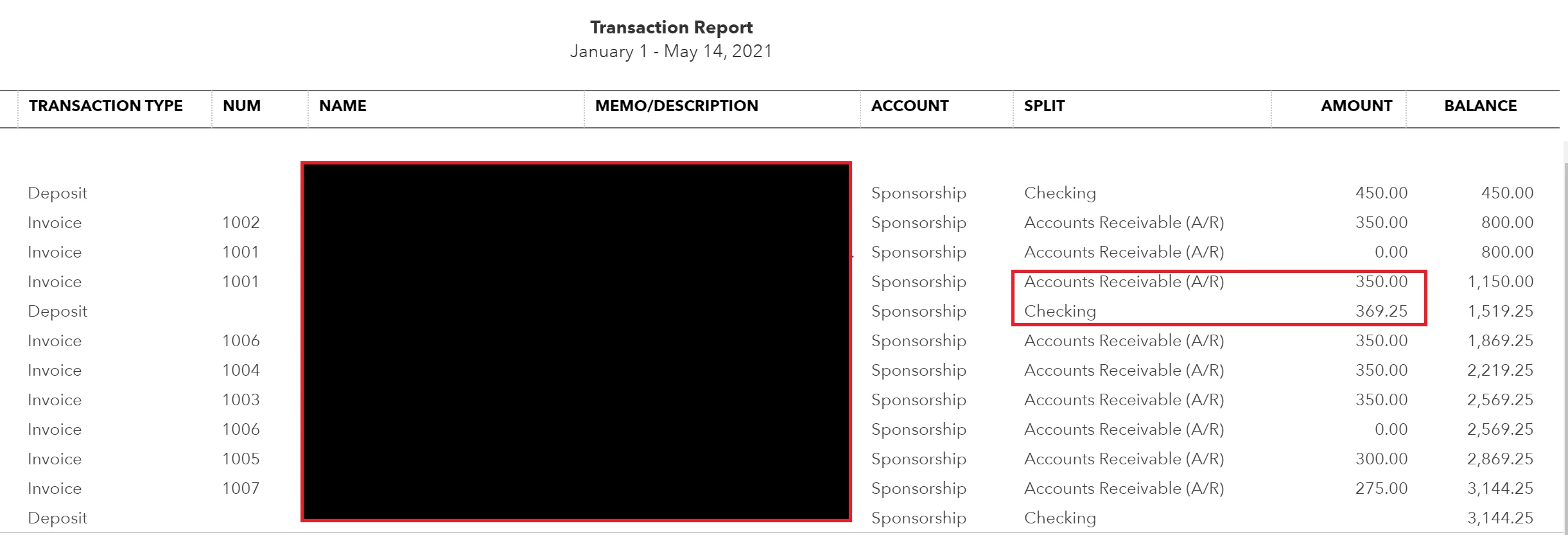 How do I go about removing the invoice total so that the total with tax is only included in the P&L statement and avoid duplicate transactions being included? Thanks.