Hi there, TNCL.
You got me here to help you sort this out. In QuickBooks Online, we can pull up the Transaction Detail by Account report and customize it to show the information you need. Please note to make sure that the customer's bill is marked as billable so the payment will show on the report which is associated with the vendor.
Here's how:
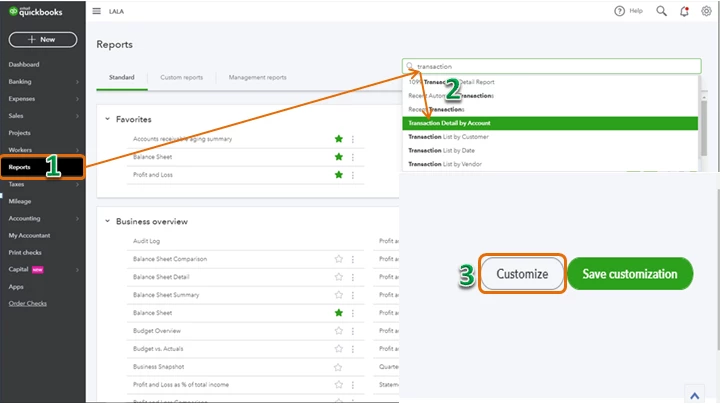
- Click the Reports tab on the left menu.
- Type in transaction in the search field and choose Transaction Detail by Account.
- Click the Customize button.
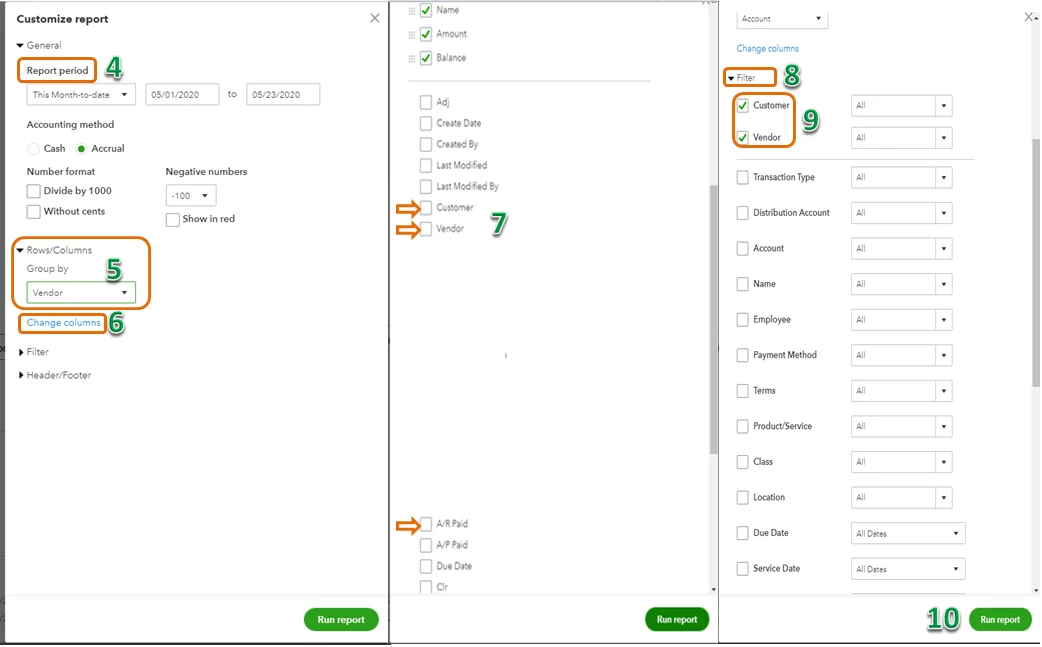
- Select the Report period.
- Click the Rows/Columns and in the Group by the drop-down arrow, choose Vendor.
- Click Change columns.
- Put a checkmark in Customer, Vendor, and A/R Paid boxes.
- Click Filter.
- Put a checkmark besides Customer and Vendor box.
- Click Run report.
Please see attached screenshots:
You can learn more details about customizing report in this article: Customize reports in QuickBooks Online.
Using the steps above, you'll be able to track which invoices are paid and which bill each invoice matches.
Feel free to leave a comment below if you have any other concerns.

