Mar 28, 2023 1:16 AM UTC
Solved

Payment from a customer is less than expected rest was taken by Fee from financial institution

I had a sale to a customer for $5000 so I recorded the sale.. When I received the amount into my bank account it was for 4850... The website that was used for the payment takes a small cut of it, $150.. 

What I did was a put in the 5000 invoice and then "Recieved" a 5000 payment and then created an expense for $150 to record the "Banking fee". Just to be clear the banking fee isnt from my bank its from a website that handles the payments for the customer...

Thanks

JessT
JessTAnswer
Mar 28, 2023 2:18 AM UTC

Hi Grimayoj!


Congratulations on getting a payment! I'll share a better way to record the service fee so that you can reconcile your transactions without issues.


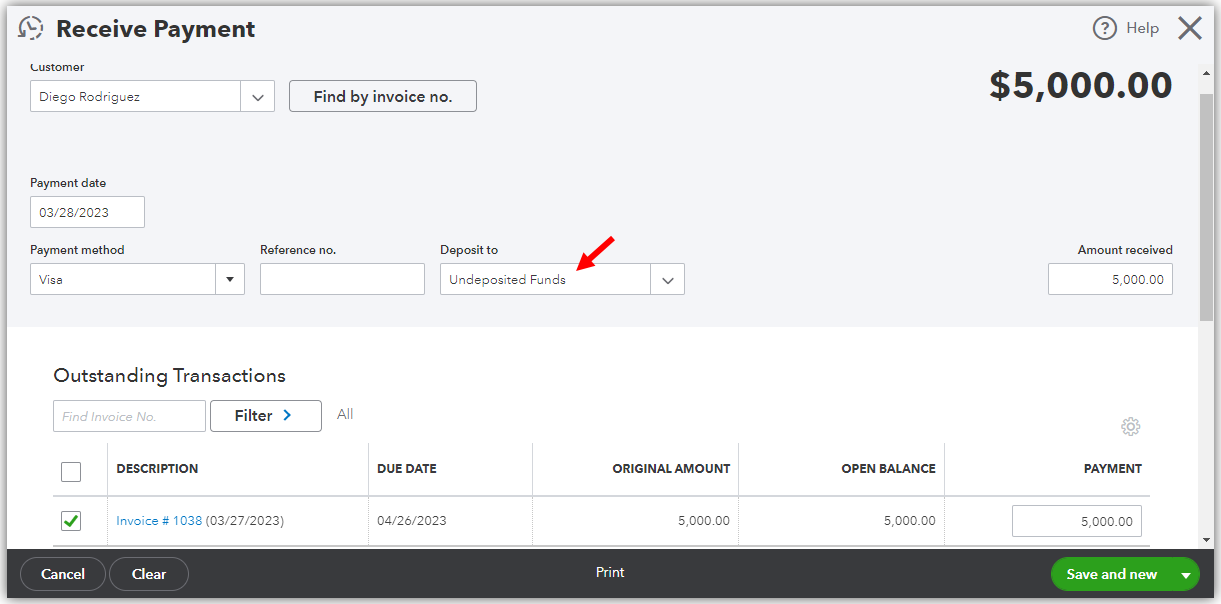
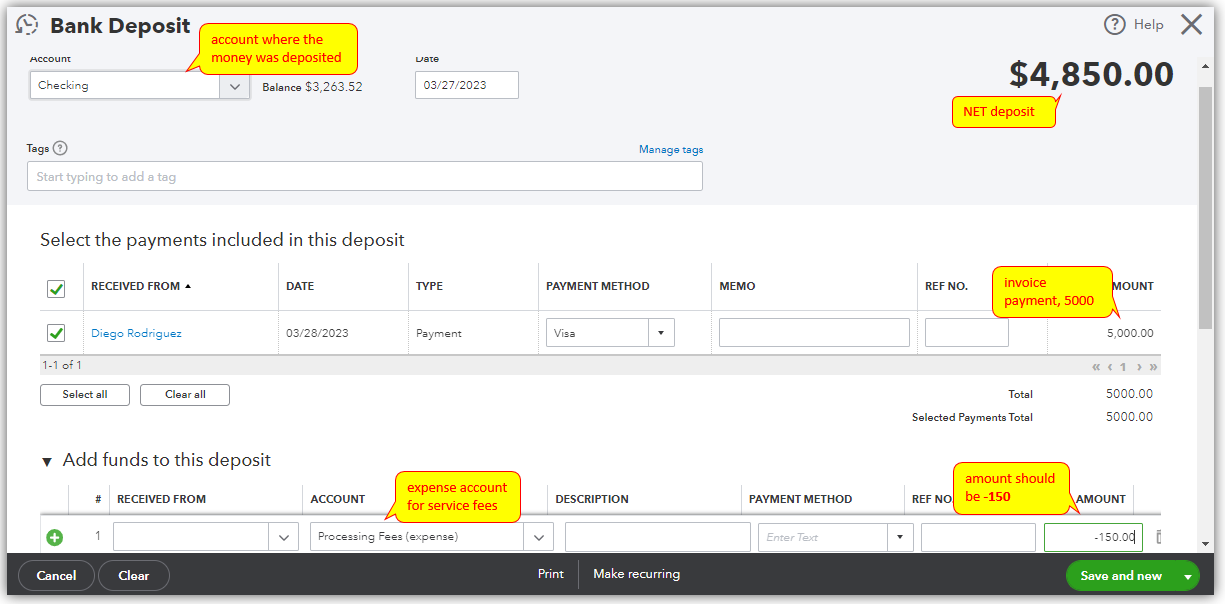
Instead of creating a separate expense transaction for the $150 service fee, you'll want to deduct it when you deposit the invoice payment. This will leave you a net deposit amount of $4850, which happened in real life. Hence, you'll need to delete the expense transaction. Then, edit your invoice payment and make sure it uses the Undeposited Funds account in the Deposit to field so the payment can be deposited.


Receiving the invoice payment and using the Undeposited Funds account.


Depositing the invoice payment with a service fee.


You can also check about reconciling your bank account for your reference in the future.


If you have have any other concerns about the payment, feel free to comment below. I'm just around to help.

1 reply

JessT
JessTAnswer
Mar 28, 2023 2:18 AM UTC

Hi Grimayoj!


Congratulations on getting a payment! I'll share a better way to record the service fee so that you can reconcile your transactions without issues.


Instead of creating a separate expense transaction for the $150 service fee, you'll want to deduct it when you deposit the invoice payment. This will leave you a net deposit amount of $4850, which happened in real life. Hence, you'll need to delete the expense transaction. Then, edit your invoice payment and make sure it uses the Undeposited Funds account in the Deposit to field so the payment can be deposited.


Receiving the invoice payment and using the Undeposited Funds account.


Depositing the invoice payment with a service fee.


You can also check about reconciling your bank account for your reference in the future.


If you have have any other concerns about the payment, feel free to comment below. I'm just around to help.