March 2, 2022
Solved

Payroll item type entry error

  • March 2, 2022
  • 1 reply
  • 0 views

Today once payroll was finished, I noticed I entered an amount as leave time instead of Years of Service.  The amount paid is correct but for reporting purposes I need to move the amount to the correct category.  Is this possible?

Best answer by JasroV

I'll help you update your paychecks, @mdussault.


You'll want to edit your paychecks and ensure to select the correct payroll item to steer away from any discrepancies. I'll show you how.


  1. Go to the Employees menu in your QuickBooks Desktop (QBDT).
  2. Select Edit/Void Paychecks.
  3. On the Edit/Void Paychecks screen, change both the Show paychecks date from/through from dates to the date of the check, and press Tab on your keyboard.
  4. Select the check-in question, and click Edit
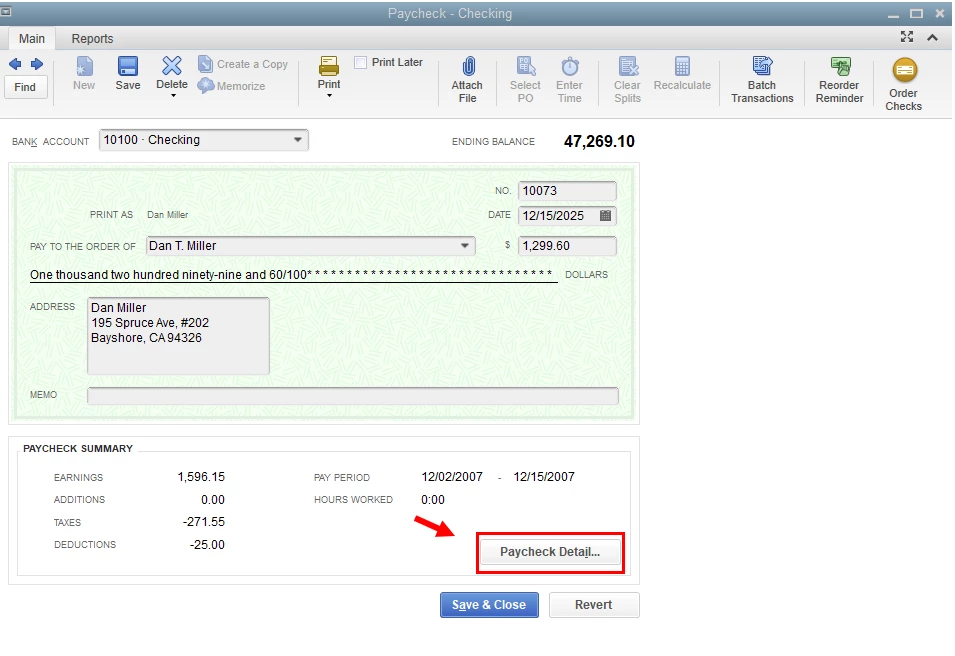
  5. From the Paycheck - Checking page, click Paycheck Detail
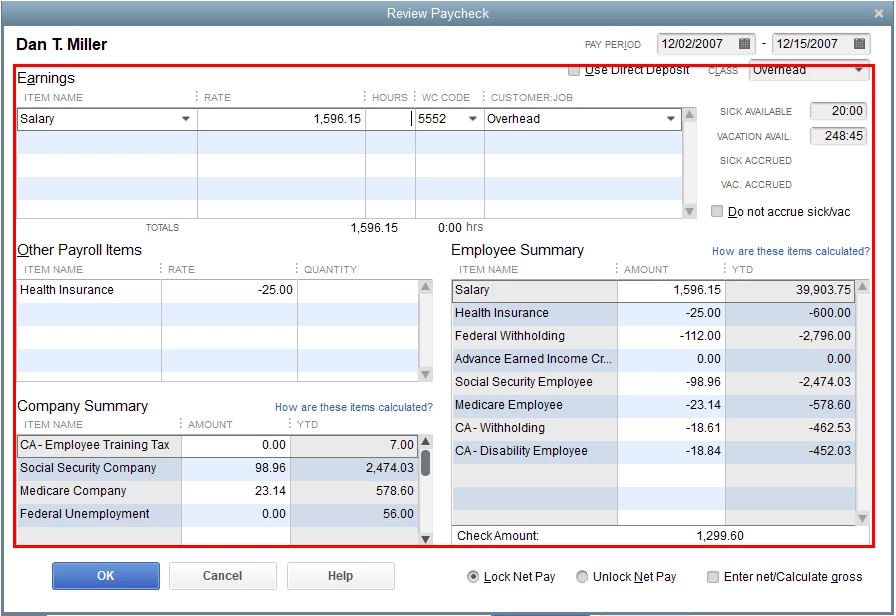
  6. Make some necessary changes in the Review Paycheck window and click OK when done. 
I'd also recommend working with your accountant for guidance and other ways to better record this. This way, we can ensure the accuracy of your accounts after making these changes. 


Additionally, I'm attaching this link that can guide you on how to let your employees view their paychecks online: Invite your employees to QuickBooks Workforce to see pay stubs, W-2s and more.


Please don't hesitate to leave a reply if you have any follow-up questions about paychecks and QBDT. I'll be here ready to help you at any time. Keep safe and have a good one!


1 reply

JasroV
JasroVAnswer
March 2, 2022

I'll help you update your paychecks, @mdussault.


You'll want to edit your paychecks and ensure to select the correct payroll item to steer away from any discrepancies. I'll show you how.


  1. Go to the Employees menu in your QuickBooks Desktop (QBDT).
  2. Select Edit/Void Paychecks.
  3. On the Edit/Void Paychecks screen, change both the Show paychecks date from/through from dates to the date of the check, and press Tab on your keyboard.
  4. Select the check-in question, and click Edit
  5. From the Paycheck - Checking page, click Paycheck Detail
  6. Make some necessary changes in the Review Paycheck window and click OK when done. 

I'd also recommend working with your accountant for guidance and other ways to better record this. This way, we can ensure the accuracy of your accounts after making these changes. 


Additionally, I'm attaching this link that can guide you on how to let your employees view their paychecks online: Invite your employees to QuickBooks Workforce to see pay stubs, W-2s and more.


Please don't hesitate to leave a reply if you have any follow-up questions about paychecks and QBDT. I'll be here ready to help you at any time. Keep safe and have a good one!

mdussaultAuthor
March 2, 2022

You are AMAZING! Thanks