

July 28, 2022
Solved

Payroll Reports in Excel > Tax Form Worksheets

  • July 28, 2022
  • 5 replies
  • 0 views


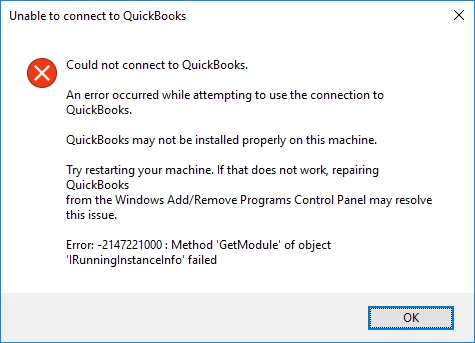
I receive the error shown below when using Payroll Reports in Excel > Tax Form Worksheets.  Initially, the Tax Form Worksheet opens in Excel where the options to choose a tax form are presented - when I choose '941 Quarterly' and then 'Create Report', I get the error shown below.


The product is QuickBooks Desktop Pro Plus 2022.  This error is new with the 2022 version that I recently installed - I've been using these worksheets for years.  We do not have a payroll subscription - we do it manually and use these tax forms to help complete federal tax forms.  Calls with the help desk are anything but helpful - telling me I need to speak to the payroll team (but can't because I don't have a subscription), or that the installation is corrupt (it isn't - QB is up to date, and everything else works fine).  


Any help or suggestions are appreciated!
 

Best answer by BigRedConsulting

@jsclements 

RE: I am not subscribed to QB Payroll - the link you provided is for those with QB Payroll subscriptions.


The reason the Tax Form Worksheets won't work is that the version that ships with QuickBooks 2022 is very old and is not designed to work with QuickBooks 2022.


Intuit hasn't updated the default workbook templates that install with QuickBooks for many years, instead expecting the user to get payroll updates in order to get the latest versions of the templates. That sort of back-fired this year because none of those old templates will work with QuickBooks 2022 because it was changed from a 32-bit to a 64-bit application.


The version that ships with QuickBooks 2022 is 1.08, which is ancient.  You need at least version 1.27 for QuickBooks 2022, per Intuit's release notes.


If you launch the Tax Form Worksheets and the default file name, in the Excel window title area, is QB_Taxform_Link1 then your version of the template is too old.


For some reason, Intuit renamed the updated version of the template. When you have the updated version, the default file name in the Excel title area is QB_Taxforms1.


RE: I would appreciate more advice on how to solve my specific problem.


To solve this problem, get a payroll subscription.

Or, you can download the updated file , save it locally, unzip it, and launch it by double-clicking it (instead of launching it from the QuickBooks menu.)

5 replies

Adrian_A
July 28, 2022

Thank you for adding a screenshot, jsclements.


Let's run some updates to fix the error message you encounter.


QuickBooks 2022 is 64bit. Thus, it will need 64-bit version of Office to maximize the performance. Once you have this version, make sure the latest release for QuickBooks Desktop 2022 and payroll updates are downloaded before opening the report again.


See the following link to learn more about the recent updates in our program: Release notes for QuickBooks Desktop 2022.


For the steps to update your software, use this link. You can also visit this page to get the latest payroll tax table: Latest payroll news and updates.


Additional information and references are also provided here in case you need them:


Join us again in the Community if you need anything else. I'd be glad to help you.

July 28, 2022
  • The latest updates for QB 2022 have been installed. 
  • I have the 64-bit version of Office365 installed, including Excel
  • I am not subscribed to QB Payroll - the link you provided is for those with QB Payroll subscriptions


I appreciate your suggestions - but they seem like generic troubleshooting steps not specific to my problem.  I would appreciate more advice on how to solve my specific problem.

BigRedConsulting
July 28, 2022

@jsclements 

RE: I am not subscribed to QB Payroll - the link you provided is for those with QB Payroll subscriptions.


The reason the Tax Form Worksheets won't work is that the version that ships with QuickBooks 2022 is very old and is not designed to work with QuickBooks 2022.


Intuit hasn't updated the default workbook templates that install with QuickBooks for many years, instead expecting the user to get payroll updates in order to get the latest versions of the templates. That sort of back-fired this year because none of those old templates will work with QuickBooks 2022 because it was changed from a 32-bit to a 64-bit application.


The version that ships with QuickBooks 2022 is 1.08, which is ancient.  You need at least version 1.27 for QuickBooks 2022, per Intuit's release notes.


If you launch the Tax Form Worksheets and the default file name, in the Excel window title area, is QB_Taxform_Link1 then your version of the template is too old.


For some reason, Intuit renamed the updated version of the template. When you have the updated version, the default file name in the Excel title area is QB_Taxforms1.


RE: I would appreciate more advice on how to solve my specific problem.


To solve this problem, get a payroll subscription.

Or, you can download the updated file , save it locally, unzip it, and launch it by double-clicking it (instead of launching it from the QuickBooks menu.)

BigRedConsulting
July 28, 2022

Are you using the worksheet template that came with QuickBooks 2022 / launching the workbook from within QuickBooks 2022?  If not, then it won't work.

July 28, 2022

Yes - I'm launching the template from QB2022.

January 17, 2023

I just encountered this problem for the first time in the 12 years I've been using QuickBooks after I updated to Quickbooks 2023.  After an hour on the phone with customer support, I was told they couldn't help me because I don't pay for their payroll subscription.  

January 17, 2023

I'll make sure this gets sorted out, @SWC_TN.


Have you tried checking what's new and improved in QuickBooks Desktop 2023? If not, I recommend doing so and downloading its most recent features. This lets you maximize the performance of the program and get rid of unusual behaviors.


You can refer to this link to learn what's new and improved in the latest updates to QuickBooks Desktop 2023 and Enterprise 23.0: Release notes for QuickBooks Desktop 2023.


However, if you still can't run the report successfully after downloading the latest version, you may want to follow the provided workaround by @Fiat which is to download the updated file, save it locally, unzip, and launch it by double-clicking it (instead of launching it from the QuickBooks menu.) 


Furthermore, I'd also recommend getting a payroll subscription to be able to have access to payroll reports with the most updated features. With this subscription, you'll also receive payroll updates, such as the most current and accurate rates and calculations for supported state and federal tax tables, payroll tax forms, and e-file pay options.


 Once decided to subscribe to a payroll subscription, here's an article that'll guide you in setting this up: Get started with QuickBooks Desktop Payroll.


Feel free to tag my name if you need any additional help with regard to accessing payroll reports in QuickBooks Desktop. It's always my pleasure to be of assistance. Have a good one.

January 18, 2023

Did you read my response at all???? I just said I encountered the problem AFTER downloading Quickbooks 2023.   

I'm not paying $50 a month for payroll.  I have managed to use payroll manually for 12 years.   

March 31, 2023

I am SO tired of excel issues with quickbooks

April 3, 2023

My problem exactly with the same results from Quickbooks help line