April 11, 2023
Solved

Print Chart of Accounts

  • April 11, 2023
  • 1 reply
  • 0 views

I have QB Pro 2020 and want to print a simple Chart of Accounts.  There does NOT seem to be a simple way to do this.  Help please!

Best answer by Mark_R

Hi there, @bob11.


Printing a chart of accounts in QuickBooks Desktop (QBDT) is easy peasy. I'd be happy to guide you through the steps.


  1. Open your QuickBooks Desktop company file.
  2. Go to the List menu, then select Chart of Accounts.
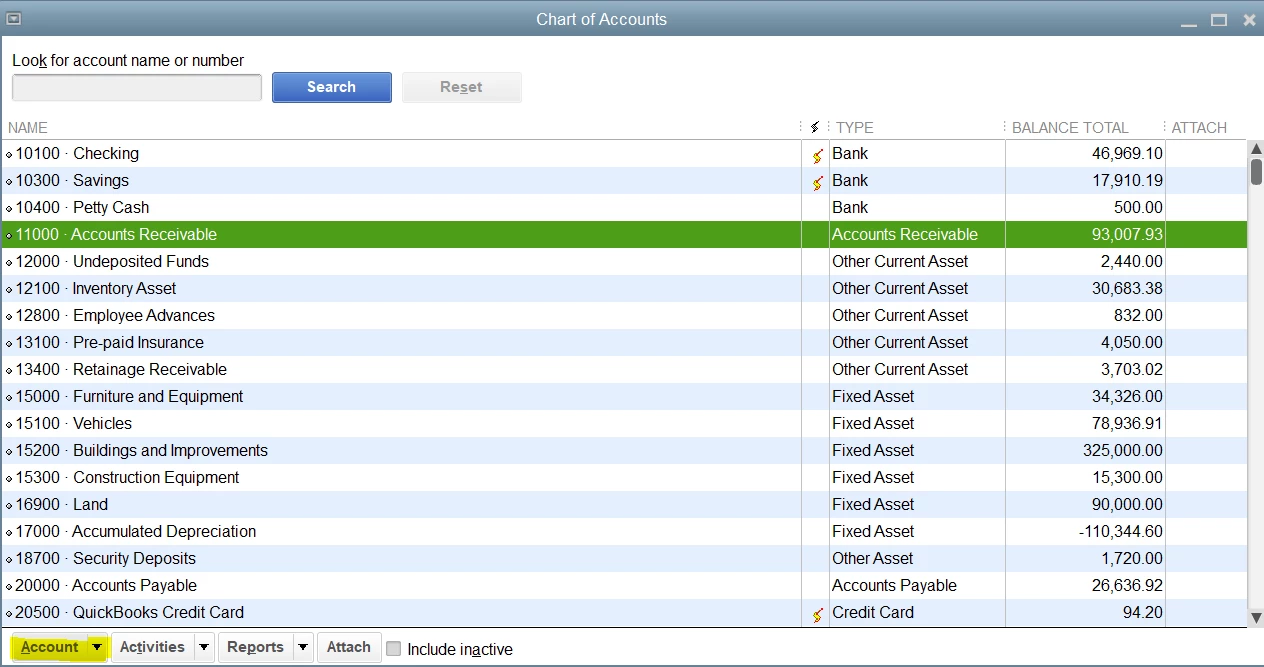
  3. From the Account drop-down, select Print List.
  4. Review the print settings.
  5. Click Print.


Just in case you encounter issues when printing the chart of accounts, you can check out this article to learn how to fix it: Fix printing issues in QuickBooks Desktop.


Come back to this post if you have other concerns or follow-up questions about printing the chart of accounts in QBDT. I'll be around to provide further assistance.

1 reply

Mark_RAnswer
April 11, 2023

Hi there, @bob11.


Printing a chart of accounts in QuickBooks Desktop (QBDT) is easy peasy. I'd be happy to guide you through the steps.


  1. Open your QuickBooks Desktop company file.
  2. Go to the List menu, then select Chart of Accounts.
  3. From the Account drop-down, select Print List.
  4. Review the print settings.
  5. Click Print.


Just in case you encounter issues when printing the chart of accounts, you can check out this article to learn how to fix it: Fix printing issues in QuickBooks Desktop.


Come back to this post if you have other concerns or follow-up questions about printing the chart of accounts in QBDT. I'll be around to provide further assistance.

April 11, 2023

I hadn't noticed the little drop down box "Activities" at the bottom. So accustomed to the selections at the top of the program.  I was successful and I thank you very much as it really was a simple process.  

April 11, 2023

You're always welcome, Bob.


I'm glad that my peer, Mark_R, was able to help you with printing your Chart of Accounts in QuickBooks Desktop.


Please know that the Community forum is always open to help you again if you have other concerns with QuickBooks in the future. Have a great day ahead!