

December 6, 2021
Solved

Print invoice details

  • December 6, 2021
  • 1 reply
  • 0 views

I'm using QB Desktop Enterprise. Is there a way to print a list of invoices that include the description of the items in each invoice? 

We recently created a bunch of gift cards for door prizes on Black Friday. When creating the gift cards in QB POS, they entered the gift card number so it shows in the description on the invoice. I can pull a report in Desktop with the list of invoices and the amounts, but can't see the descriptions of items. Any ideas?
Best answer by ShiellaGraceA

Hi @JeanG,


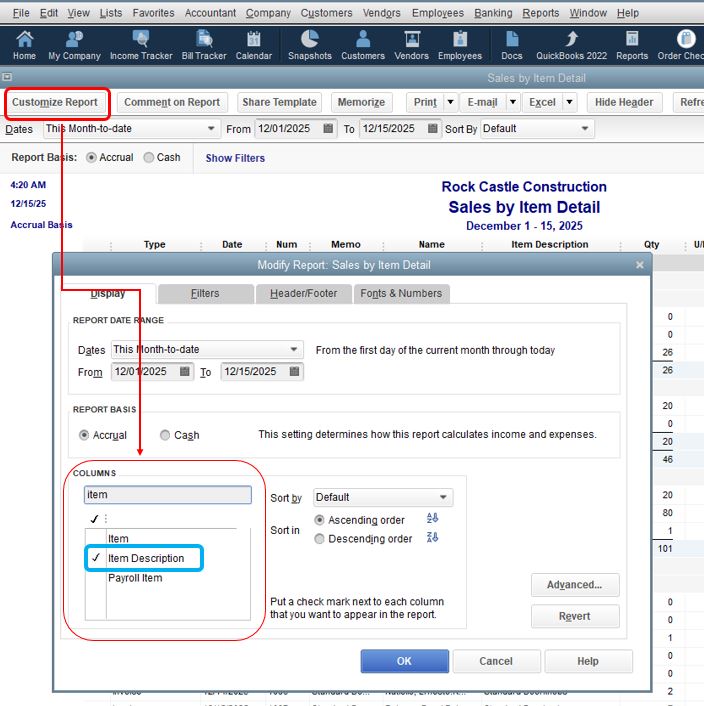
I know a report that you can use to view the item's description. You can use the Sales by Item Detail report and filter it to add the description. Let me guide you how.


  1. Go to Reports.
  2. Select Sales and then choose Sales by Item Detail.
  3. Tap the Customize Report button.
  4. Under Columns, search Item Description
  5. Click OK. See the attached images below.


With the above steps, you're able to view the invoice's items description and amount. For more details about customizing reports, check out this guide: Customize reports in QuickBooks Desktop.


Also, here's a link that'll help you create and manage reports in QuickBooks Desktop: Reports.


Keep me posted if you still have questions or concerns about filtering reports. I'm always here to help. Take care and have a lovely day ahead.

1 reply

December 6, 2021

Hi @JeanG,


I know a report that you can use to view the item's description. You can use the Sales by Item Detail report and filter it to add the description. Let me guide you how.


  1. Go to Reports.
  2. Select Sales and then choose Sales by Item Detail.
  3. Tap the Customize Report button.
  4. Under Columns, search Item Description
  5. Click OK. See the attached images below.


With the above steps, you're able to view the invoice's items description and amount. For more details about customizing reports, check out this guide: Customize reports in QuickBooks Desktop.


Also, here's a link that'll help you create and manage reports in QuickBooks Desktop: Reports.


Keep me posted if you still have questions or concerns about filtering reports. I'm always here to help. Take care and have a lovely day ahead.