

February 20, 2020
Question

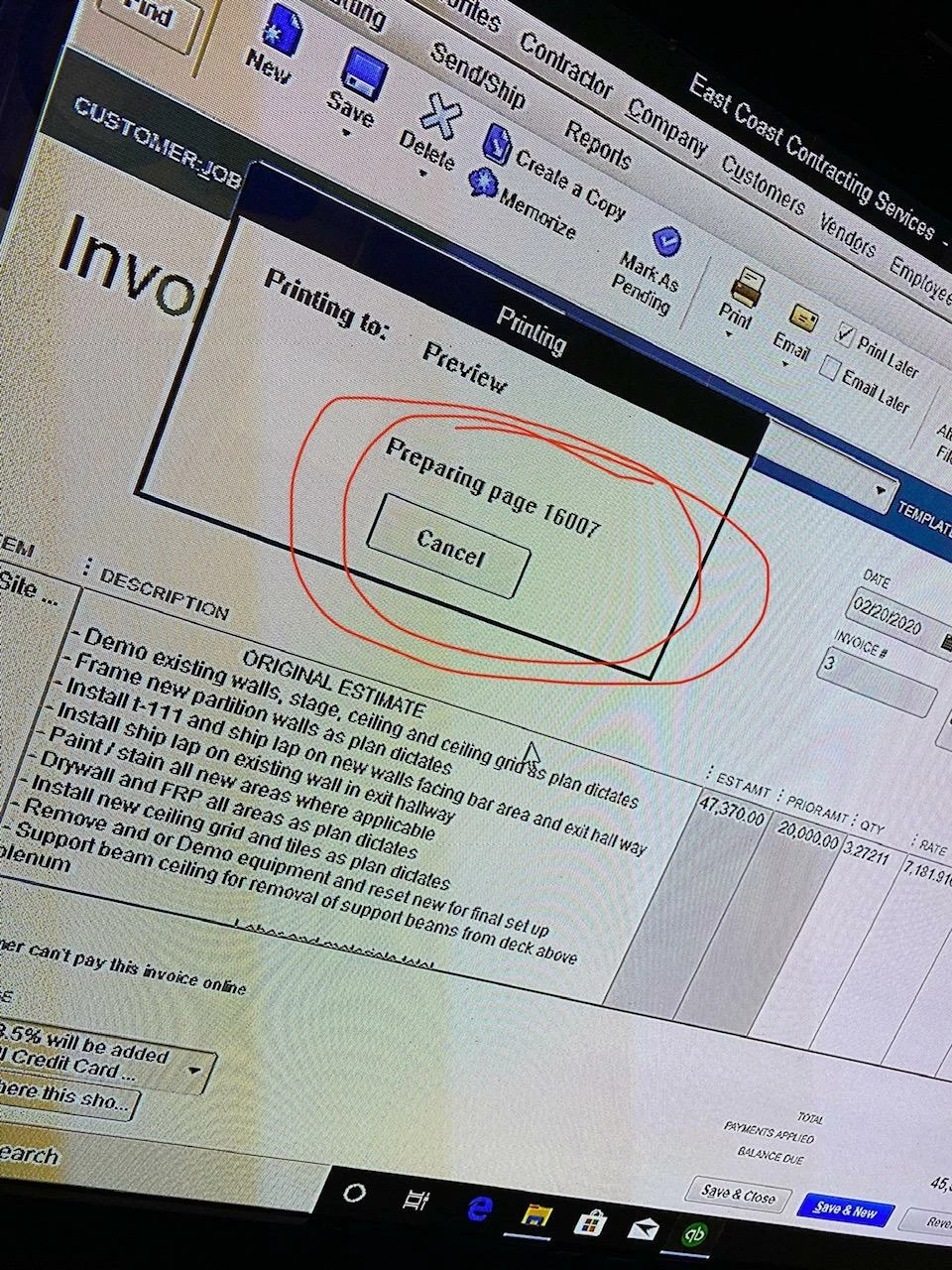
Problems after creating a new Invoice... Will not email, print preview or email. Tries to create thousands of pages in the invoice.

  • February 20, 2020
  • 3 replies
  • 0 views

I've created partial invoices in the past based on an estimate and didn't have an issue. 

Now I create in invoice, it wont email, save or print. It just give me the thinking icon.  When I try and do a print preview of the invoice it shows that it's trying to prepare thousands of pages. It counts up to 30K and then goes back down, then repeats.


QuickBooks 2018 Desktop Premier


HELP
3 replies

RyanZAuthor
February 20, 2020

QuickBooks 2018 Desktop Premier

February 21, 2020

Thanks for sharing the snapshot, @RyanZ.


When the Print Later box is check when creating an invoice, the system automatically queues it for printing at a later time.


This reason why the system shows the number of invoices when previewing. However, I can help you control this function when previewing. Let me show you how:


  1. Go to the File menu and select Print Forms.
  2. Click Invoices and uncheck the invoices that you don't want to view when printing.
  3. Select OK.


You can also open each invoice and uncheck the Print Later box from there. Then, make sure that the same box is unchecked when creating invoices. This will prevent future transactions from showing when previewing.


You can also view the number of invoices that you've created in the Customer Center: Invoices section. Here's how:


  1. Go to the Customers menu and select Customer Center.
  2. In the Transactions section, click Invoices.


If I can be of further assistance, please let me know by posting below.

RyanZAuthor
February 21, 2020

I went and cleared all the invoices and started over. Made sure the Print Later was uncheck, Made sure their wasn't anything in the print queue. I saved and tried to preview... Same issue... it starts to print preview multiple pages. So I shut the program down and start over.


The fix doesn't work. 


another note. I don't have any issue going back to an invoice I created prior and doing a print preview or emailing that invoice. 


I really don't care about printing. I'm just trying to email the client. Same issue, if I try and save it as a PDF. 


MichelleBh
February 21, 2020

Thanks for the quick reply, @RyanZ.


I want to make sure you're able to email the invoice to your customer. There's a possibility that there's something wrong with your PDF. To better isolate the issue, let's run the Print Repair Tools from the QuickBooks Tools Hub.


Here's how:

  1. Download the QuickBooks Tool Hub. The name of the file is QuickBooksToolHub.exe.
  2. Open the file you downloaded and install
  3. Follow the on-screen instructions to complete the process. 

Once done, go to the Tool hub, then select Program Problems and run the QuickBooks PDF & Print Repair Tools. After that, let's try to email or save as a PDF the invoice in QBDT. 


If the same problem, I suggest rebooting your computer and reopen. Then reset the temp folder permissions by following steps listed below.


  1. Press Windows key + R, then enter %TEMP% and click Enter
  2. Choose Properties, then select the Security tab.
  3. Pick Full Control, then email or save the invoice again.

However, if the issue persists, confirm if you can print it to your XPS Document Writer because QBDT uses parts of the XPS to save as PDF and email. For the detailed steps about the process, visit this article: Troubleshoot PDF and Print problems with QuickBooks Desktop.


Once the invoice sent, you can always check the invoice status by hitting the See History hyperlink. It will show you the status, such as SentViewedPaid, or Deposited. For the complete instructions, check out this article: Verify that an invoice was emailed and read by the recipient.


Let me know how it goes by clicking the Reply button below. I'm always here to help. 

November 30, 2021

Fix!


QuickBooks's tech were no help,

The Progress invoice template is what's causing the issue. The template is not complete so what you have to do is 

1. Go into List

2. Templates

3. Progress Invoice

4. In the preview you'll see that the are sections of the template missing.

5. Click Additional Customization 

- uncheck everything in the Header, Columns, Prog Cols, Footer, and Print. 

- once you've done that click Default. 

- save and exist now.


All should be good now and you can go back in to your invoice and you'll be able to preview, save pdf, email, and print with no issues. 

You also be able to customize the template as you wish as well.

December 12, 2023

Finally! A fix that helps. 2 years later, and it's still an issue. Thank you so much!