

October 18, 2017
Solved

Product/service showing up under wrong income account

  • October 18, 2017
  • 3 replies
  • 0 views

I have updated a product/service I sell to a new income account and made it a sub-category. Upon doing this, all invoices have been updated showing the new income account and correctly show it as a subcategory. However, when I run a P&L for the year, it returns the income to the prior income account, not the newly updated one. Why is this not synced eventhough it has been updated on the invoices? 
    Best answer by vpcontroller

    @brittanyiah


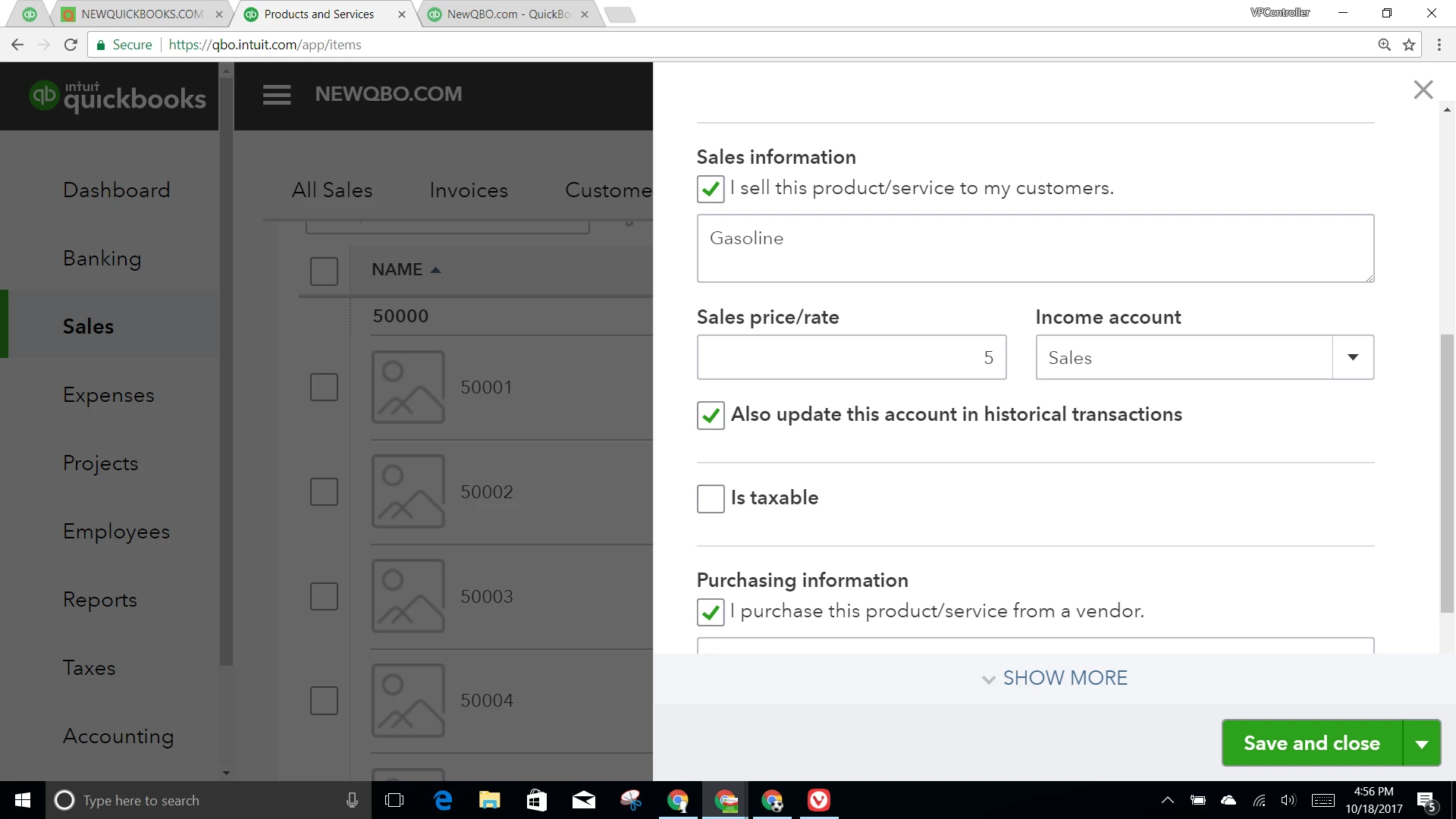
    It would not change if you old invoices are associated with the inventory item. You would need to go into your old invoices one at a time, and change to the new inventory item, But if they are associated services/non-inventory items, change the income account and select "Also update this account in historical transactions" box (right below income account), it should also change historical transactions as it said. In case you missed selecting that box, follow the instructions below.

    How do I change the account my product and service item is associated with?


    +++


    3 replies

    vpcontroller
    October 18, 2017

    @brittanyiah


    It would not change if you old invoices are associated with the inventory item. You would need to go into your old invoices one at a time, and change to the new inventory item, But if they are associated services/non-inventory items, change the income account and select "Also update this account in historical transactions" box (right below income account), it should also change historical transactions as it said. In case you missed selecting that box, follow the instructions below.

    How do I change the account my product and service item is associated with?


    +++


    October 19, 2017

    I did read that in another post, but unfortunately that box doesn't appear on mine. Perhaps because I'm running the online version?Sorry the picture is crooked, but I wanted to give a visual of some kind. Thanks!


    October 19, 2017

    Also, the income account is already correct. To make the box pop up, I have to put it into a different income account. When I go back to the correct income account, the box disappears. Thanks!

    November 21, 2018

    Is there a way to batch update "Also update this account in historical transactions" function under Product and Services? Thanks

    vpcontroller
    November 21, 2018

    @pino


    @pino wrote:

    Is there a way to batch update "Also update this account in historical transactions" function under Product and Services? Thanks


    If you're referring to batch update for multiple items (non-inventory type and service type), the answer is NO. You will need to edit one item at a time.


    For Inventory type, there is NO "Also update this account in historical transactions" function in QBO. It's only for non-inventory and service items.


    Related article: https://quickbooks.intuit.com/community/Inventory-and-projects/How-to-change-the-account-for-a-product-service-item/td-p/186348


    November 21, 2018

    Well, can it be done for service and non-inventory type then?

    Thanks

    December 17, 2020

    I am experiencing the same problem and tried the solution of changing the income account associated with the Service to try an update old invoices and the income account in the P/L.  I checked the "Also update this account in historical transactions" box and saved it, but it does nothing.  When I run the P/L again the income remains in that old account, not to the updated account. 

    Kristine Mae
    December 17, 2020

    Good job for doing the basic steps to fix the issue, Stevewoo.


    I suggest reaching out to our customer care support since it didn't make any difference. You can follow Angelyn_T's steps on how you can get in touch with us.


    I'll add this article as a future reference: Set up and track your inventory in QuickBooks Online.


    We're just one post away. Feel free to reach out to us if you have other concerns.