April 18, 2019
Solved

Profit and Loss by Job including PO?

  • April 18, 2019
  • 1 reply
  • 0 views

Hello, 


I've been running through a number of P&L by Job reports and have come into this same scenario:


Profit margin is much higher than expected, there are some COGS not included, so I then pull up a custom report showing all POs by job, mentally add those costs into the P&L and realize that the margin is normal.


So because the POs are with companies we have credit with, and they bill monthly, our P&L by Job report isn't picking up on those costs until the bills come in.  What I am looking for is to have a report that shows all P&L by Jobs and includes POs that have been tagged to that job - regardless of whether they have been billed.  


Thanks,

Best answer by Angelyn_T

Hello there, @br1.


It's my pleasure to join the thread and help you today so you'll be able to run reports in QuickBooks Desktop (QBDT) to include both the posting and the non-posting transactions.


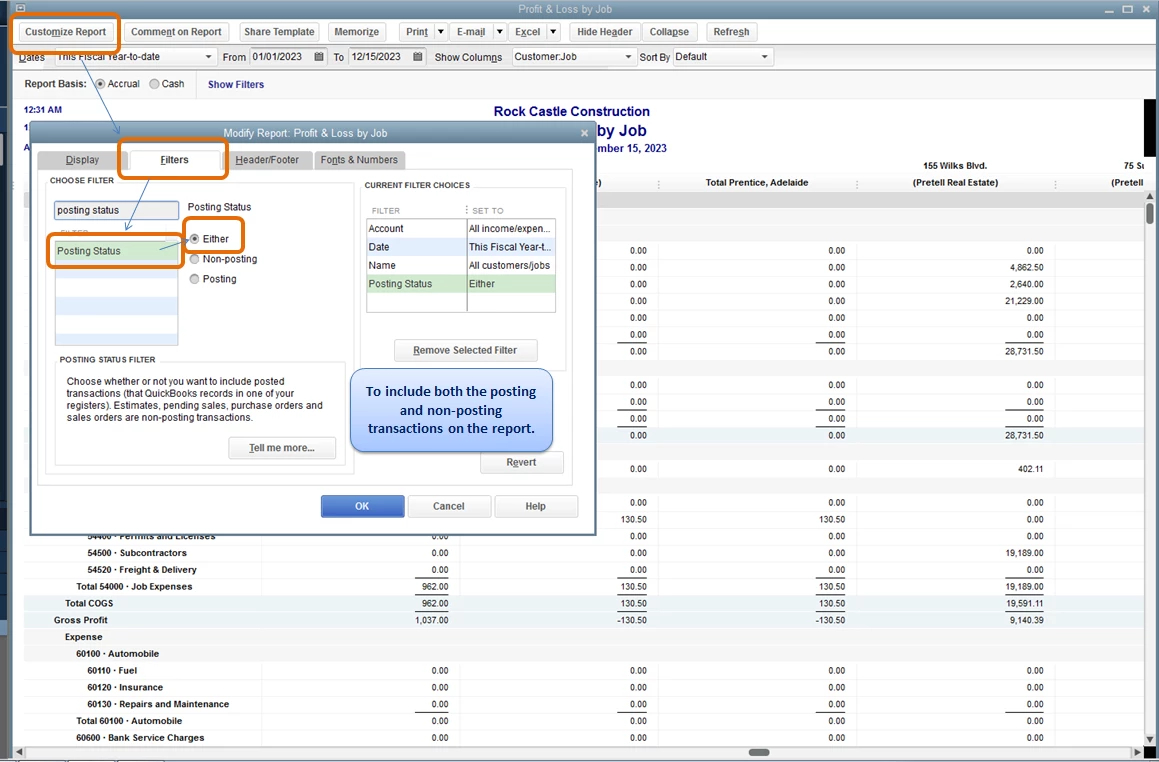
When running reports in QBDT, to include both the posting and the non-posting transactions, you must filter the Posting Status of the report. Let me guide you how.


  1. On the report's page, click on Customize Report.
  2. Go to the Filter column.
  3. Look for Posting Status, then select Either.
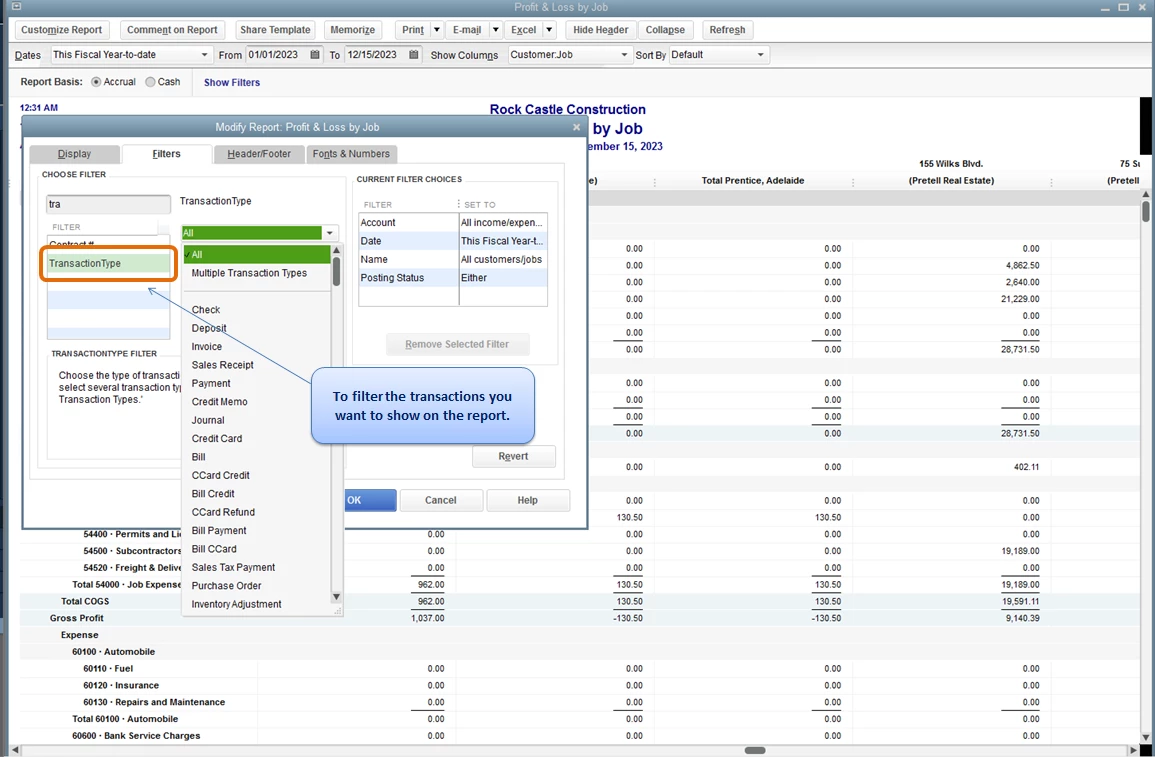
  4. You can also choose on what transactions you want to reflect on the report by clicking on Transaction Type.
  5. Click OK to save the changes.

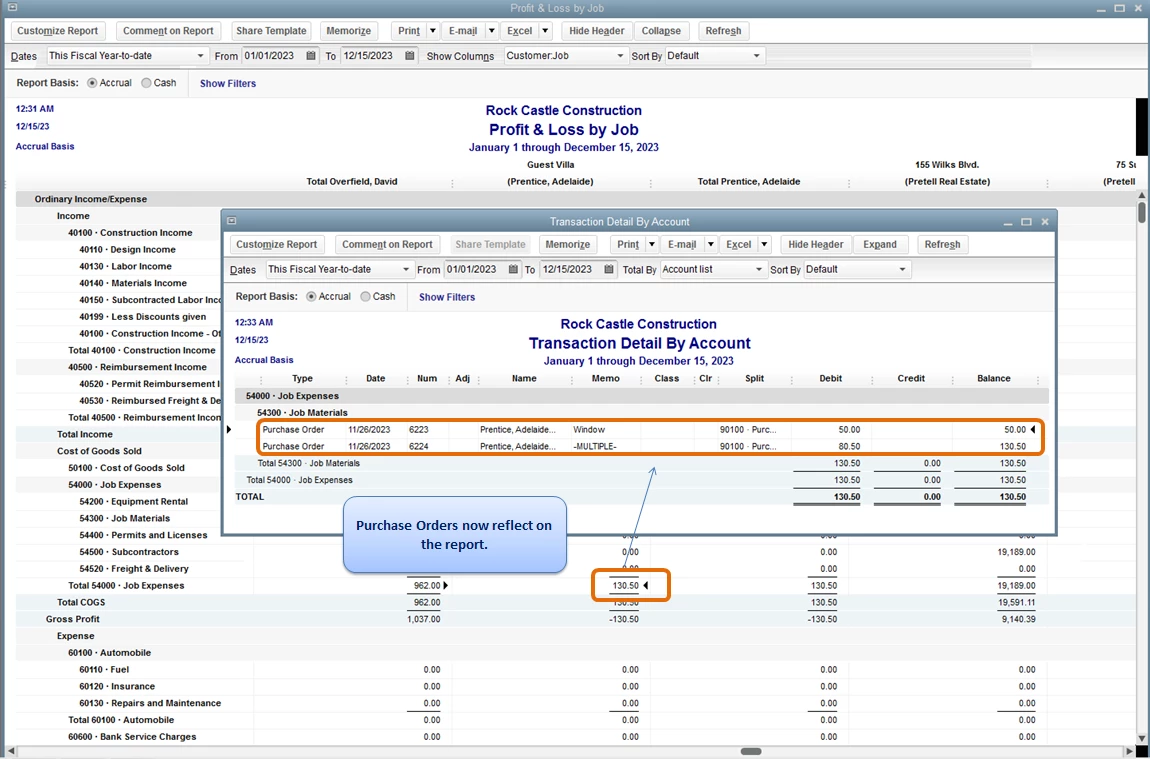
Once done, you can now see both the posting and non-posting transactions on the report.


You can see attached screenshots for additional reference.


On the other hand, to learn more about running and customizing reports in QBDT, you may check these articles: 


Please feel free to add a post/comment below if you have any other questions about running reports in QBDT. I'll be right here to help you!

1 reply

Kristine Mae
April 18, 2019

Thanks for being so detailed. I'd like to explain how a purchase order works, Br1.


A purchase order is a non-posting transaction. Having said that, it will not affect any reports and accounts. That's the reason why it's not showing on the Profit and Loss by Job report unless you convert it to a bill.


If you have more questions, please let us know. We're just a comment away. 


br1Author
April 18, 2019

Of course - but there are other reports that can be made to include both posting and non-posting transactions.  So is there a way to combine them in a custom report?

Angelyn_T
Angelyn_TAnswer
April 18, 2019

Hello there, @br1.


It's my pleasure to join the thread and help you today so you'll be able to run reports in QuickBooks Desktop (QBDT) to include both the posting and the non-posting transactions.


When running reports in QBDT, to include both the posting and the non-posting transactions, you must filter the Posting Status of the report. Let me guide you how.


  1. On the report's page, click on Customize Report.
  2. Go to the Filter column.
  3. Look for Posting Status, then select Either.
  4. You can also choose on what transactions you want to reflect on the report by clicking on Transaction Type.
  5. Click OK to save the changes.

Once done, you can now see both the posting and non-posting transactions on the report.


You can see attached screenshots for additional reference.


On the other hand, to learn more about running and customizing reports in QBDT, you may check these articles: 


Please feel free to add a post/comment below if you have any other questions about running reports in QBDT. I'll be right here to help you!