

Progressive Invoicing Reports for a Contractor on QuickBooks Desktop Premier 2020
Hi Everyone!
Your help would be appreciated!
Normally, we use the typical Estimate, then create Invoices from the estimate with progressive billing as the project goes through three or more stages.
For the last 7 years, we’ve used the “Job Progress Invoices vs. Estimates” which gives a decent amount of information, and I’ve customized it to look like this:
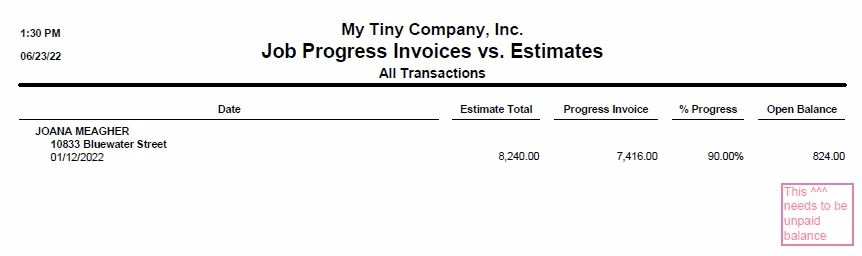
This particular estimate has been invoiced at 90%, the area under “open Balance” is the balance “yet to be invoiced.”
What we actually need is the “open balance” to be “the unpaid balance.”
This particular customer paid the initial 20% invoice but has failed to pay the 70% invoiced 3 months ago.
This is the report that I give to the guy who does the scheduling.
If he sees that it’s invoiced at 90% then he knows that soon we will need to schedule the final portion of the job.
If he sees that it’s invoiced at 90% and the customer has not yet paid, then when they call for a final, he can gently remind them that they have a balance due.
In Desktop Premier 2020 Job Progress Invoices vs. Estimates, is there another name in the customization that will add that unpaid balance?
If not, is there another report that will show the unpaid balance AND the Progress %?
Thank you so much!