Yes, @ACO_llc, if you categorize bank deposits as asset, liability, or equity accounts, they will not appear on the Overview page, only the profit loss accounts.
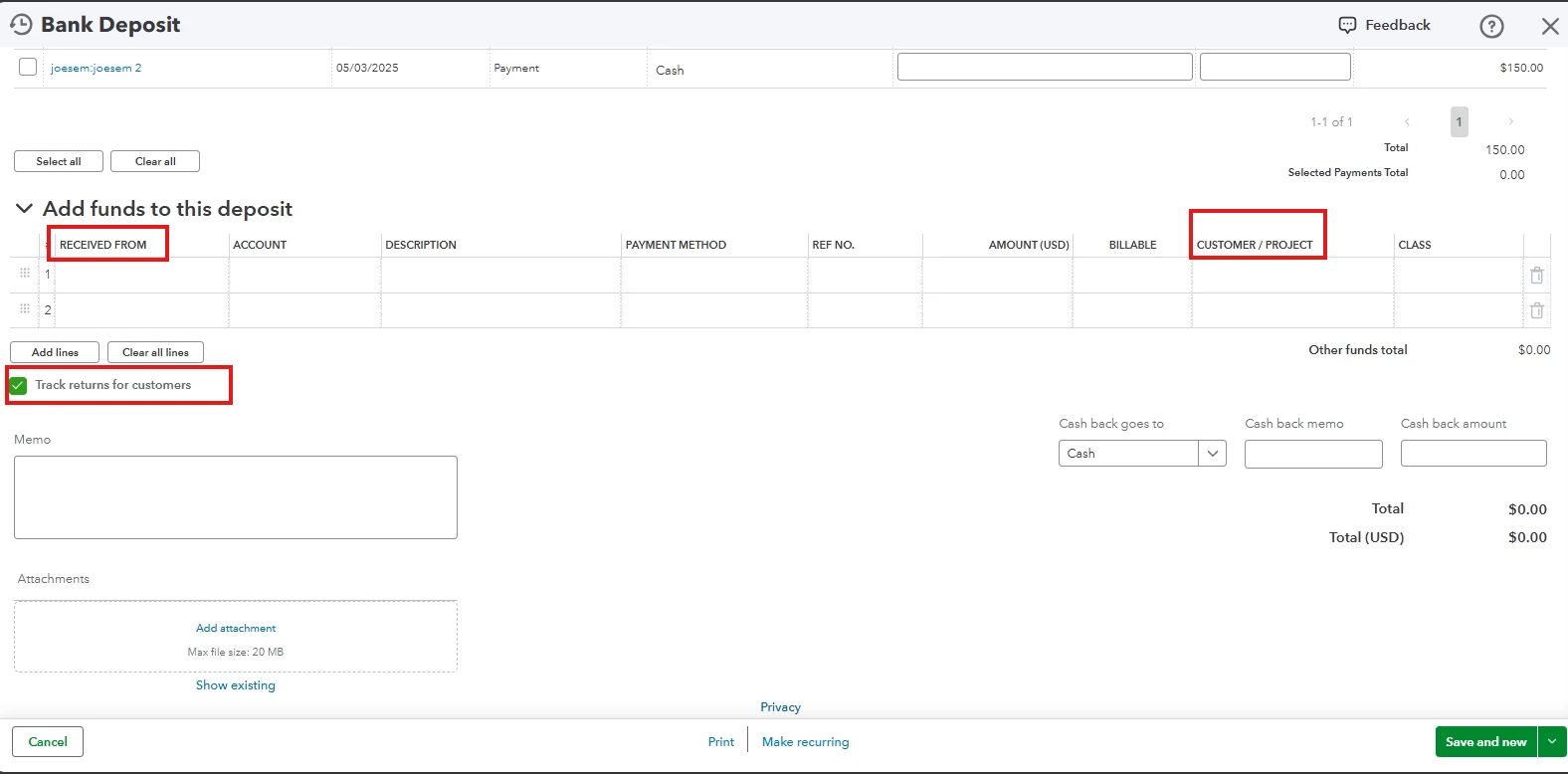
On the Bank Deposit page, under Add funds to this deposit, tick the check box beside "Track Returns for Customers" to assign your income to a specific project without associating an invoice.
To show the income transactions on the Overview page, follow the steps below:
- In the RECEIVED FROM dropdown, select the appropriate project.
- In the CUSTOMER/PROJECT, choose the customer.
Similarly, for expenses, choose the appropriate project in the Customer/Project column and use the expense account to ensure visibility in the project overview or any project reports.
Use this link to create projects in QuickBooks Online. It will guide you in viewing and editing the associated transactions and running project-specific reports.
Lastly, for enhanced reporting and optimal use of QuickBooks, contact our Live Expert Assisted team for personalized support and guidance, ensuring confident and efficient use of QuickBooks.
If you need more clarification about your Projects, get back to this thread by clicking the REPLY button. We are here to support and guide you through every step of the process.
Income that is not linked to sales transactions will not appear in the project's Overview or any other reports. However, you can run the Project Profitability Summary Report to display the income transactions.
This seems self-contradictory. You say that income "not linked to sales transactions" will NOT appear in the Overview or reports. But then you say they will appear in the Profitability Summary Report. They can't both be true. But through experimentation myself I found the answer I need:
There a Customer/Project field on the Expense form (checks too) so those can be assigned even if there is no associated Bill. Those transactions appear in the Project and the Profitability Report. Now I notice on the Bank Deposit form there's a checkbox that says "Track Returns for Customers." I've never had that on because we don't do returns. But when I DO turn it on the Customer/Project field appears in the Bank Deposit form. Now I can assign income for which there are no invoices to a specific project (show) and easily run a profitability report for the show. And GUESS WHAT? The transactions ALSO appear in the Overview for the Project. So what you said above is NOT true.
THAT'S WHAT I NEEDED TO KNOW. I hope this is helpful to others.

