

March 12, 2021
Solved

Proper way to record GrubHub Sales from Toast POS System

  • March 12, 2021
  • 1 reply
  • 0 views

Hi everyone, I've been stuck in this question for a couple of weeks. I decided to seek help here, appreciated if someone could help me with this.

So I bookkeep for a newly opened restaurant, we use Toast POS system. We integrated GrubHub into the system, so whenever there are GrubHub orders it will appear in Toast.

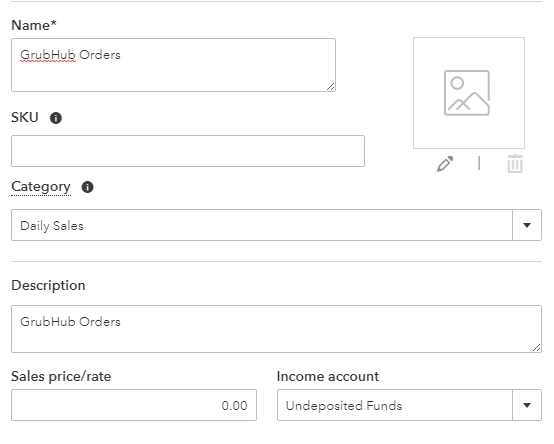
For basic setups I followed this tutorial https://5minutebookkeeping.com/how-to-record-daily-sales-in-quickbooks-online/ I also set up GrubHub Orders as the screenshot
 

And here is my example of one of my daily sales receipts
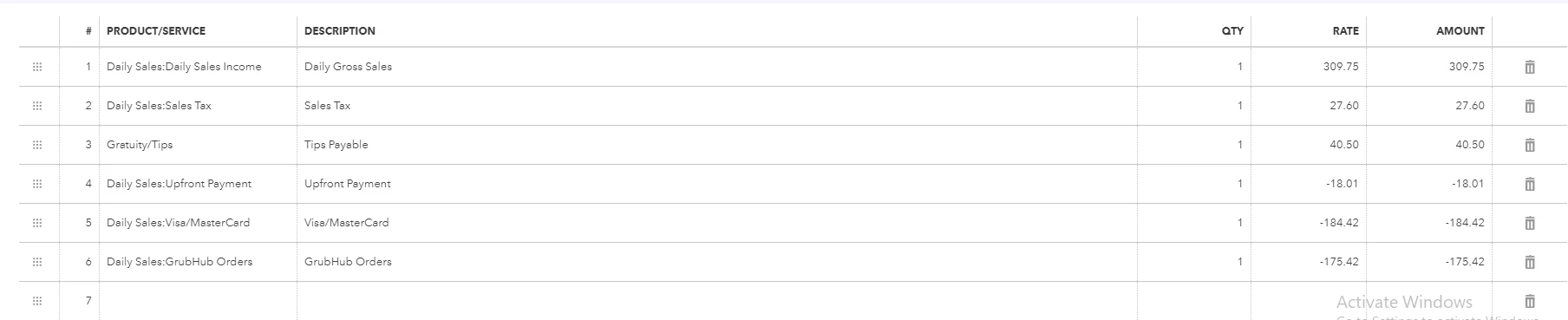


So far so good until I make a bank deposit, all the negative numbers in "GrubHub Orders" appear as positive here.
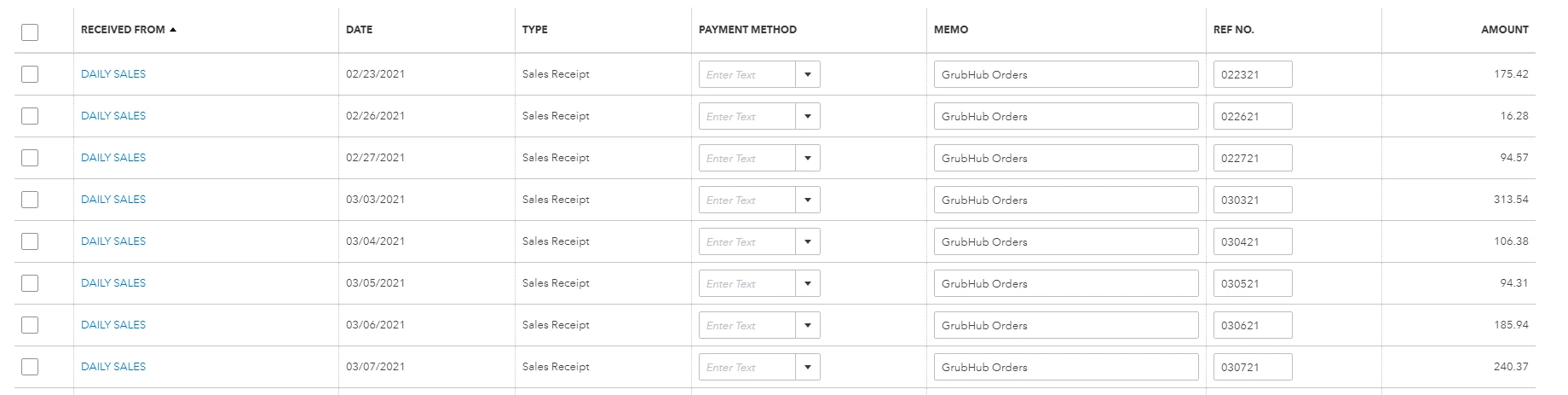


If I include them, the deposit amount will exceed and I have to deduct it in the "Add funds to this deposit" section at the bottom, but I don't know what account I should categorize it into. If I do not include them, then they will forever be here every time I opened "Bank Deposit". 


I have no clue where these transactions should be going, please help!

Best answer by Jen_D

Thanks for posting here, @Youber,


You're on the right track with recording your daily sales in QuickBooks Online. The steps on the link you shared highlights all the process needed to categorize daily sales and deductions.


On the other hand, it looks like Grubhub also sends transactions into QuickBooks. In this case, if they transfer daily sales through bank deposit, you no longer need to record another sales receipt in our program. Otherwise, it will only overstate your income.


Regarding the incorrect posting of the amount, you need to verify this with Grubhub support. While our program is the receiver of the sales data, what reflects in the system will always depend on the information sent to us.


We can definitely help you record entries in QuickBooks, but we need to understand how data is communicated from their app. They can explain properly how why the amount does not reflect correctly.


Once we have that information, we can proceed to categorizing the bank deposits. I'll leave this article for your reference with daily sales:Record your total daily sales


Kindly post here again for any additional information and updates. I'll be right here if you need anything else with recording daily sales. Have a good one!

1 reply

Jen_D
Jen_DAnswer
March 12, 2021

Thanks for posting here, @Youber,


You're on the right track with recording your daily sales in QuickBooks Online. The steps on the link you shared highlights all the process needed to categorize daily sales and deductions.


On the other hand, it looks like Grubhub also sends transactions into QuickBooks. In this case, if they transfer daily sales through bank deposit, you no longer need to record another sales receipt in our program. Otherwise, it will only overstate your income.


Regarding the incorrect posting of the amount, you need to verify this with Grubhub support. While our program is the receiver of the sales data, what reflects in the system will always depend on the information sent to us.


We can definitely help you record entries in QuickBooks, but we need to understand how data is communicated from their app. They can explain properly how why the amount does not reflect correctly.


Once we have that information, we can proceed to categorizing the bank deposits. I'll leave this article for your reference with daily sales:Record your total daily sales


Kindly post here again for any additional information and updates. I'll be right here if you need anything else with recording daily sales. Have a good one!

YouberAuthor
March 12, 2021

Hi Jen_D, thank you for your reply. I checked the financial transactions on GrubHub after reading your post, and I found out that they reported sales to Toast but never deposited any money to our bank. I just requested the transfer, now all I have to do is to wait for it to show in my bank. I cannot believe it's easy as it is.. thank you so much for your help!

MonicaM3
March 12, 2021

Hi @Youber.


Thanks so much for letting us know you were able to this resolved. 


Feel free to reach out with any other questions or concerns. We're happy to help anytime!


Have a great weekend!