Welcome to the Community, @ktuva.
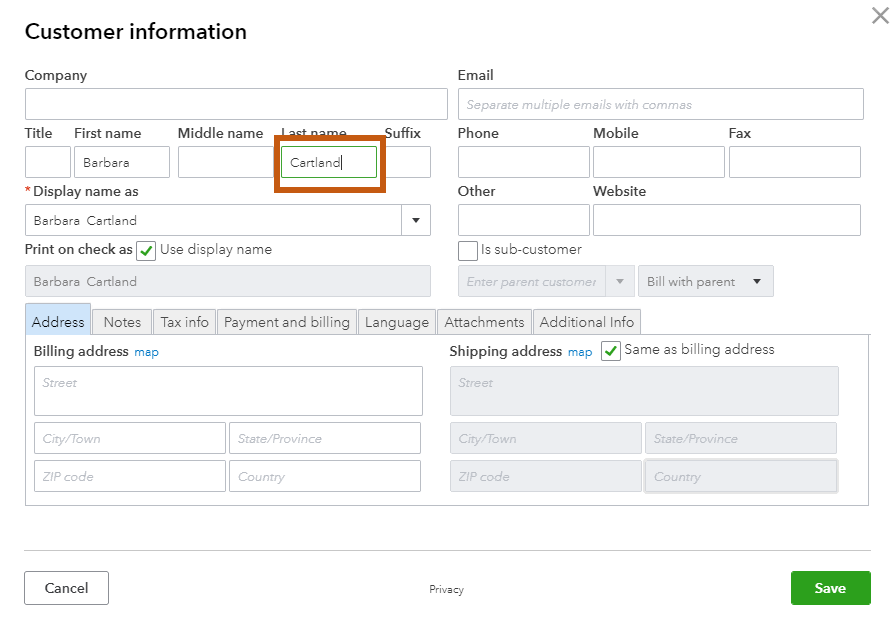
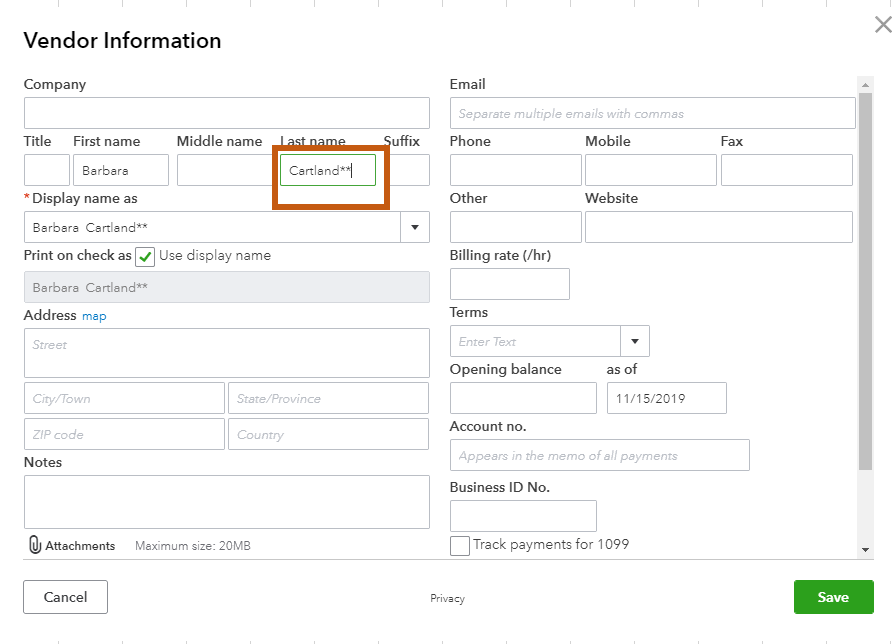
I'd recommend setting up this Contractor as a Customer in your account. They can have both roles in your company. You can add your Customer as your Vendor and use the same credit card for your transactions. However, you need to add a character or symbol to one of the names so you can save it without any error. Here's how:
To add a customer:
- Go to the Sales tab on the left menu, then select the Customers tab.
- Click New customer on the upper-right corner.
- Type the name, address, and other necessary information.
- Hit Save
To add a vendor:
- Go to the Expenses tab on the left menu, then select the Vendors tab.
- Click New vendor on the upper-right corner.
- Type the name, address, and other necessary information. (Make sure to add a character or symbol if you're adding the name as our customer).
- Hit Save.
I've provided a couple of screenshots below for reference:
You can reach out to your accountant to make sure that the profiles are properly setup.
If you have any additional questions or concerns, please let me know! Have a great rest of your week.
**Say "Thanks" by clicking the thumb icon in a post
**Mark the post that answers your question by clicking on "Accept as solution"