March 13, 2021
Solved

QB Online - Pay Bills- print checks- selection limited to 50 bills at one time. How do I reset the selection quantity back to 150?

  • March 13, 2021
  • 1 reply
  • 0 views
QBO used to allow 150 bills to be paid by check at one time. Now it is only 50. Do you know how to change it back to allow 150 bills at one time?
Best answer by Angelyn_T

Hi Rosie.


Thank you for reaching out to us here on the Community page.


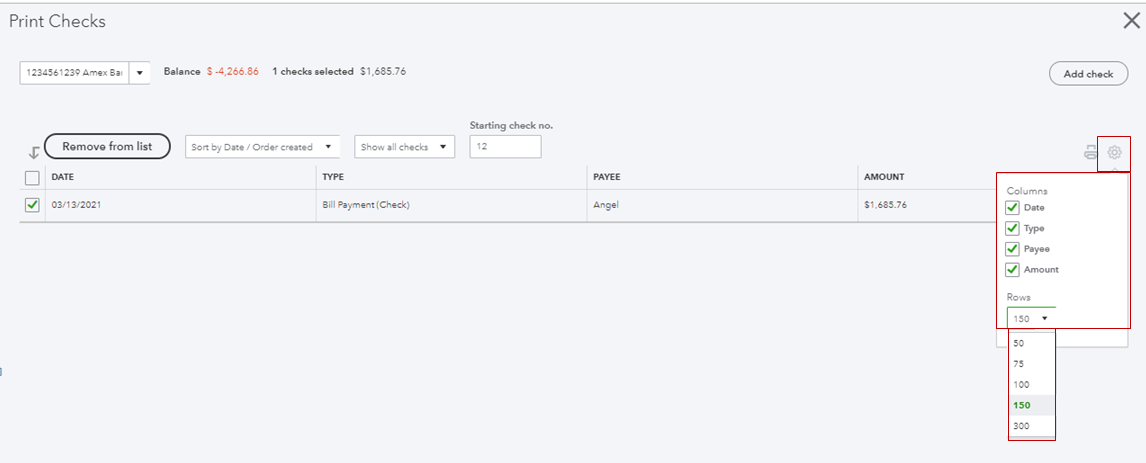
You can adjust the number of transactions you can pay or print from the settings or gear icon. I can show you how.


  1. Open the Pay Bills or Print Checks window.
  2. Go to the Gear icon at the upper right side of the page.
  3. Tap on the drop-down arrow under Rows.
  4. Select 150.


I've added these screenshots for your visual references.


For more tips about bill payments, you can open these articles:


You can also review the topics from our help articles for additional resources about QuickBooks in the future. Here's the link: Find QuickBooks help articles for QBO.


If you have any other questions about your bill and bill payments transactions, please let me know by adding a comment below. I'm more than happy to help. Have a good one!

1 reply

Angelyn_T
Angelyn_TAnswer
March 13, 2021

Hi Rosie.


Thank you for reaching out to us here on the Community page.


You can adjust the number of transactions you can pay or print from the settings or gear icon. I can show you how.


  1. Open the Pay Bills or Print Checks window.
  2. Go to the Gear icon at the upper right side of the page.
  3. Tap on the drop-down arrow under Rows.
  4. Select 150.


I've added these screenshots for your visual references.
 

For more tips about bill payments, you can open these articles:


You can also review the topics from our help articles for additional resources about QuickBooks in the future. Here's the link: Find QuickBooks help articles for QBO.


If you have any other questions about your bill and bill payments transactions, please let me know by adding a comment below. I'm more than happy to help. Have a good one!


rosie12Author
March 15, 2021

Thank you very much Angelyn T (QuickBooks Team) posted a new reply in Reports and accounting on March 13, 2021 10:40 AM:


Your reply solved my issue and will definitely be helpful in the future.  Much appreciated!

Rosie D
