

December 11, 2018
Solved

QB Pro 2018 Vendor Information Edit existing note

  • December 11, 2018
  • 1 reply
  • 0 views

I selected a vendor In the Vendor Information Screen.  The existing note is incorrect and needs to be edited.  I can highlight the note, copy, the note, place my cursor within the note, but am unable to edit or add to the note.  How do I edit the note.  The information provided in a previous question was for QB 2015 and everything follows with the exception of clicking on the Note Tab and editing the information.   Thank you. 
 

Best answer by

Thank you. 

I found the tabs you were referring to.  They are not at the top but between the Vendor Information and the Accounting entries.  


Hi there, @jcjlaw,


Thanks for visiting us today. I'm glad you're able to find the section to edit your notes in Quickbooks Desktop.


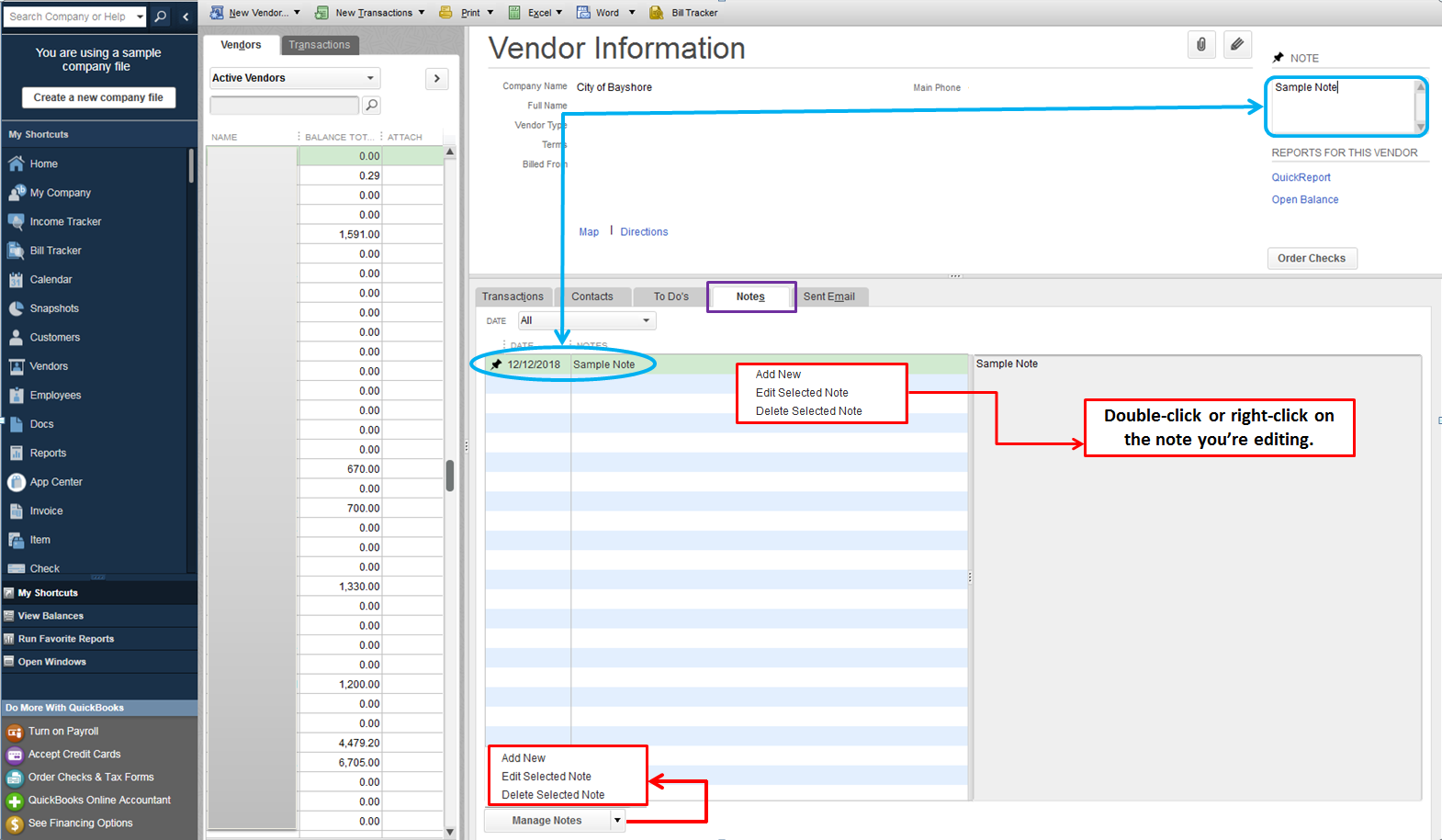
BRC's answer above is correct. You can double-click the note to successfully update it. You can also try these alternative steps below to add or edit notes:

  • On the Note tab, right-click on the pinned note then click Edit Selected Note.
  • You can also use the Manage Notes button at the bottom, then select Add new or Edit Selected Note.

Please see the screenshot I've added below for your reference.


That should get you right back on track, @jcjlaw.


Please feel free to get back to the Community for your QuickBooks related concerns. I'm here to back you up. All the best!

1 reply

December 11, 2018

Click on the Notes tab and then double click the note you want to edit.


jcjlawAuthor
December 11, 2018

I don't have those tabs.  

The notes were created with QB 2015 sometime ago. 

See the attachment.  This is a snapshot of the Vendor Info screen once I clicked on the Vendor.  I am unable to double click on the Note at the top of the screen, nor the note itself.  The Edit pencil to the left only edits the corporate information such as address, tax settings, etc. 

Any Suggestions?


jcjlawAuthor
December 11, 2018

Thank you. 

I found the tabs you were referring to.  They are not at the top but between the Vendor Information and the Accounting entries.