

August 31, 2022
Solved

QBE - AP Report format

  • August 31, 2022
  • 1 reply
  • 0 views

I am curious if there is a report format similar to the AP Ageing Summary that shows the detail open invoices aged out.  The AP Ageing Detail does not use the same ageing period format nor group all the invoices by the Vendor, but instead purely by the ageing categories.  The more standard way of viewing a detail ageing (whether AR or AP) is in the format of the AP Summary report except the detail invoices/credits are shown to support the summary total figures.  Is this available someplace in QBE?
Best answer by MariaSoledadG

I have some information that I want to share about AP Summary and AP Ageing report, Big-Al.


For now, the available reports that you can use in QuickBooks Desktop are only the AP Summary and AP Ageing report. You'll want to export both reports and merge them if you want some of your data to be made available to each report. 


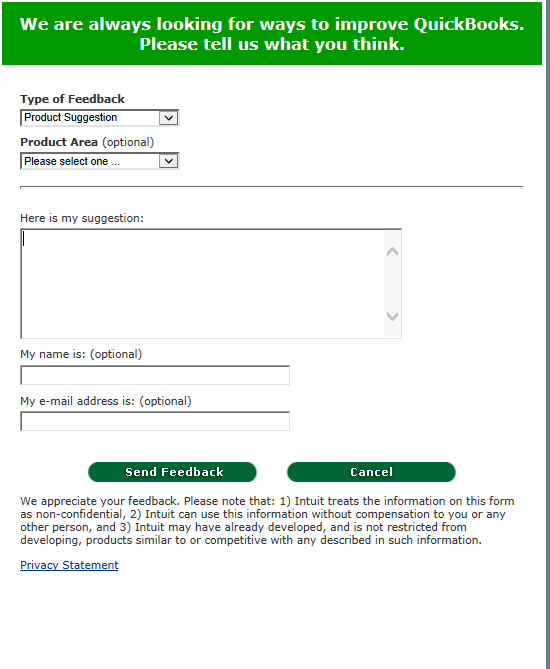
In the meantime, I suggest sending feedback to our product team so they'll know how useful is this for your business and improve the product's features to meet your needs. To do this, follow the steps outlined below:


  1. Go the Help menu.
  2. Select Send Feedback Online.
  3. Choose Product Suggestion.

  4. Click Send Feedback.


Furthermore, QuickBooks lets you add or delete columns, and add or remove information on the header or footer to make sure you'll get the information you need. Learn from this report on how to customize them: Customize Reports In QuickBooks Desktop.


Reach out to us if there's anything else that you want to help us with reports. Remember, we're here to make sure we get you covered. 

1 reply

MariaSoledadG
August 31, 2022

I have some information that I want to share about AP Summary and AP Ageing report, Big-Al.


For now, the available reports that you can use in QuickBooks Desktop are only the AP Summary and AP Ageing report. You'll want to export both reports and merge them if you want some of your data to be made available to each report. 


In the meantime, I suggest sending feedback to our product team so they'll know how useful is this for your business and improve the product's features to meet your needs. To do this, follow the steps outlined below:


  1. Go the Help menu.
  2. Select Send Feedback Online.
  3. Choose Product Suggestion.

  4. Click Send Feedback.


Furthermore, QuickBooks lets you add or delete columns, and add or remove information on the header or footer to make sure you'll get the information you need. Learn from this report on how to customize them: Customize Reports In QuickBooks Desktop.


Reach out to us if there's anything else that you want to help us with reports. Remember, we're here to make sure we get you covered.