

November 8, 2024
Question

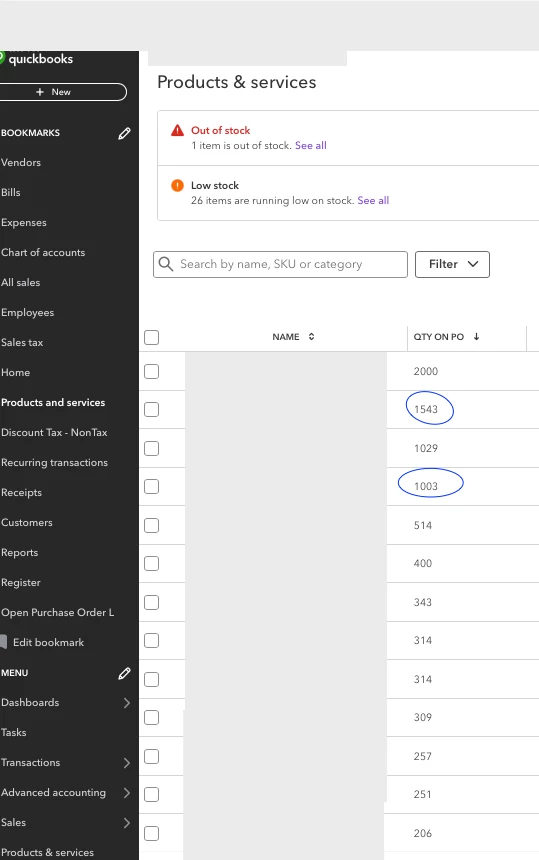
QTY ON PO in Products/Services shows an INCORRECT Open PO QTY - QBO

  • November 8, 2024
  • 1 reply
  • 0 views

Products & Services shows Open PO quantities when PO is not open.   The only accurate numbers are the 2 POs I have circled in blue.  


And please do not recommend the "clear your cache fix" - that does not work.


I tried different platforms - Windows, Mac, desktops, phones, tablets, apps and browsers.  The numbers are all the same and incorrect.


I've deleted, added, received against again.  No fixes.  Please help with something that works.  This has been going on for the entire year I have used QBO.
 

1 reply

November 8, 2024

I truly appreciate the hard work you've put into trying different troubleshooting steps, s1b.


I recommend contacting our customer care team to investigate the issue further. It will only take a few clicks, follow the steps provided below:


1. Sign in to your QuickBooks Online Account.

2. Select the (?) Help button.

3. Choose the Assistant tab to get help from the QB Assistant or click the search tab to enter your question and find Help articles.


To check the support availability, I suggest visiting this link for more details: Get help with QuickBooks products and services.


Let me share this article to help you better understand how to propose a specific item you wish to purchase and specify the quantity: Create and send purchase orders in QuickBooks Online.


I've added this reference to aid you in converting purchase orders into bills: Add purchase orders to expenses, bills, or checks in QuickBooks Online.


If you have any other concerns about incorrect purchase order quantities, don't hesitate to leave a comment below. I'll be around to assist you further.