

February 27, 2025
Solved

Quickbooks customer reports no longer show amount or ship to state

  • February 27, 2025
  • 1 reply
  • 0 views

There was a recent release to Quickbooks desktop, and we turned on purchase orders and pricing.

Right now, I cannot run Customer invoice reports and see the amounts, or see the ship to state.

There is a filed Adj. Cost that appears on banking and customer reports that are not available on the tab to display fields. 

When I choose the Ship to state, the field does not appear on the report. 

We recently enabled pricing levels, and enabled inventory and purchase orders.

I cannot determine why the banking and customer reports have changed. Losing the ability to see the ship to state prevents me from reporting sales tax by state

Any ideas?
 

Best answer by Dandie_A

Hi there, pennees.


Thanks for letting us know about the trouble you're experiencing with the recent QuickBooks Desktop update. We're seeing a number of similar reports. To get personalized help and contribute to our understanding of this, please reach out to our support team directly. They can gather the details of your situation, and will keep you informed on next steps.


To connect with them:


  1. Open QuickBooks.
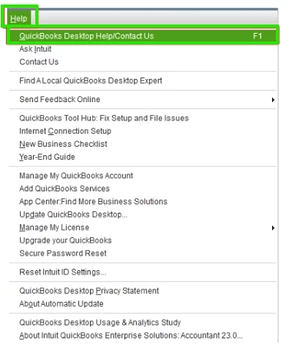
  2. Go to Help, then select QuickBooks Desktop Help/Contact Us.


    We appreciate your patience as we work to address this.

1 reply

Dandie_AAnswer
February 27, 2025

Hi there, pennees.


Thanks for letting us know about the trouble you're experiencing with the recent QuickBooks Desktop update. We're seeing a number of similar reports. To get personalized help and contribute to our understanding of this, please reach out to our support team directly. They can gather the details of your situation, and will keep you informed on next steps.


To connect with them:


  1. Open QuickBooks.
  2. Go to Help, then select QuickBooks Desktop Help/Contact Us.


    We appreciate your patience as we work to address this.