October 19, 2022
Solved

QuickBooks Online Advanced - number of digits in Amount field

  • October 19, 2022
  • 2 replies
  • 0 views

Hello, I am interested in QuickBooks Online Advanced. I'd like to know: (1) how many digits does the amount field contain?, (2) Can we type Khmer fonts in description/memo field? and (3) is there Khmer currency (KHR) in the software? Look forward to hearing from you.

Best answer by Kevin_C

Hi Fiat Lux,


Thanks. Can I type Khmer font in the description/memo field in the QB Desktop US version? Thanks for the help.


Thanks for getting back here, @Reaksmeysk.


I'm glad that I've helped you with your initial concern. Let me share some insight about the digits limitation in the amount field in QuickBooks Online (QBO).


Currently, there's no QBO version that allows you to input more than 11 digits in the amount field of any transaction.


I recognize how the functionality to enter up to 13-digit in the amount field would be beneficial to your business. That said, I recommend sending your feedback to our Product Development Team. It allows them to review all the feedback we receive to ensure we’re meeting the needs of our customers.


  1. Go to the Gear icon at the top.
  2. Select Feedback.
  3. Enter your comments or product suggestions.
  4. Click Next.


Moreover, in case you want to navigate through QBO Advanced to familiarize yourself with the program, simply visit this link to proceed with the test drive: https://qbo.intuit.com/redir/testdrive_us_advanced.


On the other hand, you can also utilize what Fiat Lux-Asia shared above. However, the option to use the Khmer fonts for the description and memo fields is not possible within the program. It will be displayed like the screenshot below:
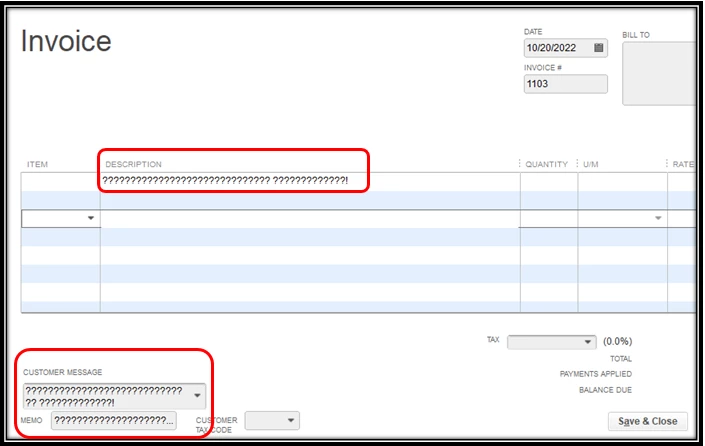
 

Please know that you're always welcome to post a reply in this thread if you have any other questions about your QBO account. I'll be here ready to assist you. Keep safe!


2 replies

October 19, 2022

Hello there, @Reaksmeysk.


I appreciate you reaching out to us. I'd be glad to provide answers to your QuickBooks Online (QBO) Advanced queries.


For your first concern, the amount field can reach up to 11 max digits.


Moreover, yes, you can type Khmer fonts in the description or memo field. See the sample screenshot below:


With regard to your final concern about Khmer currency (KHR), yes, it's also available in the QuickBooks software. You'll just have to enable the multicurrency feature and then add the KHR to the list of your currencies.


Feel free to check out this article for more information about using multicurrency in QBO Advanced: Set up and use multicurrency in QuickBooks Online.


Here's a sample screenshot of an invoice with a KHR currency and Khmer fonts in the description/memo field.


Additionally, feel free to visit this page to see the list of available features in QuickBooks Online Advanced: QBO Advanced features.


Keep me posted if you still have questions or concerns about setting up your QBO Advanced account. I'm always here to lend a helping hand. Have a wonderful day ahead!

October 20, 2022

Hi Kevin,


Thanks so much for detailed and useful support. I'm currently using the QBO Plus and the amount field can also reach up to 11 digits. Given we use the Khmer currency, we need the amount field up to 13 digits. Is there an option or another QBO version that can accommodate the amount field up to 13 digits.


Well note taken on the Khmer font and currency.


Cheers


Reaksmey


Fiat Lux - ASIA
October 19, 2022

@Reaksmeysk 

Make sure to enable the multicurrency feature and select your new home currency to alter USD before registering any transactions.

https:// quickbooks.grsm.io/US

https:// quickbooks.grsm.io/us-promo