January 31, 2023
Solved

Quickbooks online and journal entries

  • January 31, 2023
  • 1 reply
  • 0 views

My name is Rick. I have several  reconciled transactions that I need to modify (correct the split categories and amounts). Do I need to make journal entries? The total amounts won't change. If so, what do I do with the original transactions?

Best answer by RCV

Thanks for taking the time to scour our Community space for potential solutions, richard-moore-12. 


The last recourse for recording transactions is journal entries. They enable you to transfer money across accounts and make sure that your books balance in a particular way. Use them only if you are following your accountant advise or if you are an accounting expert. You should also have a good understanding of debits and credits.


On the other hand, we can manually edit/undo each reconciled transaction. Here's how:


  1. Go to the Accounting menu.
  2. Within the Chart of Accounts tab, locate the appropriate account for the transaction and select View Register in the Action column.
  3. Identify the transaction to edit.
  4. In the reconcile status column (indicated by a checkmark), repeatedly click the top line of the transaction to change the status. Leave it blank.
  5. Press Save.


To make everything easier, you can invite your accountant. They can undo an entire reconciliation one at a time. You can find one by visiting this article: Find an accountant. Here's how to invite your accountant:


  1. Click the Gear icon in the upper-right corner and select Manage Users.
  2. Select the Accounting firms tab.
  3. Click the Invite button.
  4. Enter your accountant's information and click Save.


You'll see a prompt once you completed the reconciliation (please see the snip for reference). When you 
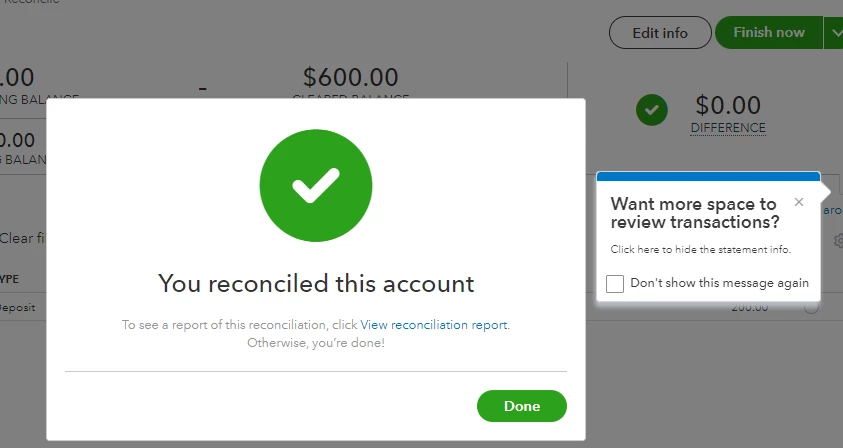


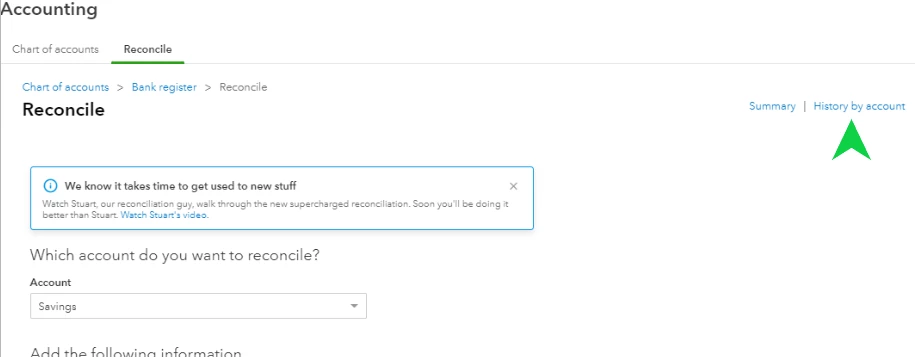
The application will then automatically record that session after you click Done. Return to the Reconciliation page once you're done, and this time choose the History by account option. This gives you more specific data and a list of the reconciliations you've finished for a certain year. Here's how:


  1. On the Reconciliation page, click the History by account option.
  2. From the Report period field, choose All Dates.
  3. Next, select the dropdown arrow beside the year. This will show all the completed reconciliations for each month.


You'll want to review these articles for more tips and information about undoing reconciliation in your QuickBooks Online account.


I'm willing to give you a hand again if you have more concerns regarding reconciling your bank account. Do you need help with a specific task in the program? Let me know the details and I'll work with you.

1 reply

RCVAnswer
January 31, 2023

Thanks for taking the time to scour our Community space for potential solutions, richard-moore-12. 


The last recourse for recording transactions is journal entries. They enable you to transfer money across accounts and make sure that your books balance in a particular way. Use them only if you are following your accountant advise or if you are an accounting expert. You should also have a good understanding of debits and credits.


On the other hand, we can manually edit/undo each reconciled transaction. Here's how:


  1. Go to the Accounting menu.
  2. Within the Chart of Accounts tab, locate the appropriate account for the transaction and select View Register in the Action column.
  3. Identify the transaction to edit.
  4. In the reconcile status column (indicated by a checkmark), repeatedly click the top line of the transaction to change the status. Leave it blank.
  5. Press Save.


To make everything easier, you can invite your accountant. They can undo an entire reconciliation one at a time. You can find one by visiting this article: Find an accountant. Here's how to invite your accountant:


  1. Click the Gear icon in the upper-right corner and select Manage Users.
  2. Select the Accounting firms tab.
  3. Click the Invite button.
  4. Enter your accountant's information and click Save.


You'll see a prompt once you completed the reconciliation (please see the snip for reference). When you 


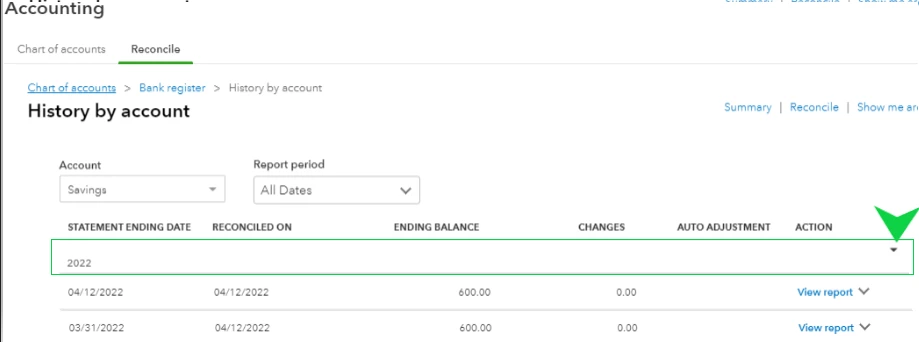
The application will then automatically record that session after you click Done. Return to the Reconciliation page once you're done, and this time choose the History by account option. This gives you more specific data and a list of the reconciliations you've finished for a certain year. Here's how:


  1. On the Reconciliation page, click the History by account option.
  2. From the Report period field, choose All Dates.
  3. Next, select the dropdown arrow beside the year. This will show all the completed reconciliations for each month.


You'll want to review these articles for more tips and information about undoing reconciliation in your QuickBooks Online account.


I'm willing to give you a hand again if you have more concerns regarding reconciling your bank account. Do you need help with a specific task in the program? Let me know the details and I'll work with you.

