November 21, 2018
Solved

Real Estate agents fee deductions from commission checks in QB online?

  • November 21, 2018
  • 7 replies
  • 0 views
Original commenter did not share additional details

Best answer by VivienJ

It's nice to have you in the Community, @Sonny G.  


That's a good question! I can absolutely help create a commission check with fees deducted on it.   


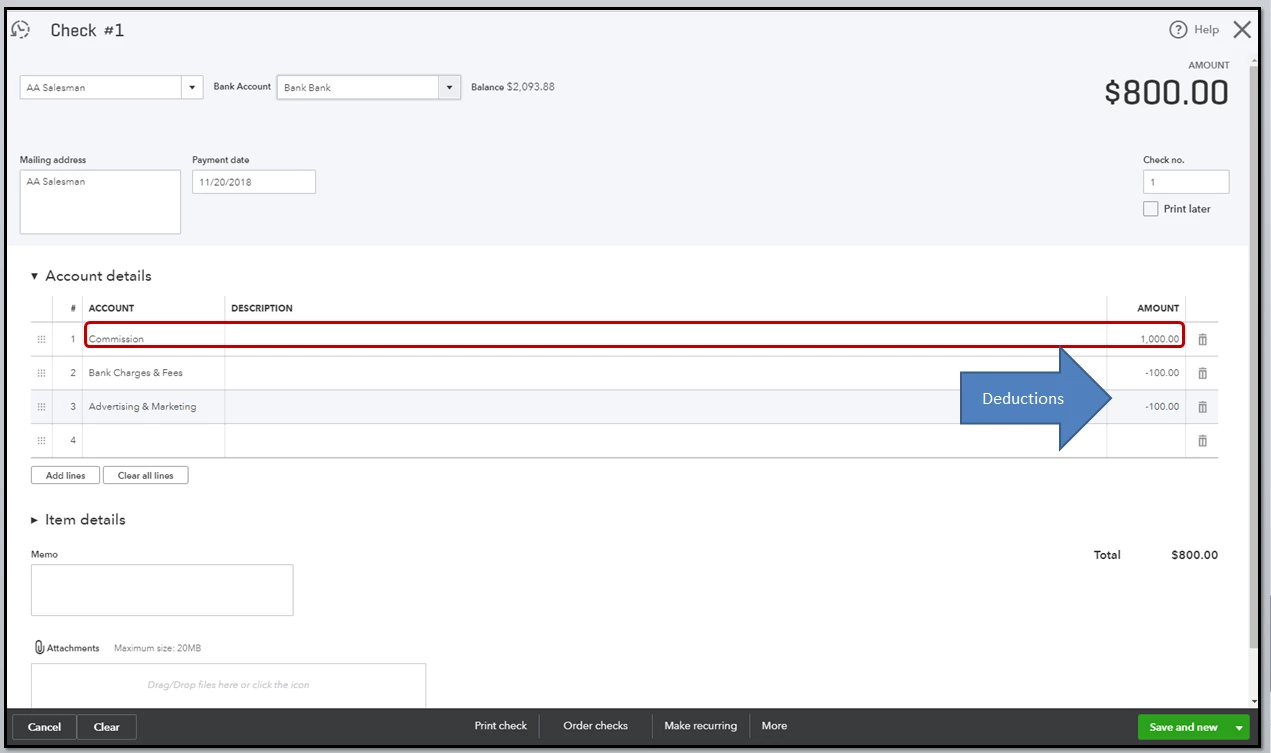
First, I would like to know how these Real Estate agents are entered in QuickBooks Online? If you recorded them as vendors, you can write a check for the commission amounts, then enter those fees in negative. Make sure to set up a commission expense account in QuickBooks Online prior to creating the checks. 


To create a Commission Expense account:

  1. Go to the Gear icon, then choose Chart of Accounts.
  2. Click New. From the Account Type field select Expenses
  3. Pick the appropriate Detail Type.
  4. Enter a relevant name, such as Commission.
  5. Click Save and Close

To create a check:

  1. Go to the Create button (Plus icon), then pick Checks.
  2. Enter the real estate agent's details.
  3. In the Account column, choose Commission and enter the appropriate amount. 
  4. From the second line item, select the fee you need to deduct, then enter the amount as a negative sign. 
  5. Click Save and Close (see screenshot 1).

However, if you've tracked them as an employee in QuickBooks Online, you can create a deduction item for the fees to deduct. Then, run a Commission Only paycheck.   


To create a deduction item:

  1. Go to Workers in the left panel, then choose Employees.
  2. Choose the Real Estate Agent you want to edit, then click the Pay pencil icon. 
  3. Scroll down to number 4, then click the Add a new deduction link.
  4. Choose New Deduction from the Deduction/contribution drop-down. 
  5. Select Other deductions in the Deduction/contribution type.
  6. Choose an appropriate type.
  7. Enter an amount or percentage per pay period. 
  8. Click Ok

To create a Commission Only paycheck:

  1. Go to Workers in the left panel, then choose Employees.
  2. Click the Run payroll drop-down arrow, and select Commission only.
  3. Select the checkbox next to the real estate agent to include in this payroll.
  4. Enter the commission amount for each.
  5. Write in the Pay date
  6. Choose the pencil icon next to Payroll options, select the one you want and click Apply.
  7. Pick Preview payroll, and then click Submit payroll

Here are articles to give you the detailed steps:

I'd also recommend consulting with your accountant before you do the process.


You should now be able to give those commission checks to your real estate agents with the appropriate amount.   


If you need more help with this or if you're referring to something different, please let me know by leaving a reply below.  
 

7 replies

VivienJAnswer
November 21, 2018

It's nice to have you in the Community, @Sonny G.  


That's a good question! I can absolutely help create a commission check with fees deducted on it.   


First, I would like to know how these Real Estate agents are entered in QuickBooks Online? If you recorded them as vendors, you can write a check for the commission amounts, then enter those fees in negative. Make sure to set up a commission expense account in QuickBooks Online prior to creating the checks. 


To create a Commission Expense account:

  1. Go to the Gear icon, then choose Chart of Accounts.
  2. Click New. From the Account Type field select Expenses
  3. Pick the appropriate Detail Type.
  4. Enter a relevant name, such as Commission.
  5. Click Save and Close

To create a check:

  1. Go to the Create button (Plus icon), then pick Checks.
  2. Enter the real estate agent's details.
  3. In the Account column, choose Commission and enter the appropriate amount. 
  4. From the second line item, select the fee you need to deduct, then enter the amount as a negative sign. 
  5. Click Save and Close (see screenshot 1).

However, if you've tracked them as an employee in QuickBooks Online, you can create a deduction item for the fees to deduct. Then, run a Commission Only paycheck.   


To create a deduction item:

  1. Go to Workers in the left panel, then choose Employees.
  2. Choose the Real Estate Agent you want to edit, then click the Pay pencil icon. 
  3. Scroll down to number 4, then click the Add a new deduction link.
  4. Choose New Deduction from the Deduction/contribution drop-down. 
  5. Select Other deductions in the Deduction/contribution type.
  6. Choose an appropriate type.
  7. Enter an amount or percentage per pay period. 
  8. Click Ok

To create a Commission Only paycheck:

  1. Go to Workers in the left panel, then choose Employees.
  2. Click the Run payroll drop-down arrow, and select Commission only.
  3. Select the checkbox next to the real estate agent to include in this payroll.
  4. Enter the commission amount for each.
  5. Write in the Pay date
  6. Choose the pencil icon next to Payroll options, select the one you want and click Apply.
  7. Pick Preview payroll, and then click Submit payroll

Here are articles to give you the detailed steps:

I'd also recommend consulting with your accountant before you do the process.


You should now be able to give those commission checks to your real estate agents with the appropriate amount.   


If you need more help with this or if you're referring to something different, please let me know by leaving a reply below.  


Sonny GAuthor
November 21, 2018

Thanks for the information. Failed to expound on my problem, but in addition to the deduction for the fees, the agent was invoiced. Therefore there is the problem of credit and associated entries into A?R for the payment.

HoneyLynn_G
November 21, 2018

Thanks for looping back, @Sonny G.


I appreciate you clearing things out. I'd like to recommend the initial steps given by my peer @VivienJ


Since the agent is given an invoice,  you can set up a commission expense account and create a check. You can follow the same steps given.


Here are also some articles you can use as a reference:

That should help you choose the associated account for the payment. Just don't hesitate to add a comment if you have additional questions. We'll keep an eye on your reply. Wishing you and your business continued success!

October 24, 2019

Hello @FRG2020,


I'll be happy to show you the steps that'll let you record the commission checks of your real estate agents fee deductions.


To start with, are your real estate agents recorded as your vendors or employees? Depending on how you record them, you can follow the steps outlined below so you can successfully create your commission checks.


First, if you record them as your vendors, you'll have to create a new expense account for your commission checks. To do so:

  1. Go to Lists.
  2. Select Chart of Accounts.
  3. Click the Plus icon at the bottom of the page.
  4. Under Type, select Expense.
  5. Enter Commission as the name of your new expense account.
  6. Click OK.

Once completed, here's how you can enter and create your commission checks:

  1. Go to Banking.
  2. Select Write Checks.
  3. Choose your bank account.
  4. Under Pay to the Order of, select your vendor (Real State Agents).
  5. On the Account column, select your recently created expense account.
  6. Enter the amount of your commission checks.
  7. Click Save.

Meanwhile, if your real state agents are recorded as your employee, you can select the Commission as their pay type an create a check. Here's how:

  1. Go to Employees.
  2. Find and open your employee's profile (Real State Agent).
  3. On the Pay section, select Edit.
  4. Under What additional ways do you pay your employee, select Commission.
  5. Click OK.

From there, let me show you how you can create your commission check:

  1. Go to Payday.
  2. Select your employee (Real State Agent).
  3. Under Commission, enter the amount of your commission check.
  4. Click Approve Paychecks.

Know that you can always visit our Help Articles for QuickBoks Desktop Mac in case you need some reference for your future tasks.


If there's anything else that I can help you with, please let me know in the comment section down below. I'll be always around ready to help.

July 27, 2021

Hello, I have a question on how to record the commission paid to agent but the agent is not a 1099. I have XYZ Realty as the parent company and under that umbrella I have ABC Realty company. XYZ Realty pays the agent directly under 1099 but ABC Realty needs to record commission without hitting income because ABC pays for the marketing and other expenses for buyer and seller. For example: the commission is $5,000.00. That is split between the agent and ABC realty 50/50. XYZ Realty takes out their royalty portion out of the agents commission and the same to ABC Realty. How can I book the agent commission in quickbooks? I still would like to see how much each agent is making even though I don't have to 1099 them directly. For reporting purpose only.

JasroV
July 27, 2021

Thanks for sharing the details of your concern with us, @abtevent.


You can record a commission of your agent that isn't included in your 1099 by issuing a check. I can guide you how.


To begin with, you'll want to ensure you set up a commission expense account in your QuickBooks Online (QBO). Here's how.


  1. Go to the Gear icon.
  2. Select Chart of Accounts.
  3. Click New
  4. From the Account Type field select Expenses
  5. Pick the appropriate Detail Type.
  6. Enter a relevant name, such as Commission.
  7. Then click Save and Close.


Once done, you can now proceed in creating a check:


  1. Go to the + New menu.
  2. Click Check.
  3. Choose the Payee from the drop-down menu.
  4. From the Bank account drop-down menu, select the account the check withdraws the money from.
  5. Select your expense account from the Category column.
  6. Enter the needed details, then click Save and close.


I'd also encourage you to work with your accountant for additional guidance. They'll be able to share with you the best way to handle this and ensure your book is well accounted for. If you're not affiliated with one, you can visit our ProAdvisor page and look for one from there.


If you're using QuickBooks Desktop (QBDT), you can refer to the steps outlined in these articles. The steps may be different, but the workflow is very much the same.


I'm also attaching these links for additional reference:


Once done, you'll want to run your payroll reports to see and check how much your agents are making.


If you have other follow-up questions about recording commissions in QuickBooks, you can always get back to me in this thread. I'll be around to assist you. Keep safe and more power to your business!

September 2, 2021

I am having a real problem with this in QuickBooks so I need some help on what I am doing.

As a broker, I receive escrow checks from buyers. I have one escrow account that I deposit into and I have two categories: Escrow Fund Liabilities: Offer To Purchase and Escrow Fund Liabilities: Purchase and Sale as Massachusetts is a 2 strep escrow state.


When the job closes, I transfer the funds from the escrow account to the General Account: I then pay my 1099 Contractors (Vendors) from this account with the category: Escrow Funds Liabilities: Escrow Liability-C21 Salesperson and the Co-Brokers with: Escrow Funds Liabilities: Escrow Liability-CoBroker Salesperson. On each transfer, there is a remaining amount which is now income to the company to pay royalty fees, expenses, etc. 


On closings where I am not holding escrow, I receive a closing check from the Co-Broker (Listing Office) I record that as Commission Received. then from there, I pay my 1099 Contractors (Vendors) Commission Paid: Commissions Paid: Commission Paid-C21 Salesperson. The rest of the money is now income as above. 

My question is am I accounting for the Escrow Money Properly or is there another way to show the remaining money as Income Received?

September 3, 2021

I am a real estate agent. How do I account for the fees taken out by the broker on my commission checks? 

Say the total commission on a sale is $2000.00 but the broker takes out advertising $250.00 and painting of property $300.00. So my true check is only $1450.00. 


May 20, 2022

How is Agent Equity that is deducted of commission cheque entered in quickbooks desk top.?

February 10, 2025

We are a brokage.  Title companies pay us our commission and deduct agent commissions and transaction coordinator fees when they pay us our net commission.  As the broker we are required to 1099 the agents and the TC.  How do we enter this from the deposit in QBO so it will issue a 1099-NEC?  I have no problem with the desktop version, but QBO does not include this as an expense with the agent detail to be to issue the 1099.


Rainflurry
February 10, 2025

@JDH52 


This is a solved thread from 6+ years ago.  It's best to start a new thread so the title will be accurate to your specific issue and can help other users if they have the same question. 

February 11, 2025

I understand how to input as a negative and list the agents name and in QB desktop this will be included with the 1099 amounts.  But QB online does not list these negative deposits with the Vendor name or does it include it in the total for 1099's.  On the general ledger the dollar amount is listed only.

Sorry if i am not explaining it correctly.
