Solved
Recently, invoices aren't attached to emails from QB. The receipts I attach are, but there is no invoice attached to the email. Is this an intentional change from QB?
Original commenter did not share additional details


Thank you for getting back to us, @bbrpermitting.
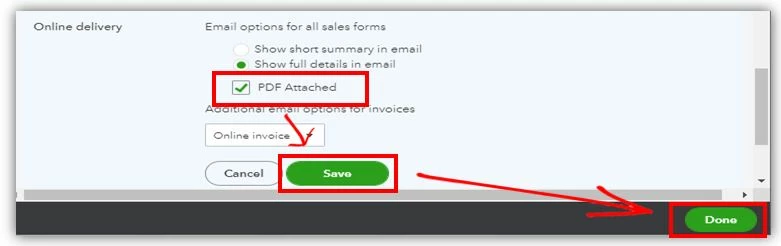
Let's check the settings to make sure that all your invoices are attached to your emails when sending from QuickBooks Online (QBO).
The online delivery setting is available to all versions of QuickBooks Online (Simple Start, Essentials and Plus). You can try to check for the Online delivery section under the Sales tab from your Account and Settings. I'll attach screenshots below:


To know more about this functionality, check this article: Automate invoice reminders in QuickBooks Online.
For more details about the different file types that you can attach to any transactions in QBO, see the following links below:
Let me know if there's anything else that you need about this or with QuickBooks. I'd be happy to help. Have a good one!
Enter your E-mail address. We'll send you an e-mail with instructions to reset your password.