

March 15, 2021
Solved

Reconcile credit card account

  • March 15, 2021
  • 2 replies
  • 0 views

I am reconciling a credit card. The previous month was correct.

The opening statement amount and date are correct, and match the paper statement.

Everything matches to the penny, QB to the paper statement, including debits and credits for the month, but it still shows me that I am out of balance, strangely almost ($1.51 less) by the amount that payments (and refunds) were applied to the account.

I can't figure it out. Please help. Attached is a screen shot of the reconcile page, with each line item matched exactly to my paper statement.
Best answer by DivinaMercy_N

We want everything to be as easy as possible, @Book Oblate.


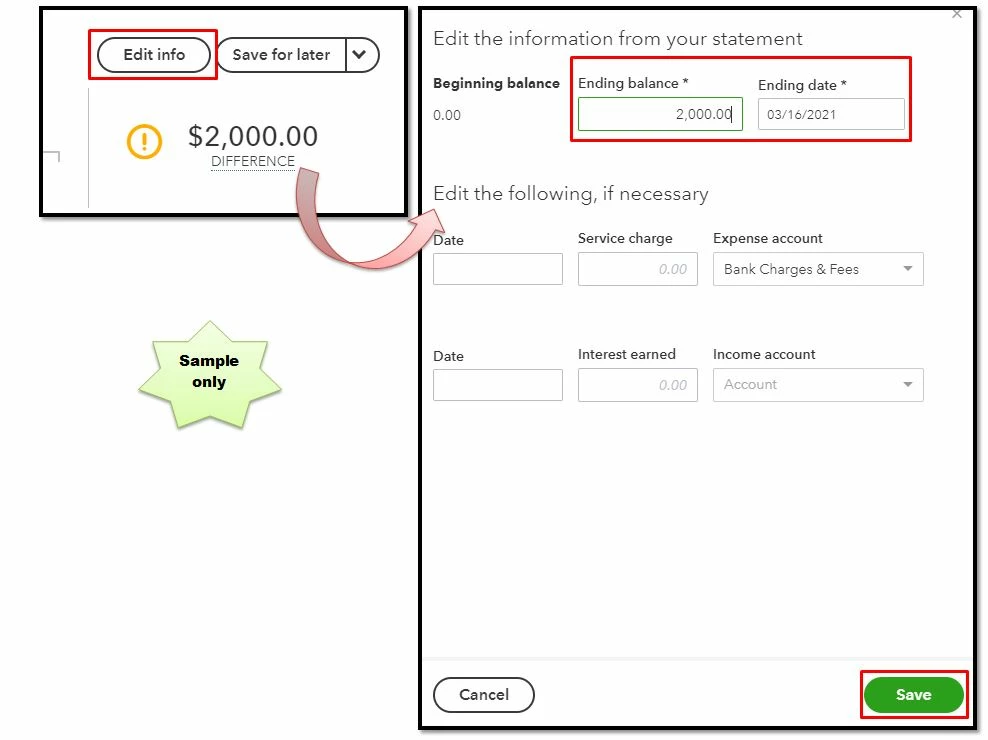
To reconcile your account, the difference between the ending balance in QuickBooks and your bank statement must be $ 0.00. Since the ending balances don't match. Here are the steps you can perform to find and fix issues.

  1. First, review the opening and beginning balance.

  2. Then, check the ending balance you entered, just select Edit info in the Reconciliation screen. 

  3. Verify the Ending balance and Ending date.
  4. Review your bank statement. Make edits as needed. When you're done, select Save


If there's still a difference, proceed to Step 3 to 7 of this article: Fix issues at the end of reconciliation in QuickBooks Online. 


Once done, you're now ready to reconcile your account. For the detailed guide, please visit our Reconciliation hub


When the reconciliation is finished, you can pull up a reconciliation report to have a summary of your reconciled transactions and to review past reconciliations QBO. 


Let me know how this goes and leave a reply below if you need further assistance reconciling your account. I'm always here to help. Have a good one. 

2 replies

DivinaMercy_N
March 15, 2021

We want everything to be as easy as possible, @Book Oblate.


To reconcile your account, the difference between the ending balance in QuickBooks and your bank statement must be $ 0.00. Since the ending balances don't match. Here are the steps you can perform to find and fix issues.

  1. First, review the opening and beginning balance.

  2. Then, check the ending balance you entered, just select Edit info in the Reconciliation screen. 

  3. Verify the Ending balance and Ending date.
  4. Review your bank statement. Make edits as needed. When you're done, select Save


If there's still a difference, proceed to Step 3 to 7 of this article: Fix issues at the end of reconciliation in QuickBooks Online. 


Once done, you're now ready to reconcile your account. For the detailed guide, please visit our Reconciliation hub


When the reconciliation is finished, you can pull up a reconciliation report to have a summary of your reconciled transactions and to review past reconciliations QBO. 


Let me know how this goes and leave a reply below if you need further assistance reconciling your account. I'm always here to help. Have a good one. 

March 15, 2021

After going through this entire list of suggestions and steps, I finally figured out the problem. The statement had a negative balance, which I did not add the minus sign when I entered the balance in QB. Everything is fine now. Thank you.

June 8, 2021

my QB account includes the use of clients using CC's for purchasing but I don't have a need for that anymore. I'd like to know how much not having that CC service will reduce my monthly bill. I'm a small business that was extremely hurt by Covid. I had one order the entire year of 2020 and it's not looking good this year. I sell conference tables. Who's buying those right now ??? NO ONE. I'd like to keep the minimal package for Quickbooks but I don't need the CC usage part. IO'm just looking at how little I can pay with minimal QB's. 


Bob 

JessT
June 8, 2021

Hi Bob,


I know this pandemic has affected most businesses, especially like yours because with the help of technology most people work from home.


On the other hand, the QuickBooks Payment service is free. You will only be charged when your customers pay using a credit card, and that is taken from their payments. Therefore, you are not charged for anything if you do not want to use it.


About your QuickBooks subscription, I assume you use QBO because you pay for it monthly. The lowest plan that you can choose the Simple Start. However, I would recommend contacting our Support Team so they can take a look at your account and guide you through the process. See also about downgrading a QBO plan.


Let me know if you have questions. I'm just right here to help you.