May 9, 2020
Solved

Reconciled bank statement but some of the transactions were deleted and recreated for that month

  • May 9, 2020
  • 1 reply
  • 0 views

Hi, each month, I reconcile the bank statement for the balance to zero out. However, some of the reconciled transactions were deleted and recreated. Now when I go to the previous reconciled statements, it tells me the transactions that were deleted and shows a negative number. I did manually change the deleted and recreated trnsactions to “R” ... is that good enough? Or im i missing a step here. Thank you.
Best answer by AileneA

Hi there, @MohamedRashid.  


Thank you for reaching out to the Community. Yes, you're doing it correctly. After recreate the transaction, we can go back to your register and change it's status to Reconciled (R) manually. You can use this article for the detailed steps: How to undo and remove transactions from reconciliations in QuickBooks Online.  


You can also review the Audit Log to see the details and recreate it manually. Here's how:


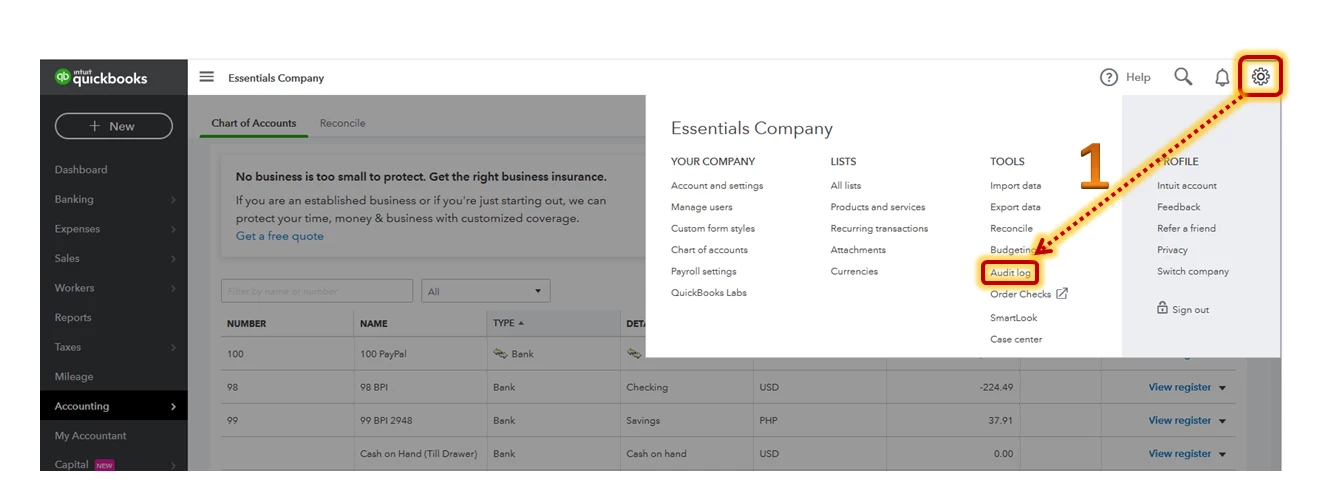
  1. Click the Gear icon in the upper-right corner and tap Audit Log.
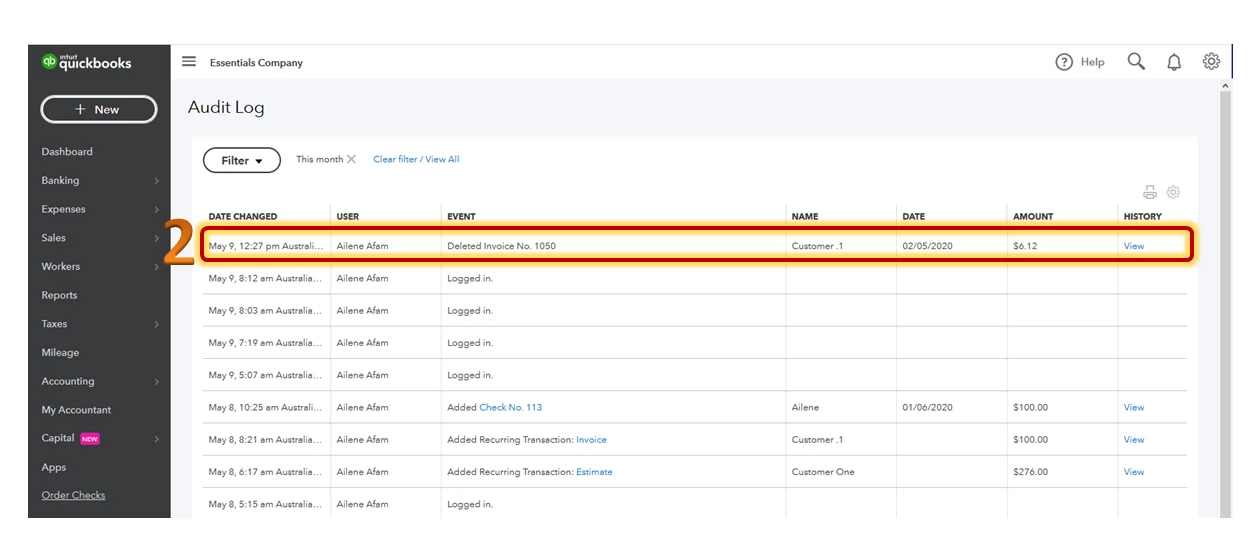
  2. Look for the deleted transaction and click View.
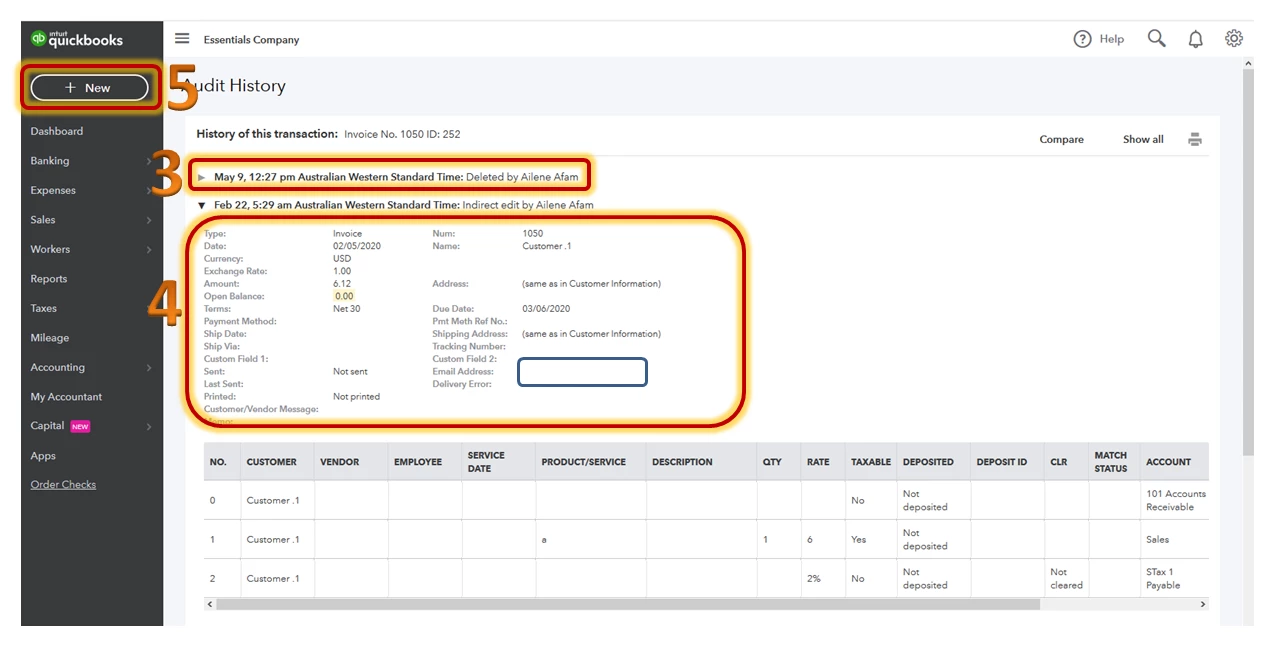
  3. Press the arrow on when it was created and deleted.
  4. Take note of the transaction details.
  5. Recreate the transaction manually by clicking the Create menu (+).


Stay in touch if you have additional questions about this. I'm always around in the Community to help you out.

1 reply

AileneAAnswer
May 9, 2020

Hi there, @MohamedRashid.  


Thank you for reaching out to the Community. Yes, you're doing it correctly. After recreate the transaction, we can go back to your register and change it's status to Reconciled (R) manually. You can use this article for the detailed steps: How to undo and remove transactions from reconciliations in QuickBooks Online.  


You can also review the Audit Log to see the details and recreate it manually. Here's how:


  1. Click the Gear icon in the upper-right corner and tap Audit Log.
  2. Look for the deleted transaction and click View.
  3. Press the arrow on when it was created and deleted.
  4. Take note of the transaction details.
  5. Recreate the transaction manually by clicking the Create menu (+).


Stay in touch if you have additional questions about this. I'm always around in the Community to help you out.

May 9, 2020

Hi, thanks so much for the information. 


I went in and made sure all transactions that were deleted and recreated were reconciled "R." Please see screenshot. However, when I go to the reconciled report for that month, it still shows negative/deleted transactions (see screenshot). Is this fine?


IntuitLily
May 9, 2020

I appreciate the steps you performed to resolve your issue, @MohamedRashid.


Let me add some information about reconciling the recreated transaction. Since you've already deleted this reconciled transaction once, this will show changes in the reconciliation history.


The purpose of recreating and manually marking it as reconciled is to amend the opening balance for the current reconciliation. However, the Reconciliation Change report will still show the changes made on your previous reconciliation.


Let me know if you have follow-up questions regarding the reconciliation process or anything related to QuickBooks. I'm glad to help.