Hello there, Vabburi. I'm here to guide you on how you can reconcile your account in QuickBooks Online (QBO).
In QuickBooks Online, in order to keep the balance accurate, you'll need to reconcile first the transactions from 2023 before we can proceed to 2024.
The off of clearing transaction is only applicable to QuickBooks Desktop (QBDT).
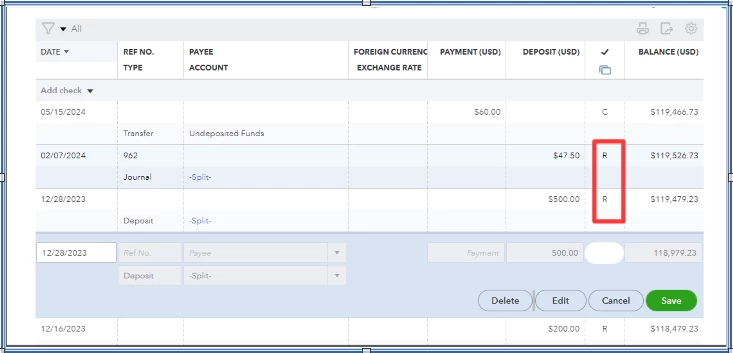
You have the option to reconcile the 2023 transactions by manually putting R so it will be removed on the reconciliation page.
I'll add a screenshot for visual reference.
You can also create an adjustment entry to force reconcile the account. To do that follow these steps:
- Go to the Gear icon.
- Select Reconciliation.
- Click the dropdown arrow beside Save for later.
- Choose finish.
- Click Adjustment and finish.
I recommend consulting your accountant in creating an adjustment to make sure they can suggest and make changes to your reconciled reports.
Then you can proceed in reconciling your 2024 transactions.
Additionally, I'm also including these resources that will guide you in fixing the account balance discrepancy and running the reconciliation report:
I'll be available on this thread whenever you need additional assistance managing your bank transactions or anything else. Please feel free to provide more details.

