December 23, 2022
Solved

Record a vendor refund

  • December 23, 2022
  • 1 reply
  • 0 views

There are many posts out there about vendor refund in quickbooks online, but *all* of them include supplier credit, something that most of us don't have since we are on the low tier. 


My scenario the vendor has already refund me directly in my bank account. I need to categorize this income. Help me? 🙂

Best answer by KlentB

I'll be more than happy to assist you with your concern, trixobird.


We can simply create a bank deposit in QuickBooks Online to account for the refund you received from your vendor. Here's how to do it:


  1. Click the + New button.
  2. Choose Bank Deposit.
  3. Go to the Add funds to this deposit section.
  4. Enter the reimbursed amount and choose the appropriate account.
  5. Add a memo as needed, then click Save and close.
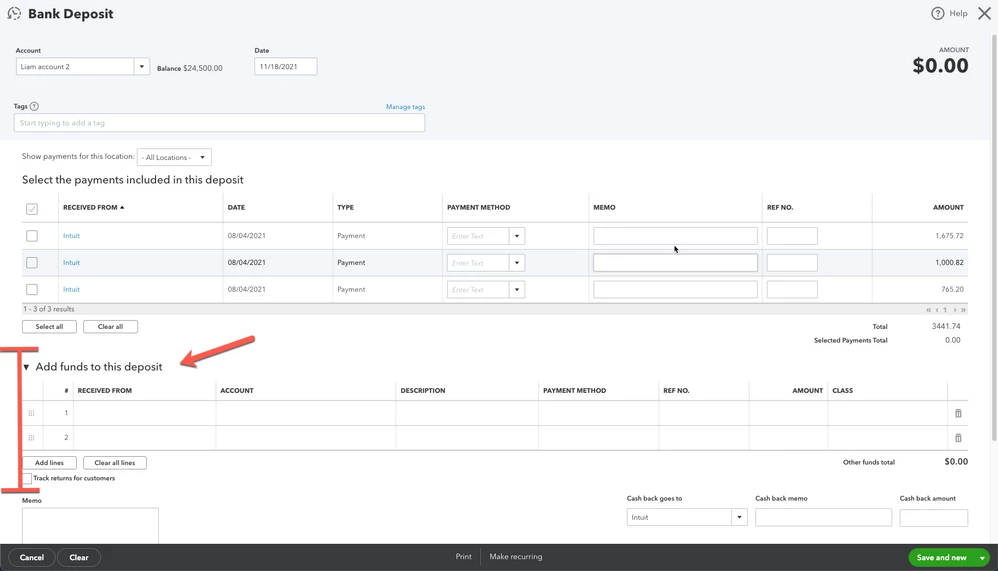


To learn more about handling supplier credits, feel free to read this article: Enter vendor refunds in QBO.


If you need more help in accomplishing your other tasks, please let me know by adding a comment below. I'll always have your back. Happy Holidays, trixobird!


1 reply

KlentB
KlentBAnswer
December 23, 2022

I'll be more than happy to assist you with your concern, trixobird.


We can simply create a bank deposit in QuickBooks Online to account for the refund you received from your vendor. Here's how to do it:


  1. Click the + New button.
  2. Choose Bank Deposit.
  3. Go to the Add funds to this deposit section.
  4. Enter the reimbursed amount and choose the appropriate account.
  5. Add a memo as needed, then click Save and close.


To learn more about handling supplier credits, feel free to read this article: Enter vendor refunds in QBO.


If you need more help in accomplishing your other tasks, please let me know by adding a comment below. I'll always have your back. Happy Holidays, trixobird!

May 12, 2023

I overpaid a vendor. This solution doesn't get rid of the credit on the vendor account. How do I get the vendor account to record the refund check so that the vendor balance is 0? 

DHeraV
May 12, 2023

Thank you for chiming in on this thread.

Let me guide you on how to zero out the vendor balance in QuickBooks Online (QBO). Once you have recorded the refund as a deposit, you can then link this to the vendor credit. Here's how:
 

  1. In your QBO account, click on the +New icon, then select Expense or Check.
  2. In the Choose a payee drop-down, select the vendor name.
  3. Leave the Reference / Check #, Date, Amount, and Memo fields blank.
  4. From the Add to Expense or Add to Check section, select Add for the outstanding vendor credit and deposit.
  5. Select Save and close.


For detailed information, kindly visit: Enter vendor credits and refunds in QuickBooks Online.


Moreover, I'll also share this link where you can search for articles that can serve as your reference to guide you manage your suppliers: QuickBooks Online Help Articles for Expenses and Vendors.


Feel free to leave a reply if you require further assistance with managing vendor refunds in QBO. The Community team always has your back. Have a good one.