Allow me to chime in and provide more information to achieve the report you need, Bryan.
The reports given by my colleague are correct. However, we can generate another kind of report, such as Sales by Customer Detail, which offers a broader scope. This report can be tailored to meet your needs and provides detailed information on active customers, including their sales representative, email, and phone contact details.
Here's how:
1. Open your QBDT software, then go to Reports.
2. Select Sales, then choose Sales by Customer Detail.
3. Click on the Customize Report.
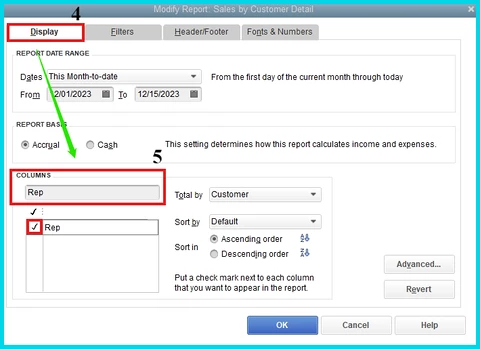
4. In the Display section, go to Columns.
5. Type in, and ensure to marked check the following:
- A rep for your Sales Rep.
- Name E-mail for your customer's email.
- Name Phone # for your customer's phone number.
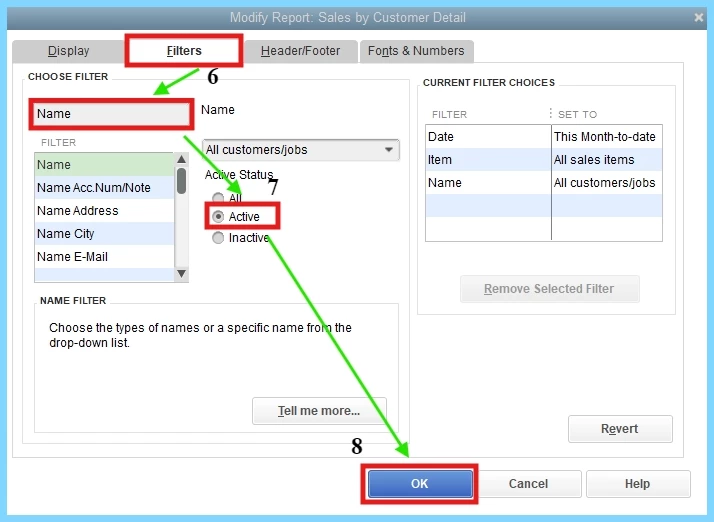
6. Go to the Filter tab, then on the Choose Filter enter Name.
7. Under the Name dropdown, there's an Active status. Make sure to select Active to show only your active customers.
8. Once done, click the OK tab.
Moreover, you have to run the Customer List to access company names. You can then export this data to an Excel file and seamlessly merge it with the Sales by Customer Detail report. You can follow the guidelines provided by my colleague above.
You can also refer to these resources to learn more about QBDT reports and personalizing them:
Additionally, this article can give you details on reports that can be exported to Excel: Export reports as Excel workbooks in QuickBooks Desktop.
Don't hesitate to return to this thread for more questions, Bryan. The Community is here to assist you at any time. Keep safe!

