May 13, 2020
Solved

report having invoice $ of invoice amount paid amount due

  • May 13, 2020
  • 1 reply
  • 0 views

I have had to start using QBO

I need a report created by Specific Date Range which shows:

Date of Invoice  - customer ---   $ of Invoice ----  AMount Paid -    Balance 

I can't find a report which shows this.

Any help?

Best answer by Tori B

Hey there, @B-MUSIC-school.


I hope you're enjoying the day so far.


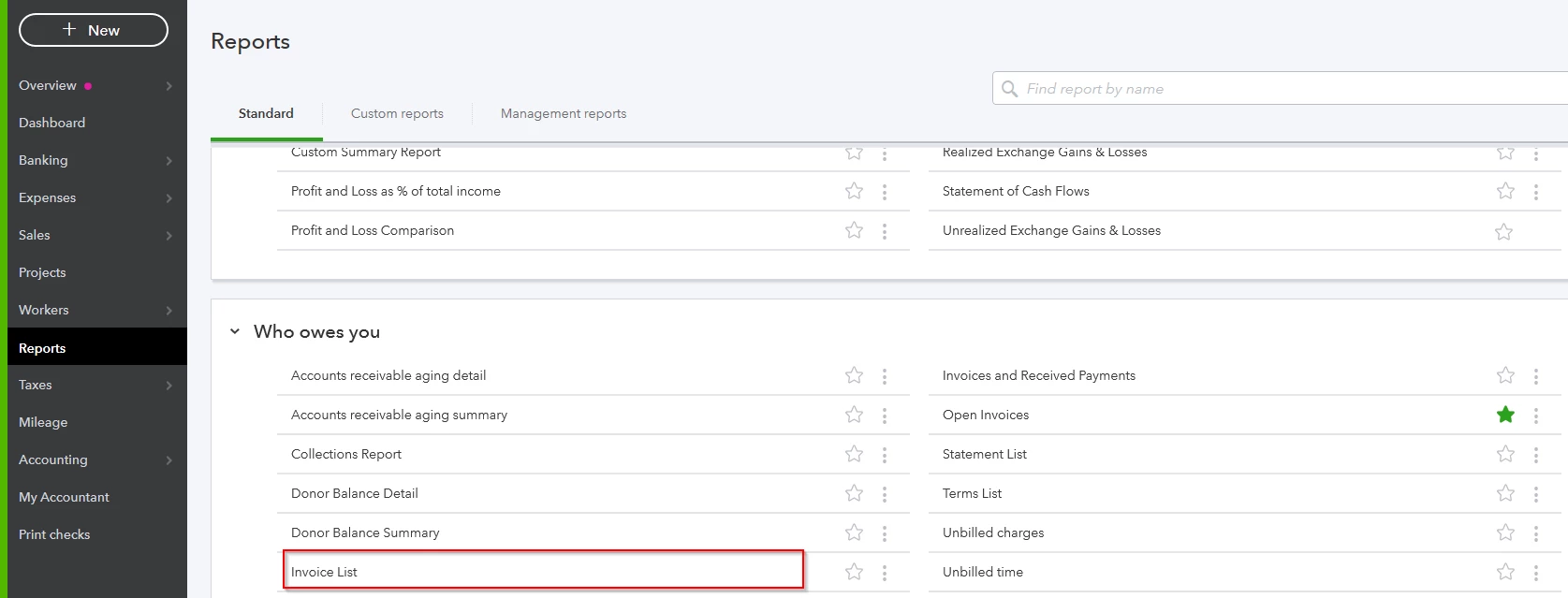
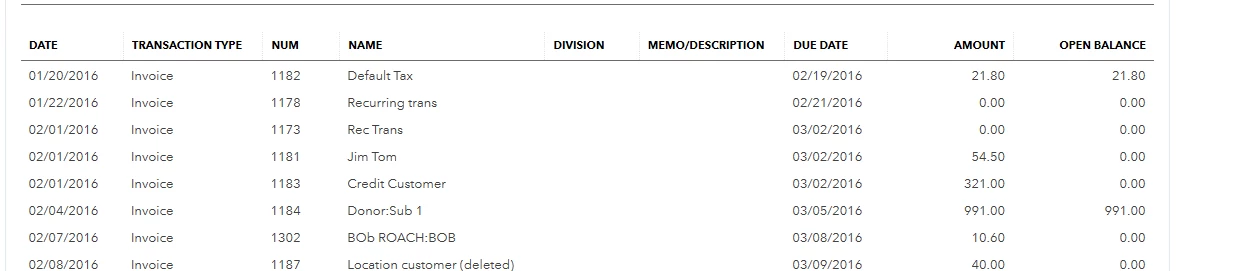
I recommend running an Invoice List report. I've included the steps to run this report below. I've also included a preview of the report. 


1. Click on the Reports menu on the left-hand side.

2. Scroll down to the Who owes you section and choose Invoice List


3. You can customize the report to add more or fewer columns if you wish by clicking on Customize report


That's all there is to it. You can check out How to Customize Reports: Basics, Sorting & Date Ranges for more details about customizing reports.


Please let me know if you have further questions or concerns. I'll be here every step of the way. You can always reach out to the Community or me anytime you need assistance. Take care! 


**Say "Thanks" by clicking the thumb icon in a post
**Mark the post that answers your question by clicking on "Accept as solution"




1 reply

Tori B
Tori BAnswer
May 13, 2020

Hey there, @B-MUSIC-school.


I hope you're enjoying the day so far.


I recommend running an Invoice List report. I've included the steps to run this report below. I've also included a preview of the report. 


1. Click on the Reports menu on the left-hand side.

2. Scroll down to the Who owes you section and choose Invoice List


3. You can customize the report to add more or fewer columns if you wish by clicking on Customize report


That's all there is to it. You can check out How to Customize Reports: Basics, Sorting & Date Ranges for more details about customizing reports.


Please let me know if you have further questions or concerns. I'll be here every step of the way. You can always reach out to the Community or me anytime you need assistance. Take care! 


**Say "Thanks" by clicking the thumb icon in a post
**Mark the post that answers your question by clicking on "Accept as solution"



May 13, 2020

THAT  does it.....    Took a bit , but once I remembered that the Not-for-Profit version uses Pledge instead of Invoice it worked just fine....

Thank you