
Solved
Report: Payment Method is VISA
How can I create and save a report in Quickbooks Desktop for Mac 2021, where all my received payments are from credit cards?

How can I create and save a report in Quickbooks Desktop for Mac 2021, where all my received payments are from credit cards?
Hello, TD98250.
Thanks for the screenshot and the details! After tinkering around the Deposit Detail report, I'll share the details on why it won't show the filtered payment method.
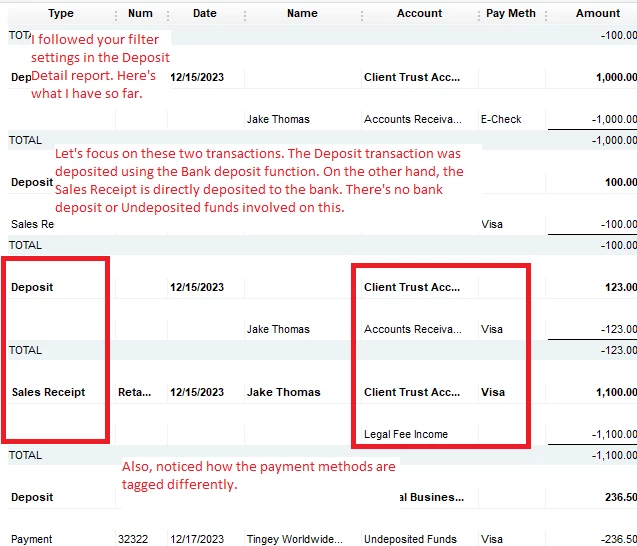
The Deposit Detail report pulls the data based on the bank accounts listed. It doesn't actually pull the data from the affected accounts (Undeposited Funds, income accounts, etc..). Rather, it will only list them since it needs to have a detailed view on all of the deposits made within a specific period.
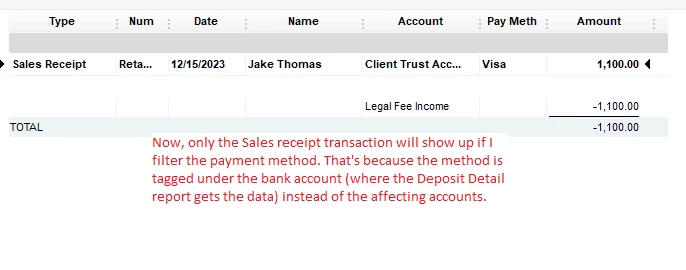
The only time it'll show the filtered payment method is when you directly deposit any invoice or sales receipt payments (without using the Bank deposit function).
When that happens, it tags a selected payment method beside the bank account.
I took a another look at your screenshot and I see that your transactions were deposited using the Bank deposit function. This is the reason why your results show a blank page.
I'll demonstrate using a couple of screenshots below:
If you need to see which payment method would a transaction fall under, you can run another report. For example, the Transaction List by Account report.
If you need help building a specific report in QuickBooks Mac, you can check these articles:
Need to record other transactions or need to work on other areas in QuickBooks? We have other articles to guide you through the processes. Check them out if you need assistance.
I'll share some guides or information again if you have questions about the reports or in QuickBooks Mac. Happy to help.
Enter your E-mail address. We'll send you an e-mail with instructions to reset your password.