November 18, 2021
Solved

Report Showing Invoices with Partial Payments

  • November 18, 2021
  • 2 replies
  • 0 views

Hi is there a report QB desktop listing all invoices with a partial payment?  I need to have a column with the total payments made and the balance still outstanding.

Thanks

Best answer by BigRedConsulting

@DBunz 

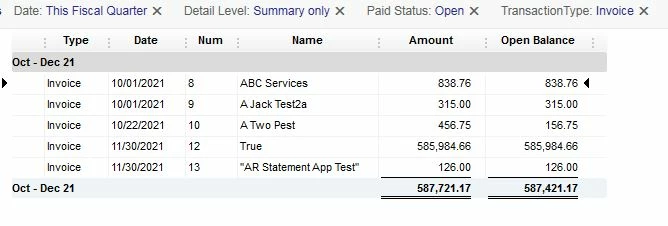
QuickBooks won't show the amount applied to an invoice as a column on a detail report, but it will show the original Amount and the Open Balance. From there, you can export the report to Excel and add a calculated column for the applied amount (which equals Amount - Open Balance).


To get a report that lists each open invoice for a date range on one row, but no other detail, follow these steps:

- Start at Reports | Custom Reports | Transaction Detail.
- Change the filters on the report so they are:

Detail Level = Summary Only

Transaction Type = Invoice

Paid Status = Open

Date range = whatever is useful

- Add the Open Balance column and Amount column if it's not already selected.

- Run the report.

- Remove any unwanted columns.


The resulting report will display one row per open invoice:
 

2 replies

Angelyn_T
November 18, 2021

Hi there, @DBunz. It's my pleasure to help you with running a report that displays your invoices with partial payments.


In QuickBooks Desktop (QBDT), you may pull up the Customer Balance Detail report to see your customer invoices with their corresponding payments and balances. 


Here's how:


  1. Open your QBDT file.
  2. Go to the Reports tab, then click on Customers and Receivables.
  3. Select Customer Balance Detail.
  4. Filter the dates and other customization.
  5. Review your invoices and payments from there.


Otherwise, you can open each of your invoices to see its related transactions.


  1. Go to the Customers tab, then click on Customer Center.
  2. Tap on the Transaction column beside Customer & Jobs.
  3. Select Invoices to open each invoice.
  4. Hit on the Transaction column to see the payments link on your invoice.
  5. Repeat the same steps for other entries.


For more tips about handling your invoices in QBDT, you can open this article: Create an invoice in QuickBooks Desktop.


When you're ready to enter the full payment, check out this link as your reference: Record an invoice payment.


If you have any other questions about getting the details of your invoices with partial payments, let me know by adding a comment below. I'm always here to help. Keep safe!

DBunzAuthor
December 7, 2021

Thanks Angelyn - I think we are on the right track but for a Google Script I am hoping to find a report that I can run that will look like the attached?  I would filter by the date of the invoice and subtotal by invoice showing the total deposits made per invoice and the outstanding balance.  


Thanks again.


Dan

BigRedConsulting
December 12, 2021

@DBunz 

QuickBooks won't show the amount applied to an invoice as a column on a detail report, but it will show the original Amount and the Open Balance. From there, you can export the report to Excel and add a calculated column for the applied amount (which equals Amount - Open Balance).


To get a report that lists each open invoice for a date range on one row, but no other detail, follow these steps:

- Start at Reports | Custom Reports | Transaction Detail.
- Change the filters on the report so they are:

Detail Level = Summary Only

Transaction Type = Invoice

Paid Status = Open

Date range = whatever is useful

- Add the Open Balance column and Amount column if it's not already selected.

- Run the report.

- Remove any unwanted columns.


The resulting report will display one row per open invoice:


DBunzAuthor
December 13, 2021

BigRed you are the Champ!  You did it.  Nice job.  I really appreciate it.  All my lost hair over this is starting to grow back already.  I can't thank you enough.
