January 29, 2022
Solved

Reports

  • January 29, 2022
  • 1 reply
  • 0 views

I am trying to find or make a report that would allow me to look at an individual employee's total gross pay by job.  So, I would be able to look up the job and be able to filter it out to see the individual employee's total pay for just that job during a certain time period.  I have tried to build my own report and I think I am close, but I can't seem to get it.  If there is a way to change the Source Name in the report, I may be able to get it, or if anyone else has a way I would love to hear it!  I am running on QB desktop Pro Plus 2021
Best answer by JenoP

I'd b glad to help with your question about running rports, Linz23.


There's an Excel report that will provide the information that you need. Here's how:


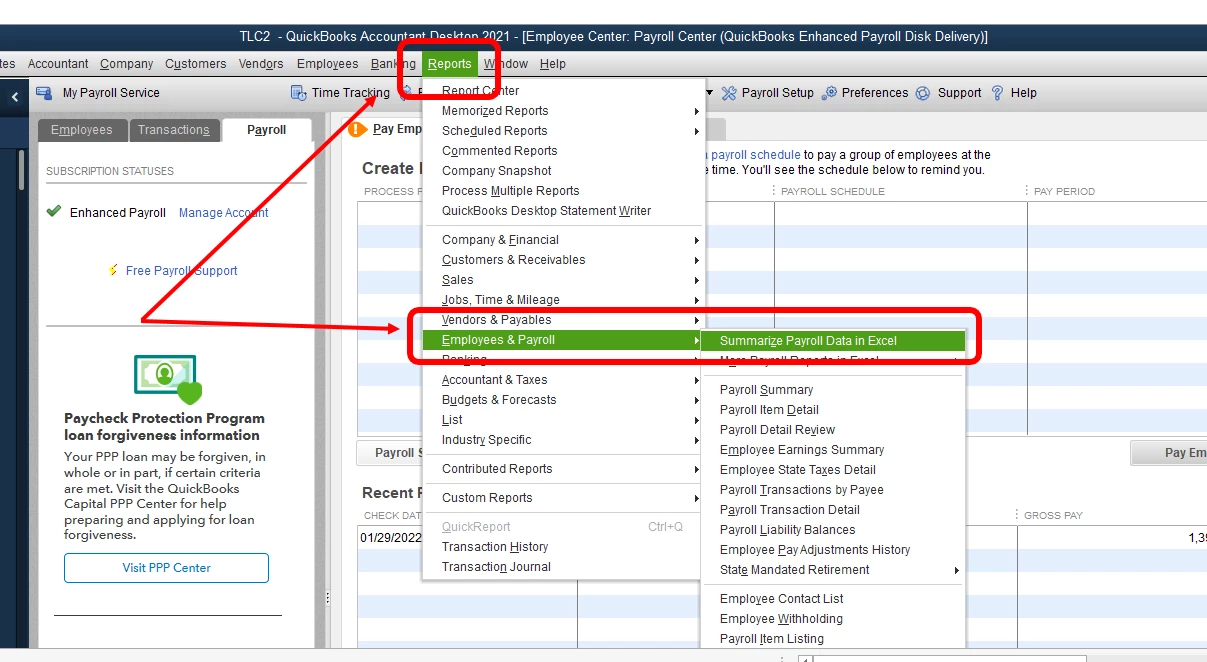
  1. Go to the Reports menu, scroll-down to Employees and Payroll, and then click Summarize Payroll Data in Excel.
  2. Select the report period in the Dates section, then click Get QuickBooks Data. You may also need to click Enable Macros if prompted. 
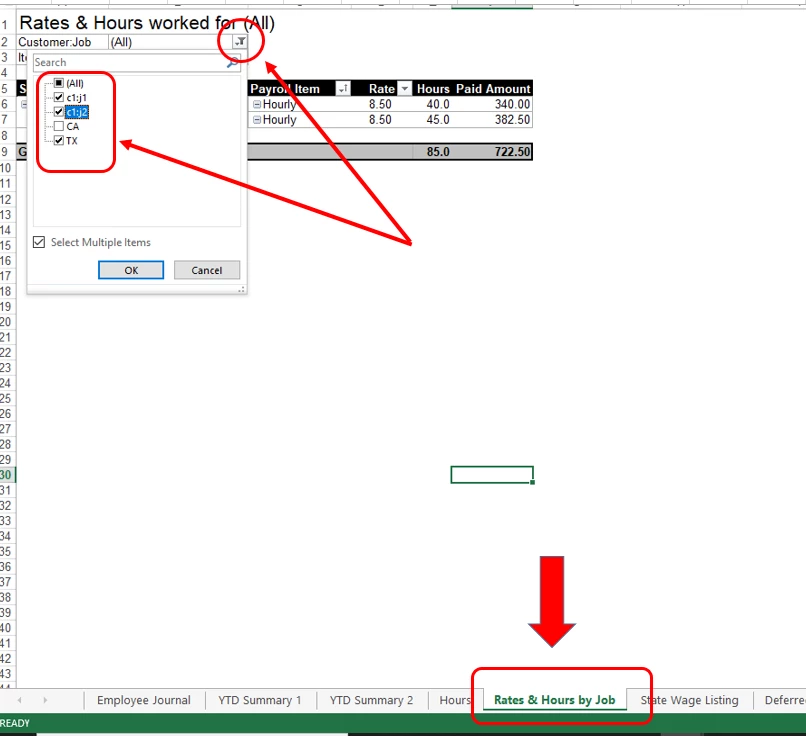
  3. Proceed to the Rates and Hours by Jobs tab.
  4. Click the drop-down list for Customer:Job, then select the job that you want.
  5. Select OK.

Here's an article about getting this report for more details: Excel Based Payroll Reports.


Let me also share this article for additional references: Customize Reports in QuickBooks Desktop.


Feel free to reply or post more questions in the Community if you still need more help. We're always here to guide you all the time. 

1 reply

JenoP
JenoPAnswer
January 29, 2022

I'd b glad to help with your question about running rports, Linz23.


There's an Excel report that will provide the information that you need. Here's how:


  1. Go to the Reports menu, scroll-down to Employees and Payroll, and then click Summarize Payroll Data in Excel.
  2. Select the report period in the Dates section, then click Get QuickBooks Data. You may also need to click Enable Macros if prompted. 
  3. Proceed to the Rates and Hours by Jobs tab.
  4. Click the drop-down list for Customer:Job, then select the job that you want.
  5. Select OK.

Here's an article about getting this report for more details: Excel Based Payroll Reports.


Let me also share this article for additional references: Customize Reports in QuickBooks Desktop.


Feel free to reply or post more questions in the Community if you still need more help. We're always here to guide you all the time. 

Linz23Author
January 30, 2022

Thank you so much! That completely solved my problem, got the exact information I needed!!