February 16, 2022
Solved

Reports Enterprise Manufacturing - on assembly cost and sale price

  • February 16, 2022
  • 1 reply
  • 0 views

Is there a report that will list the inventory assembly's Sale price, Total bill of materials cost, and Average Cost?


Best answer by Giovann_G

Hello, Dog-Dog.


I understand how important to your business to run a report that displays the total bill of materials (BOM) cost for inventory assembly. Currently, running a report that shows the total BOM cost isn't possible.


As a workaround, open each inventory assembly to see the BOM cost. Then, export the Inventory Valuation Summary report to excel. From there, you can manually add a column for BOM. I'll show you how.
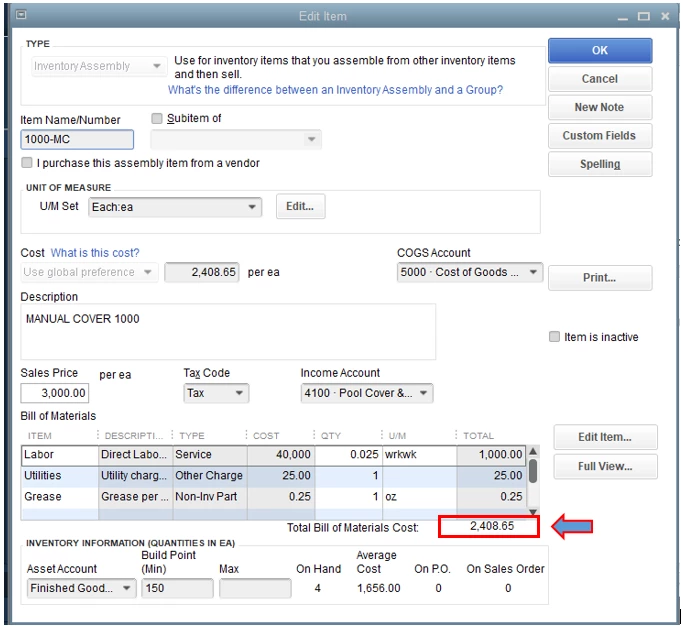
 

  1. Run the Inventory Valuation Summary report, then export it to excel.
  2. Add a column for the total bill of materials cost.
  3. Go to Lists, then Item List.
  4. Double-click the assembly item.
  5. Copy the BOM cost and paste it to excel.


I also encourage you to send a product request to our Product Development Team. They'll be able to implement user suggestions in the future.


Here's how:


  1. Go to the Help menu.
  2. Select Send Feedback Online.
  3. Click Product Suggestion.
  4. Enter your suggestions.
  5. Once down, hit Send Feedback.


I've included this article for future reference: Customize company and financial reports.


Stay in touch with us if you need further assistance with running reports. We're always here to help.

1 reply

February 16, 2022

Welcome to the Community, Dog-Dog.


You can run your Inventory Valuation Summary report to see how QuickBooks gets an item's average cost.


Here's how:

  1. In the top menu bar, go to Reports.
  2. Choose Inventory.
  3. Select Inventory Valuation Summary and set your dates to All.
  4. Double-click the item.


I've also included a couple detailed resources about working with reports which may come in handy moving forward:


If there's any additional questions, I'm just a post away. Have an awesome day!

Dog-DogAuthor
February 17, 2022

ZackE,


Thank you. This report shows the average price and the sale price. How do I get it to show the total bill of materials cost for the inventory assembly? We are currently working on margins and this is what they want to see in a report together. 

Giovann_GAnswer
February 17, 2022

Hello, Dog-Dog.


I understand how important to your business to run a report that displays the total bill of materials (BOM) cost for inventory assembly. Currently, running a report that shows the total BOM cost isn't possible.


As a workaround, open each inventory assembly to see the BOM cost. Then, export the Inventory Valuation Summary report to excel. From there, you can manually add a column for BOM. I'll show you how.


  1. Run the Inventory Valuation Summary report, then export it to excel.
  2. Add a column for the total bill of materials cost.
  3. Go to Lists, then Item List.
  4. Double-click the assembly item.
  5. Copy the BOM cost and paste it to excel.


I also encourage you to send a product request to our Product Development Team. They'll be able to implement user suggestions in the future.


Here's how:


  1. Go to the Help menu.
  2. Select Send Feedback Online.
  3. Click Product Suggestion.
  4. Enter your suggestions.
  5. Once down, hit Send Feedback.


I've included this article for future reference: Customize company and financial reports.


Stay in touch with us if you need further assistance with running reports. We're always here to help.