@Rholymar This happens when the chart of accounts has been custom-ordered and so is not auto-positioning accounts based on their type and account number (if account numbers are on) or name.
This used to be more obvious before you could also sort the chart of accounts by clicking on the different columns, a feature which creates a sort of 'layer' on top of the natural sort order and can hide the fact that the chart of accounts is in custom sort order.
If you see a little diamond next to the Name column label, then your chart of accounts is sorted on a column and is not displaying the accounts in the order they are actually positioned (whether custom or auto positioned) in the list. In this case you'll also see an arrow next to one of the columns:
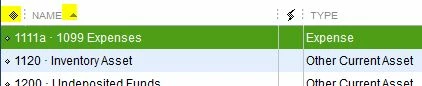
To display the chart of accounts unsorted in the window, click the little diamond and it will disappear:

The order of the accounts you see now will be the order they appear on many reports, including financial statements.
If the accounts now appear out of order, then the chart of accounts is custom-ordered. Re-sorting the list will return it to an alpha or numeric order (if account numbers are on) within each type of account. To re-sort it, pick Re-sort List from the Account button the bottom of the list.
The Balance Sheet and P&L will follow the order you see on the chart of accounts.
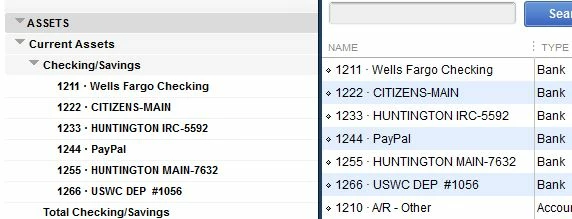
For example, here's the Balance Sheet in my test file, with the chart of accounts next to it when the chart of accounts has been resorted:
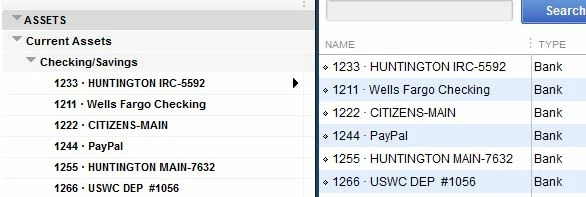
And then if I drag the Huntington account to the top of the chart of accounts, using the little diamond next to the account name (which puts the chart of accounts in custom-sort mode), then the balance sheet updates to match:
You mention that new accounts you create are popping to the top of their section on reports. This is what happens when the chart of accounts in custom-sort mode and you add an account, because in that case QuickBooks doesn't have a logical place to put the account, except by account type.

