Hello, moving-forward.
I've got you covered. I'll ensure your owner withdrawals are correctly recorded in QuickBooks.
When setting up an owner's draw, you'll want to set it up as an equity account instead of an expense.
Create a new account for the owner's draw and set it up as an Owner's Equity account. Inactivate the Compensation of Officers account if necessary.
I take it that you've already entered the withdrawal as an Expense transaction. You'll want to delete it then process the draw as a check and enter it under the equity account.
To delete the expense transaction, simply open it, click the More menu then select Delete.
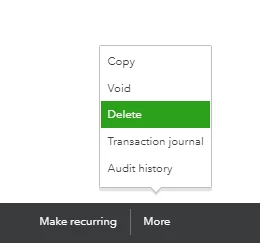
Next, process the draw through a check:
- Click the + New button.
- Select Check.
- Choose the Bank Account where your money will be withdrawn.
- Under Category, select the Owner's Equity account, then enter the amount.
- Add other details of the check such as reference number, memo, etc..
- Once done, click Save and close.
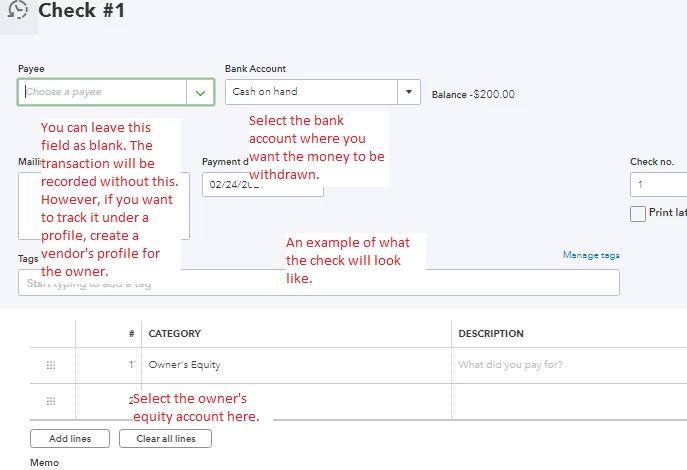
A reference for the steps can be found here: Set up and pay an owner's draw.
Also, an accountant will be able to shed some more ideas about recording this. If you need to know how these steps work on the accounting technicalities, I'd recommend consulting with one.
This won't show up under your Profit and Loss report. Instead, you'll want to run the Balance Sheet.
Need to run reports for the transactions or other records? Check out our guides from the Reports topic page.
I'll help out again if you have more questions recording other transactions. I'm also open to address any other concerns you might have for QuickBooks Online.

