May 10, 2021
Solved

Sales by rep

  • May 10, 2021
  • 1 reply
  • 0 views

How the heck do I run a "Sales by rep" report in QB online?  Can't believe how difficult this is to find....

Best answer by JoesemM

Let's make this easier for you, @shar1972. I'm here to help and provide some options on how to track sales reps in QuickBooks Online (QBO). 


Sales by Rep report is only available in the QuickBooks Desktop version (QBDT). To find it in QuickBooks Online, you can use the custom fields and add Sales Rep in the column as a workaround. Then run the Sales by Customer Detail Report, and filter Sales by Rep. Since this is just a text field so you will need to assign a sales rep every time you create an invoice or sales receipt.


Here's how:
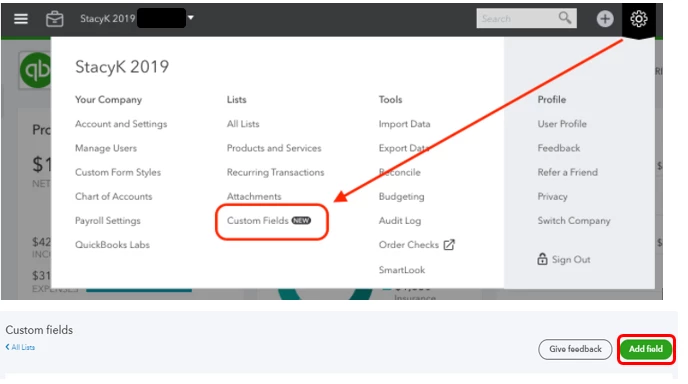
 

  1. Go to the Gear icon.
  2. Select List then Custom fields.
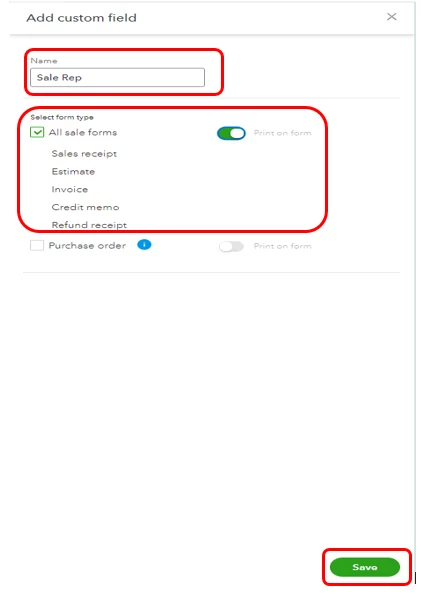
  3. Enter Sales Rep in the name column.
  4. Put a checkmark in the All sale forms.
  5. Tap the Print on the form.
  6. Click Save.

Then manually, enter the Sales Rep when creating transactions.

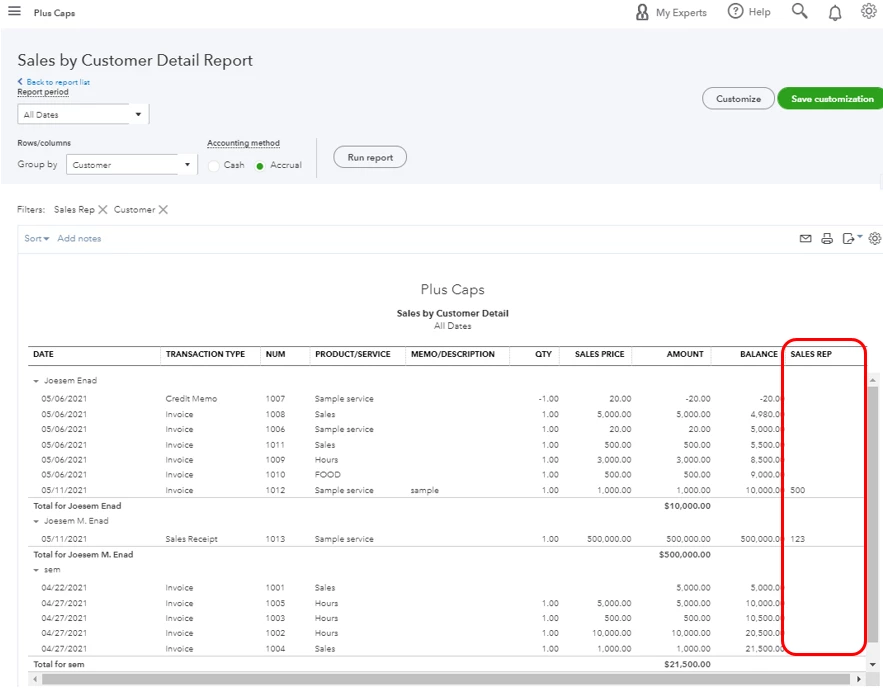
Once everything is recorded, you can now pull up the Sales by Customer Detail report. 


  1. Go to Reports in the left pane.
  2. Select Customer Detail Report.
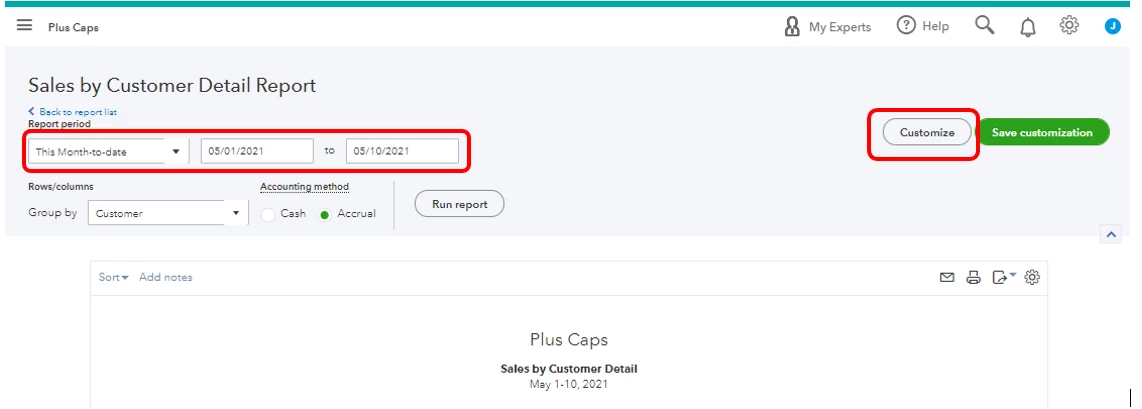
  3. Fill in the correct date range
  4. Click Customize.
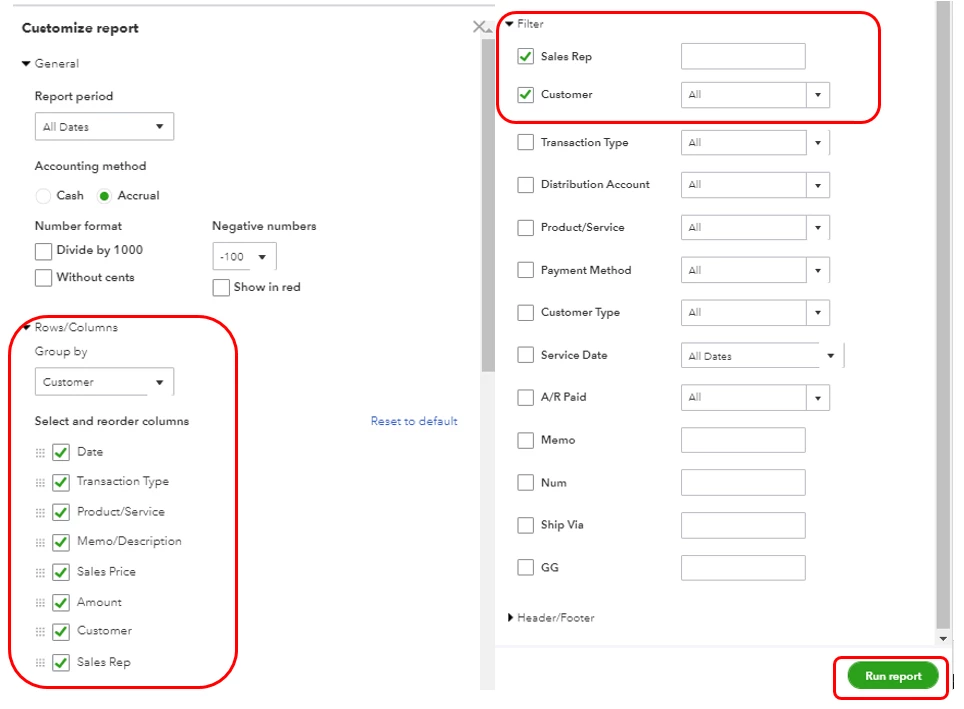
  5. In the Rows/Columns.
  6. Put a checkmark on the Sales Rep box.
  7. Expand the Filter section.
  8. Put a checkmark on the Sales Rep box.
  9. Click Run report.

You can check this article to learn more about customizing your reports: Customize reports in QuickBooks Online.


Also, you can explore all available options for making QuickBooks Online (QBO) work like your business needs.


QBO does offer the support of thousands of various third-party applications for any functionality you may need. To see if there's an app that can help you accomplish this, head to the Intuit App Center. Then, type a keyword like in the search bar.


In case you need tips and related articles in the future about the "How Do I" steps in QuickBooks Online, visit our QuickBooks Community help website for reference.


Please leave a comment below if you have any other questions or concerns, and I'll get back to you right away. I'm always happy to help.

1 reply

JoesemM
JoesemMAnswer
May 10, 2021

Let's make this easier for you, @shar1972. I'm here to help and provide some options on how to track sales reps in QuickBooks Online (QBO). 


Sales by Rep report is only available in the QuickBooks Desktop version (QBDT). To find it in QuickBooks Online, you can use the custom fields and add Sales Rep in the column as a workaround. Then run the Sales by Customer Detail Report, and filter Sales by Rep. Since this is just a text field so you will need to assign a sales rep every time you create an invoice or sales receipt.


Here's how:
 

  1. Go to the Gear icon.
  2. Select List then Custom fields.
  3. Enter Sales Rep in the name column.
  4. Put a checkmark in the All sale forms.
  5. Tap the Print on the form.
  6. Click Save.

Then manually, enter the Sales Rep when creating transactions.
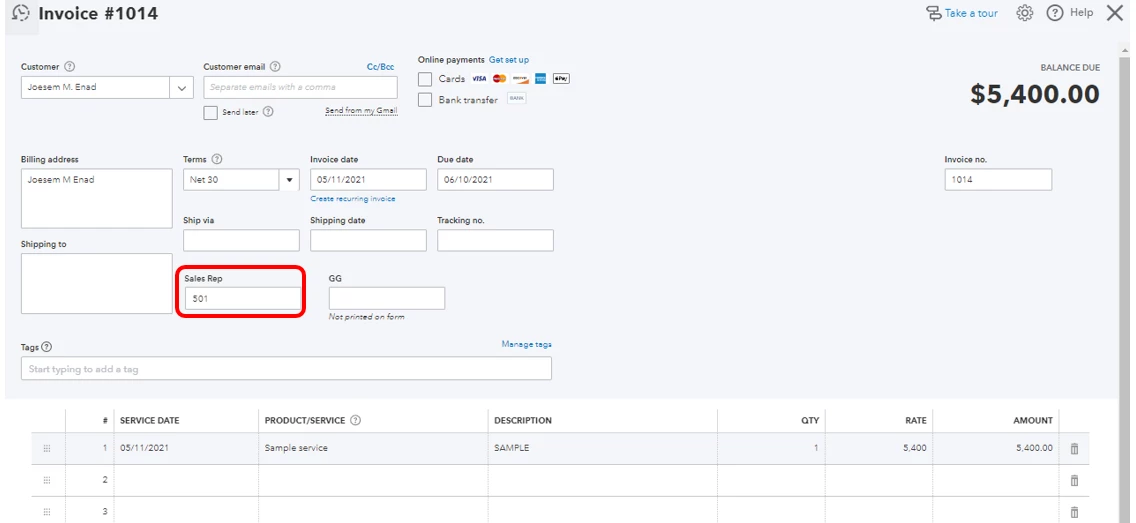
Once everything is recorded, you can now pull up the Sales by Customer Detail report. 
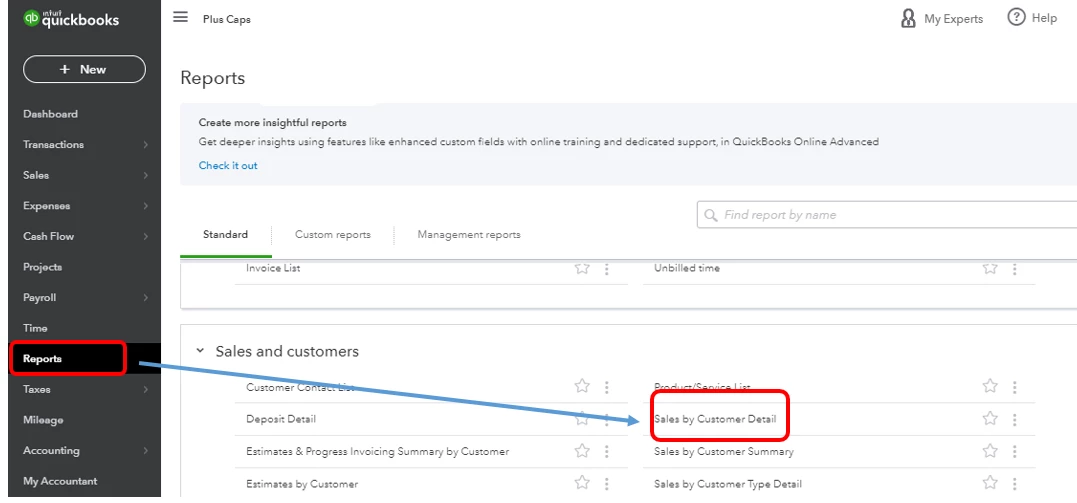
 

  1. Go to Reports in the left pane.
  2. Select Customer Detail Report.
  3. Fill in the correct date range
  4. Click Customize.
  5. In the Rows/Columns.
  6. Put a checkmark on the Sales Rep box.
  7. Expand the Filter section.
  8. Put a checkmark on the Sales Rep box.
  9. Click Run report.

You can check this article to learn more about customizing your reports: Customize reports in QuickBooks Online.


Also, you can explore all available options for making QuickBooks Online (QBO) work like your business needs.


QBO does offer the support of thousands of various third-party applications for any functionality you may need. To see if there's an app that can help you accomplish this, head to the Intuit App Center. Then, type a keyword like in the search bar.


In case you need tips and related articles in the future about the "How Do I" steps in QuickBooks Online, visit our QuickBooks Community help website for reference.


Please leave a comment below if you have any other questions or concerns, and I'll get back to you right away. I'm always happy to help.

September 10, 2021

Make sure you spell the sales rep name exactly the same way every time, even if you add space in the end it's not going to be on the report one you filtered. You will have two reports for the same sales rep. One will be, for example, "John" and the other "John ". 

September 22, 2021

Is QBO not designed for large volume business?  I can not enter a sales rep manually into every invoice! I need to be able to import my customers with their assigned reps, and assign a rep automatically.  


@konstantincra wrote:

Make sure you spell the sales rep name exactly the same way every time, even if you add space in the end it's not going to be on the report one you filtered. You will have two reports for the same sales rep. One will be, for example, "John" and the other "John ".