February 11, 2021
Solved

Sending Invoices by Emails

  • February 11, 2021
  • 1 reply
  • 0 views

I have set up a dummy company to try to work through problems before going live on a different company. Currently, I am running Desktop Pro 2020, and when I send out batch emails I get a popup stating they have been sent but they never get received. The customers I have set up are fictitious and they have been set up with my personal gmail account. The three companies I have set up on QB's, including the dummy company, have the same gmail account. This has been done so I can verify not only are the invoices being sent via email but that they are also being received via email. Even though the QB has a popup showing the emails have been sent they are not showing up in my "Sent" box nor are they showing up in my "Inbox folder, Spam folder, or any other folder". I have read some of the solutions I found online and the first one I am trying is to change the company email address I currently have setup to a different gmail account. The problem is I cannot figure out where to access the company email address associated with the dummy company I have set up and I am hoping you can send me the exact steps that will take me to the field I need to edit. 


The next question I need to ask is it even possible to set up a separate email address for multiple companies within the same license number? I would think it would be since multiple companies can be set up but I certainly cannot figure out where to go to do this. 


My next step is to change the email addresses I have set for the fictitious customers to a different email address than the company address but one that I can monitor.


If these changes do not fix my problems, what would your next couple of suggestion be?


Thanks

Fred
Best answer by jamespaul

Hello, Fred.


Changing the email address setup in the dummy company can help resolve the emailed invoices issue. I'd be happy to show you the steps on how to do this. I'll also provide information regarding your other questions. 


Before doing the steps below, you'll want to ensure your QuickBooks copy is updated to the latest release. This can help resolve common issues when using the program. 


You can edit or change the email setup through the Send forms page. These steps will take you there: 


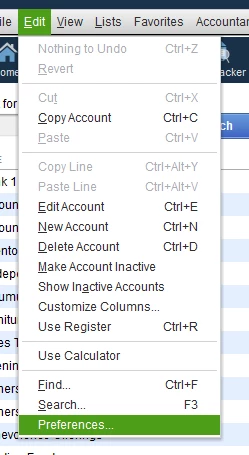
  1. Click the Edit menu, then select Preferences
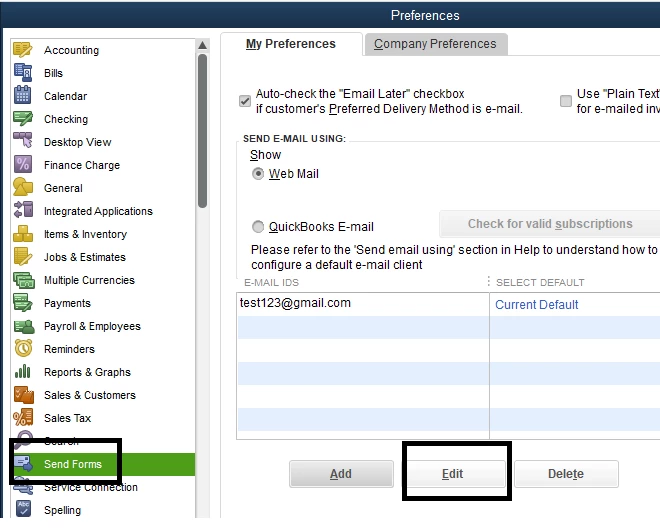
  2. Go to the Send Forms tab.
  3. Set the settings to Web mail, then click Edit
  4. Ensure the email ID is correct and the settings are properly set up (if you don't use Enhanced security).
  5. Once done, click OK.


Also, you'll want to check the filter options in your email account. They might be blocking those invoices from being received. 


Unsent invoices may or may not have an error at all. There are other helpful solutions in this article: Fix Error: Could not connect to the email server.


When you finally go live, you can check this article if you need to know if an invoice has been opened and read: Verify that an invoice was emailed and read by recipient.


For the next question, it's possible to set up separate email addresses for multiple companies within the same license number. All company files have separate preferences and settings. You can follow the steps above to set up a different email address. 


To change the email addresses for your customers, you would just need to edit their profiles. I'll show you how: 


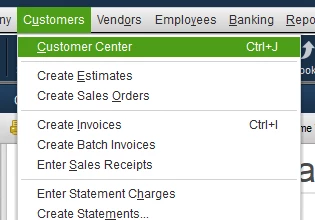
  1. Click the Customers menu, then select Customer Center.
  2. Double-click the customer's profile. 
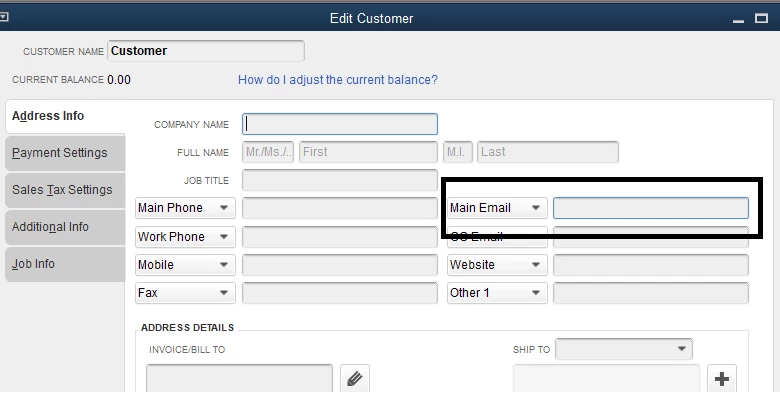
  3. Go to the Address Info tab.
  4. Change the email in the Main email box.
  5. Click OK


You can find out more details about connecting your email address for invoicing here: Connect your email to QuickBooks Desktop


I'm sure you'll find our articles helpful in case you need help recording other transactions for your customers. You can browse for one in our Sales and customers topic. 


I'll keep this thread open in case you have other questions with the Desktop platform. I'm always here to help. 

1 reply

jamespaulAnswer
February 11, 2021

Hello, Fred.


Changing the email address setup in the dummy company can help resolve the emailed invoices issue. I'd be happy to show you the steps on how to do this. I'll also provide information regarding your other questions. 


Before doing the steps below, you'll want to ensure your QuickBooks copy is updated to the latest release. This can help resolve common issues when using the program. 


You can edit or change the email setup through the Send forms page. These steps will take you there: 


  1. Click the Edit menu, then select Preferences
  2. Go to the Send Forms tab.
  3. Set the settings to Web mail, then click Edit
  4. Ensure the email ID is correct and the settings are properly set up (if you don't use Enhanced security).
  5. Once done, click OK.


Also, you'll want to check the filter options in your email account. They might be blocking those invoices from being received. 


Unsent invoices may or may not have an error at all. There are other helpful solutions in this article: Fix Error: Could not connect to the email server.


When you finally go live, you can check this article if you need to know if an invoice has been opened and read: Verify that an invoice was emailed and read by recipient.


For the next question, it's possible to set up separate email addresses for multiple companies within the same license number. All company files have separate preferences and settings. You can follow the steps above to set up a different email address. 


To change the email addresses for your customers, you would just need to edit their profiles. I'll show you how: 


  1. Click the Customers menu, then select Customer Center.
  2. Double-click the customer's profile. 
  3. Go to the Address Info tab.
  4. Change the email in the Main email box.
  5. Click OK


You can find out more details about connecting your email address for invoicing here: Connect your email to QuickBooks Desktop


I'm sure you'll find our articles helpful in case you need help recording other transactions for your customers. You can browse for one in our Sales and customers topic. 


I'll keep this thread open in case you have other questions with the Desktop platform. I'm always here to help. 

FredW2Author
February 15, 2021

Thank you JP, this was my resolution.

Fred

February 15, 2021

You're welcome, Fred! 


I'll keep this thread open in case you have more concerns for QuickBooks Desktop. 


Take care out there.