February 3, 2021
Solved

Sent out emails on accident?

  • February 3, 2021
  • 1 reply
  • 0 views

Hi all! 


I am playing around with sending an email blast to all our customers. I think I may have sent the customers an unfinished product, but I am not sure if the emails were actually sent.  Is there any way to tell if the emails were sent or not? 

I had to modify a statement to look like a customer letter and then I created statements for emailing.  I checked in my send forms area, but there isn't anything there. I am not sure if the "statement" wasn't created or if I accidentally send my unfinished product. I am still in the process of modifying the letter. It's just a very basic blank template right now, but it would probably be very confusing for customers to receive this. 


Thanks! 



Best answer by JenoP

Good day, joneill86.


Yes, there's a way to check if an email was sent. I'd be glad to share these steps with you:


  1. Go to the Customers menu and select Customer Center
  2. Look for the name of the customer and click on it.
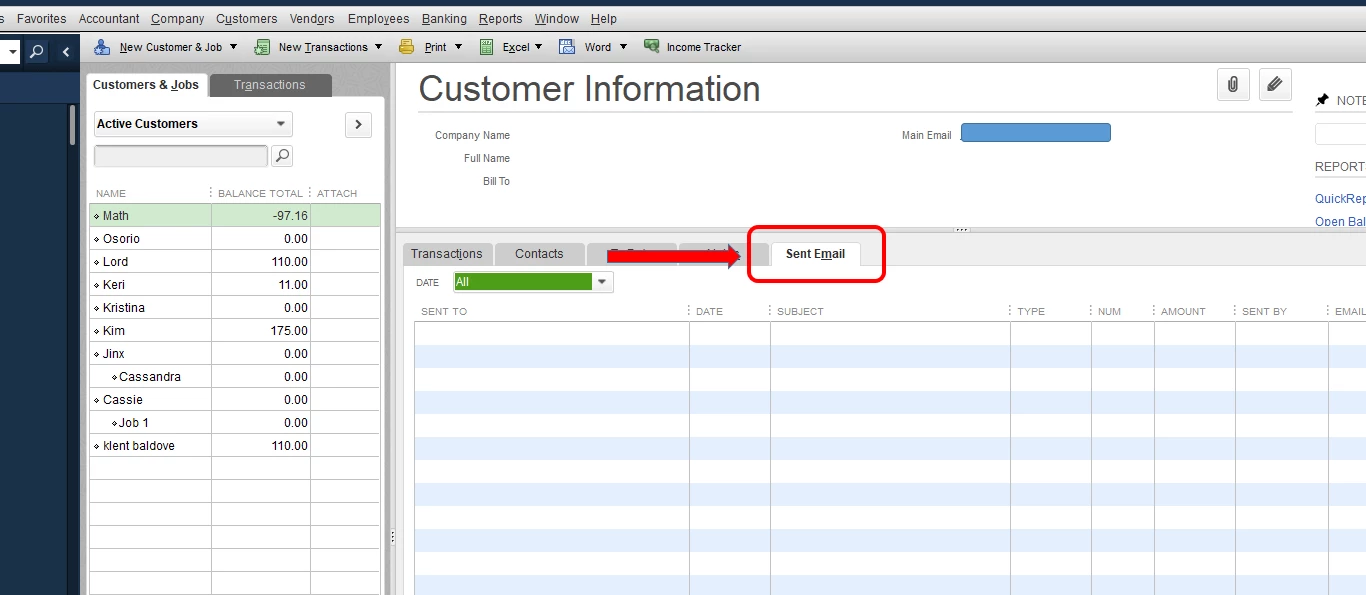
  3. Under the Customer Information section, proceed to the Sent Email tab.
  4. Check if you can see the statement to verify if it was sent or not. 


Check out this article about sending out transactions for more details: Email Sales Forms In QuickBooks Desktop.


Let me know if you need anything else. 


1 reply

JenoP
JenoPAnswer
February 3, 2021

Good day, joneill86.


Yes, there's a way to check if an email was sent. I'd be glad to share these steps with you:


  1. Go to the Customers menu and select Customer Center
  2. Look for the name of the customer and click on it.
  3. Under the Customer Information section, proceed to the Sent Email tab.
  4. Check if you can see the statement to verify if it was sent or not. 


Check out this article about sending out transactions for more details: Email Sales Forms In QuickBooks Desktop.


Let me know if you need anything else. 


joneill86Author
February 3, 2021

Exactly what  I needed! Thank you. 


I didn't think the emails were sent, but I was going to have to send out a "oops my bad" email if they were.