Brant
May 18, 2022
Solved

Serialized inventory in Quickbooks Point of Sale 2019

  • May 18, 2022
  • 1 reply
  • 0 views

Is there an add-on that will allow me to keep track of my inventory by serial numbers (not just record them at the time receipt and sell)?

We have products for which serial numbers must be recorded and tracked.  QP POS allows one to enter a serial number at the time of receipt and sale, but it does not keep up with serial numbers as specific items in inventory.

Is there an add-on that corrects this deficiency?

Best answer by Carneil_C

Hello there, @Brant.


Welcome to QuickBooks Community! I'm happy to lend a hand in tracking your inventory by serial numbers in QuickBooks Point of Sale


Currently, the option to track inventory by serial numbers is unavailable. Alternatively, you’ll want to consider looking for a third-party app in QBDT that allows you to keep track of your inventory by serial numbers.


You can go to the Apps Center and select which one from the list of applications matches your needs. Here’s how:


  1. In your browser, enter this link: Apps for QuickBooks Desktop.
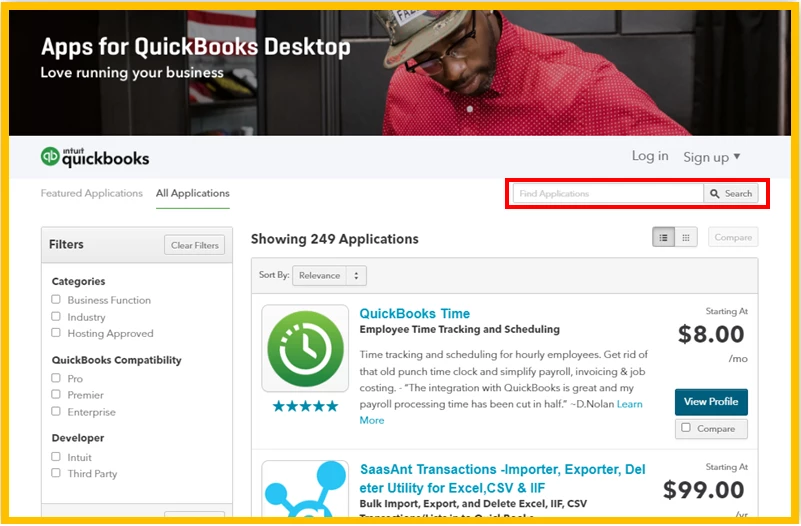
  2. From there, enter a keyword in the Search field or use the Filters section to narrow down the process.
  3. This action will display a list of apps.
  4. Click on the View Profile button to see more details about the software.
 

If you have any other questions about inventory tracking in QuickBooks Point of Sale, please feel free to leave a comment below. I'll get back here as soon as I can to help you again. Thanks for dropping by, wishing you a good one!


1 reply

Carneil_CAnswer
May 19, 2022

Hello there, @Brant.


Welcome to QuickBooks Community! I'm happy to lend a hand in tracking your inventory by serial numbers in QuickBooks Point of Sale


Currently, the option to track inventory by serial numbers is unavailable. Alternatively, you’ll want to consider looking for a third-party app in QBDT that allows you to keep track of your inventory by serial numbers.


You can go to the Apps Center and select which one from the list of applications matches your needs. Here’s how:


  1. In your browser, enter this link: Apps for QuickBooks Desktop.
  2. From there, enter a keyword in the Search field or use the Filters section to narrow down the process.
  3. This action will display a list of apps.
  4. Click on the View Profile button to see more details about the software.


If you have any other questions about inventory tracking in QuickBooks Point of Sale, please feel free to leave a comment below. I'll get back here as soon as I can to help you again. Thanks for dropping by, wishing you a good one!