March 11, 2019
Solved

Setting up / Keeping track of Donors (donation revenue, etc.)

  • March 11, 2019
  • 2 replies
  • 0 views

I'm asking this for someone who is considering purchasing Quickbooks to keep track of donors, donations, expenses, etc. for a nonprofit.   


To keep track of all (600+) donors, should each one be set up as a 'customer' in the customer center?   Or, is there a better way to set up & track each donor?  She plans to run reports showing donors, amount of donations, dates, etc. 


Is there a large advantage in purchasing Quickbooks for Nonprofits - vs - traditional Quickbooks?


Thank you!

Best answer by PreciousB

Thanks for visiting the Community, clg3.


If you're referring to QuickBooks Desktop Pro and QuickBooks Desktop Premier- Non-profit edition, I'll share some insights about their differences.


Premier has tailor-made reports or forms for specific industries and allows up to 5 users while Pro allows 3. Also, Pro and Premier tracks up to 14,500 items. Check out our website for the features of Pro and Premier:

With that said, it would be better to use QuickBooks Premier if your business is for non-profit. You'll get tools more tailored to your industry.


As for your other question, you're right that you'll have to set up the donors as customers in the Customer Center. QuickBooks uses the customer list to hold information about the people and companies to whom you sell your products and services.


Here's how:

  1. Choose Customers at the top, then select Customer Center.
  2. At the top of the Customer Center, click the New Customer & Job drop-down arrow and select New Customer.
  3. Enter the needed details and click OK to save.

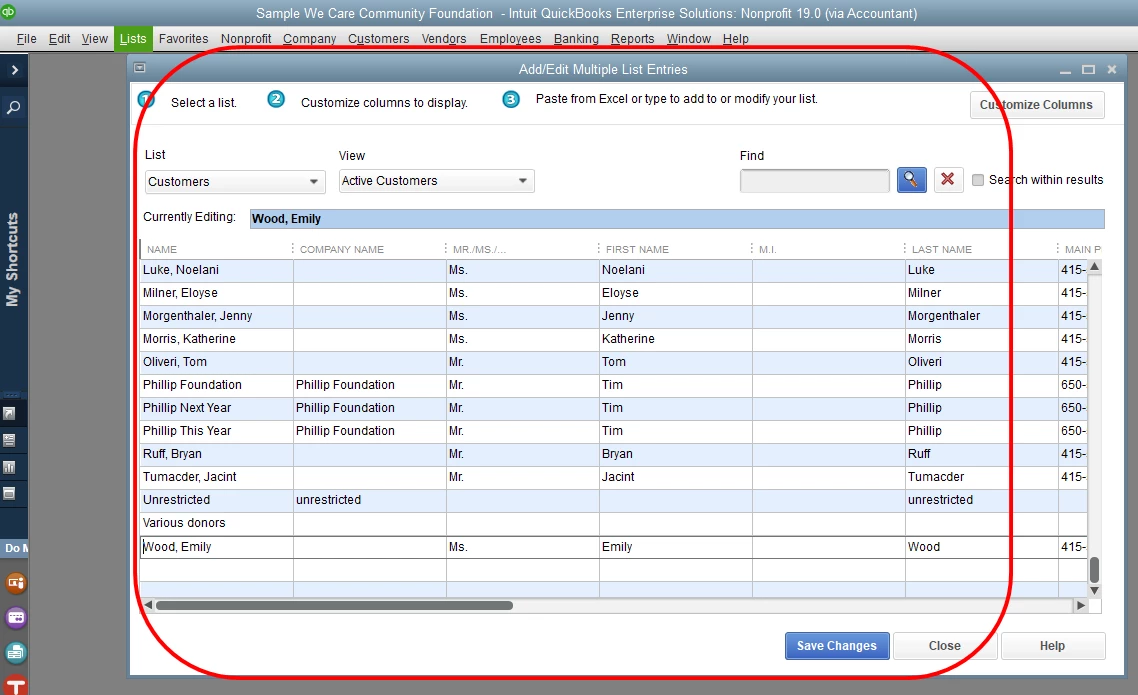
You can also use the Add/Edit Multiple List Entries window. This is QuickBooks' way to add customer’s information in bulk. You can copy the details from Excel and paste them in QuickBooks.


Here's how:

  1. Go to the Lists menu, then choose Add/Edit Multiple List Entries.
  2. Select Customers under List.
  3. Add the details and click Save Changes (check out the screenshot below).
 

That should work for you. Please reach out to me if you have any questions later on. I'm always happy to help. Have a good day.


2 replies

PreciousB
PreciousBAnswer
March 11, 2019

Thanks for visiting the Community, clg3.


If you're referring to QuickBooks Desktop Pro and QuickBooks Desktop Premier- Non-profit edition, I'll share some insights about their differences.


Premier has tailor-made reports or forms for specific industries and allows up to 5 users while Pro allows 3. Also, Pro and Premier tracks up to 14,500 items. Check out our website for the features of Pro and Premier:

With that said, it would be better to use QuickBooks Premier if your business is for non-profit. You'll get tools more tailored to your industry.


As for your other question, you're right that you'll have to set up the donors as customers in the Customer Center. QuickBooks uses the customer list to hold information about the people and companies to whom you sell your products and services.


Here's how:

  1. Choose Customers at the top, then select Customer Center.
  2. At the top of the Customer Center, click the New Customer & Job drop-down arrow and select New Customer.
  3. Enter the needed details and click OK to save.

You can also use the Add/Edit Multiple List Entries window. This is QuickBooks' way to add customer’s information in bulk. You can copy the details from Excel and paste them in QuickBooks.


Here's how:

  1. Go to the Lists menu, then choose Add/Edit Multiple List Entries.
  2. Select Customers under List.
  3. Add the details and click Save Changes (check out the screenshot below).


That should work for you. Please reach out to me if you have any questions later on. I'm always happy to help. Have a good day.

December 28, 2019

I am still confused as to how to identify donors. My client is using QuickBooks Premier Nonprofit Edition 2018. All givers have been set up as customers but she wants to be able to run donor reports. It seems to me that they must first be identified as customers. I have been able to run the Donor/Grants Report, but no others. I followed your previous instructions but I still do not understand how to identify them as donors. Can you help me?

BigRedConsulting
December 28, 2019

RE: I am still confused as to how to identify donors.


Donors are Customers in QuickBooks, entered on the customer list.


RE: All givers have been set up as customers but she wants to be able to run donor reports.


Then they are set up right.  What "donor reports" do you mean?


If you mean donor statements to send to your donors, QB won't create them properly.  Instead you can use our BRC Donor Statements - Desktop  app, which will.

December 6, 2021

Hi there, clg3.


To clarify, do you mean to set up both employee and donor? QuickBooks doesn't allow multiple names in the system. As a workaround, you can add an indication so QuickBooks will think that they are two different entries. For example:


  • LeizylM - you add M at the end of the customer's name.
  • LeizylE - you add E at the end of the customer's name.


For further assistance, it would be best to reach out to your accountant to completely set this up. They'll be the ones who can help you record the other accounting side. 


In case you want to track donations, you can definitely run a few of the following reports in QuickBooks Desktop.


  • Budget vs. Actual by Donors/Grants.
  • Donor/Grants Report.
  • Donor Contribution Summary.
  • Budget vs. Actual by Programs/Projects.


You may also want to check out this article to learn more about customizing reports in QuickBooks: Customize reports in QuickBooks Desktop.


Do you have other questions you want to add here? Just post them in the reply section and I'll be there to help you out. You have a good one.