
April 8, 2020
Solved

Sometimes the ship to address is on the invoice and sometimes it is not Can someone explain why??

  • April 8, 2020
  • 1 reply
  • 0 views
Original commenter did not share additional details

Best answer by mv32

Welcome to the Community, @captrwbristol.
 

There are two aspects why the shipping address isn't appearing in your invoice:

  • The shipping address was filled out first before selecting the customer.
  • It was manually entered into an invoice and added transactions like billable expenses.


To make sure this will appear on the customer's invoice, you have to update the customer's information and add the shipping address.


Let me show you how:
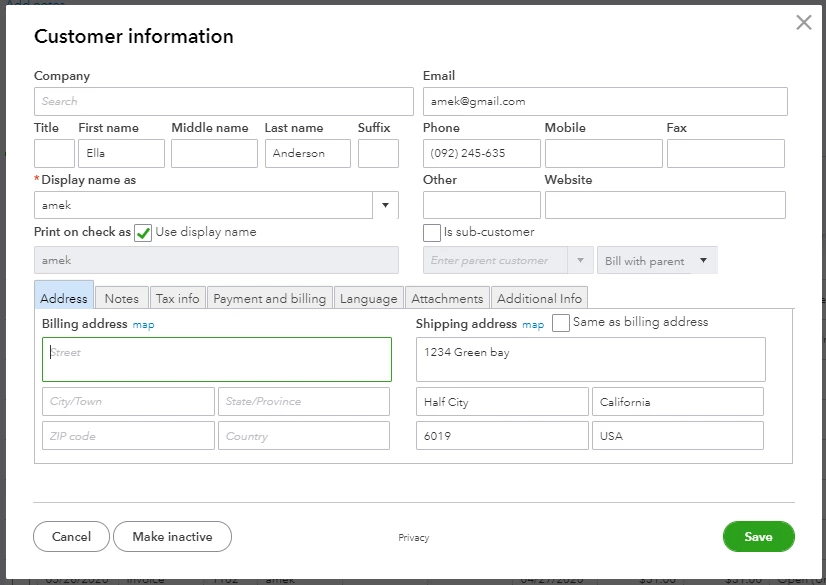
  1. Go to Sales and then select the Customers tab.
  2. Click the name of the customer.
  3. Select Edit on the upper right.
  4. Enter the Shipping address.
  5. Click Save.

Once done you can now create the invoice without missing the shipping address. 


You can refer to this video article on how to update customer information: Edit customer information.

Just in case, here's an article on how to create repeating transactions like invoices and expenses in QuickBooks Online: Create a recurring transactions.

Keep me notified by leaving a message to this post if you need further assistance. I'll be around to help. Stay safe!

1 reply

mv32Answer
April 8, 2020

Welcome to the Community, @captrwbristol.
 

There are two aspects why the shipping address isn't appearing in your invoice:

  • The shipping address was filled out first before selecting the customer.
  • It was manually entered into an invoice and added transactions like billable expenses.


To make sure this will appear on the customer's invoice, you have to update the customer's information and add the shipping address.


Let me show you how:

  1. Go to Sales and then select the Customers tab.
  2. Click the name of the customer.
  3. Select Edit on the upper right.
  4. Enter the Shipping address.
  5. Click Save.

Once done you can now create the invoice without missing the shipping address. 


You can refer to this video article on how to update customer information: Edit customer information.

Just in case, here's an article on how to create repeating transactions like invoices and expenses in QuickBooks Online: Create a recurring transactions.

Keep me notified by leaving a message to this post if you need further assistance. I'll be around to help. Stay safe!

April 8, 2020

thanks so much.  I think much of the difficulty came because I was dealing with an invoice that had already been sent.  I did modify for the future invoice and that worked perfectly.  You would think that there would be a checkbox on the Customer Profile to say whether to include the Ship To: address on the invoice.  Oh well, perhaps an enhancement...

Thanks again