April 22, 2019
Solved

SUI efile for Indiana

  • April 22, 2019
  • 2 replies
  • 0 views

We received information on how to create a report for Indiana SUI efile but when you go to select the state of Indiana it is not listed. How can we create this report?


Best answer by PreciousB

Thanks for providing more details about your concern, Jill14.


I can add some insights on e-filing SUI report.


As mandated by the Indiana state agency, QuickBooks Online (QBO) does not support e-filing for SUI forms. As my colleague let you know, run the Payroll Details report to get the SUI amount. The Employee Details report also provides their hire date. However, we are unable to get a report for the employee's Social Security number as QBO encrypted it for security purposes.


Here's how:
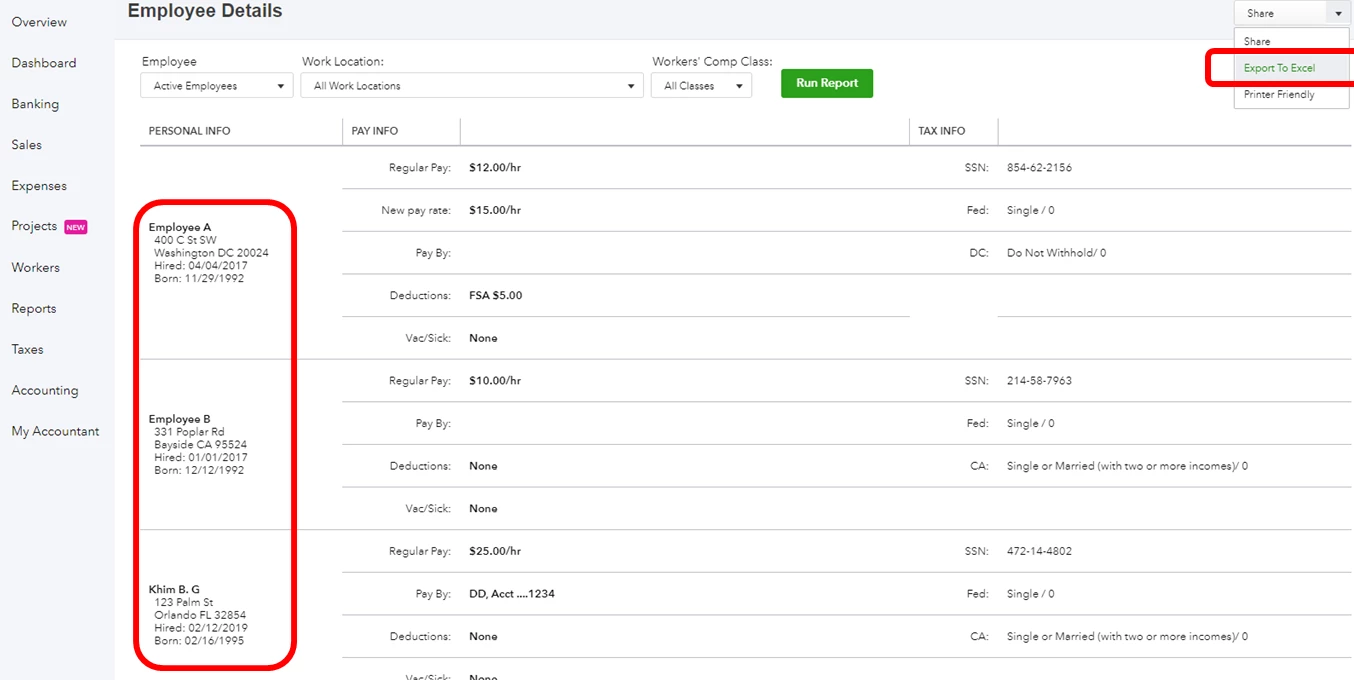
  1. Choose Reports on the left pane.
  2. Enter and select Employee Details in the search field.


You can export the reports to Excel. This way, you can merge them to get the information you need and submit it to your state's website.


To export the report:

  1. Open the report.
  2. Click the arrow beside Share
  3. Select Export to Excel.

For the complete details, check this article and expand the E-file & Pay section: Indiana Payroll Tax Compliance.


This should answer your concern for today. Please let me know how it goes or if you have any follow-up questions. I'll be happy to help. Have a good day.

2 replies

Kristine Mae
April 22, 2019

You can pull up the Payroll Details report, Jill14.


I'll guide you how:

  1. Click Reports.
  2. In the Find report by name field, enter Payroll Details.

From there, you can view the IN SUI amounts of each employee. 


Let us know if you need more help from us. We're just one comment away. 

Jill14Author
April 22, 2019

As an employer we do not pay SUI on each employee but we still need to report wages, SS#'s, hire dates etc. Is there a way to create this report?

PreciousB
PreciousBAnswer
April 22, 2019

Thanks for providing more details about your concern, Jill14.


I can add some insights on e-filing SUI report.


As mandated by the Indiana state agency, QuickBooks Online (QBO) does not support e-filing for SUI forms. As my colleague let you know, run the Payroll Details report to get the SUI amount. The Employee Details report also provides their hire date. However, we are unable to get a report for the employee's Social Security number as QBO encrypted it for security purposes.


Here's how:

  1. Choose Reports on the left pane.
  2. Enter and select Employee Details in the search field.


You can export the reports to Excel. This way, you can merge them to get the information you need and submit it to your state's website.


To export the report:

  1. Open the report.
  2. Click the arrow beside Share
  3. Select Export to Excel.

For the complete details, check this article and expand the E-file & Pay section: Indiana Payroll Tax Compliance.


This should answer your concern for today. Please let me know how it goes or if you have any follow-up questions. I'll be happy to help. Have a good day.

Jill14Author
April 22, 2019

We as an employer do not pay SUI but we still need to create a report with wages, hire date, etc.