Thank you so much for your help,
so the report the way you instructed worked - EXCEPT it just lists every transaction within that tag group.
I need the P& L for that Tag group. because there are income and expense and then the profitability to consider. Any other ideas ?
Hi there, @CHMM.
I'd be happy to help you run a Profit and Loss report with the tags in QuickBooks Online.
You can customize the Profit and Loss report and choose the Tag name. I can show you how to do that.
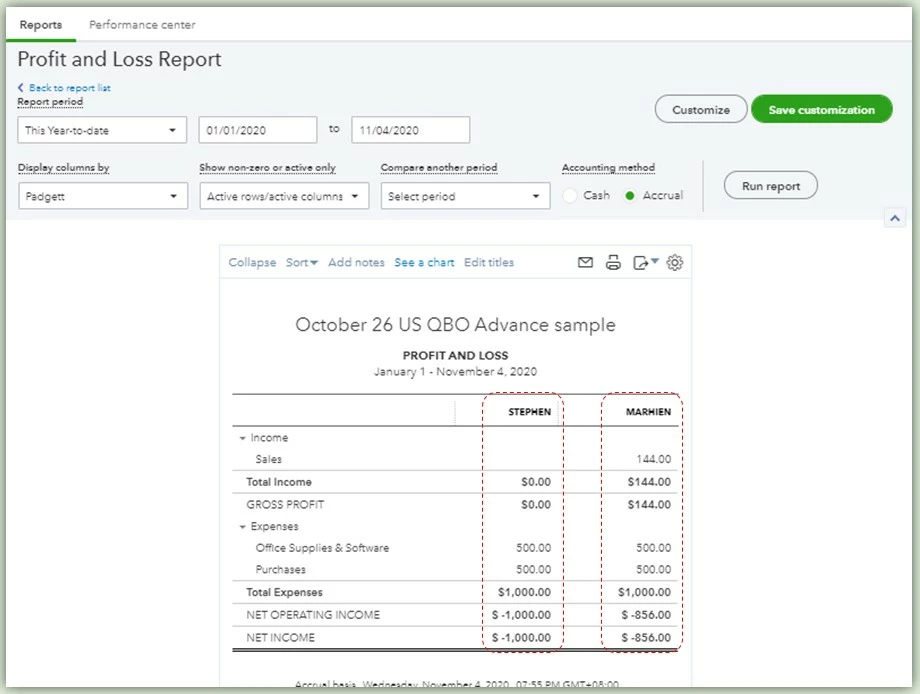
In this example, I'm naming my Tag group as "Padgett." Marhien and Stephen are the tag names I've used. Please refer to the steps below on how to customize the report:
- Go to the Reports menu.
- Enter the Profit and Loss report in the text box.
- Select the Customize button.
- Under the Rows/Columns section, go to the Columns drop-down and select the Tag group.
- Check the boxes of other aspects you'd like to show in the report.
- Select Run report.
I've added some screenshots for your additional reference.

After running the customized report, the tag names are now showing.
After you've done customizing the report, you may also memorize it so that you can use the selections you've chosen in the future.
I'll be here if you have other concerns or questions about QuickBooks. I hope you're doing great today, take care!


