December 12, 2018
Solved

The min quantity must be less than the max quantity in Quickbooks Pro 2017. How do I set the max field?

  • December 12, 2018
  • 1 reply
  • 0 views
Original commenter did not share additional details

Best answer by JanyRoseB

Hi there, jjm10.


Good to see you here in QuickBooks Community. It's my priority to guide you on how to set the maximum field in QuickBooks Desktop. 


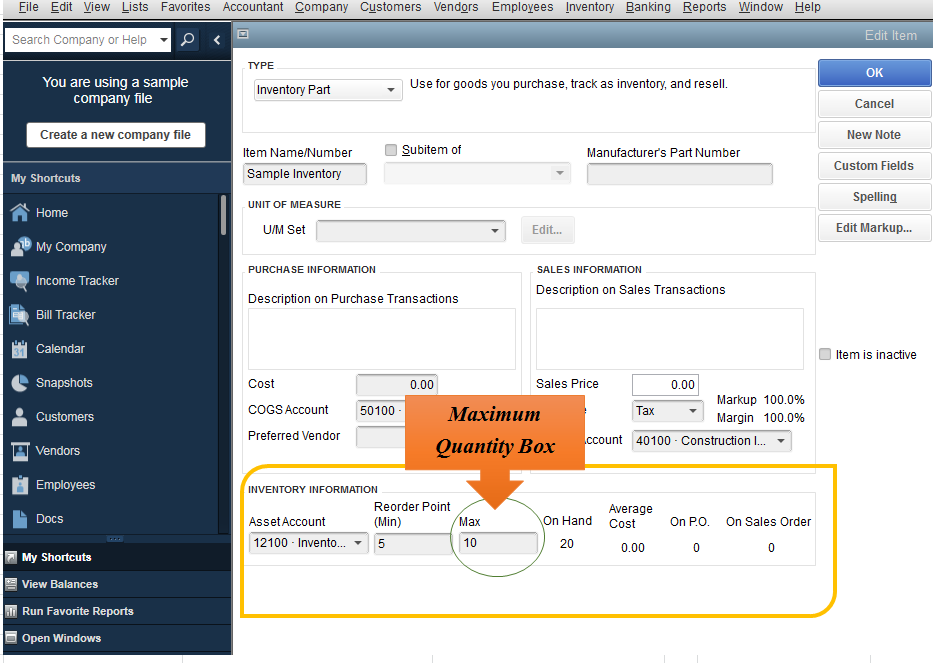
Are you trying to adjust the Max Quantity box for your inventory item? If so, there are two options on how to do this in QuickBooks. First, you can make the adjustment in the Inventory Information


Second option, you can visit the Add/Edit Multiple List Entries. Let me walk you through the process: 


  1. Go to List at the top menu bar, then select Add/Edit Multiple List Entries.
  2. Choose Inventory Parts from the List drop-down.
  3. Click the Customize Columns tab.
  4. Highlight Max in the Available Columns options and click Add.
  5. Click Ok
  6. Once done, you can manually change the amount on the Max column.

For additional reference you can check this article: Create, build, and work with inventory assembly items.


If you need further assistance with the steps, you can contact our QuickBooks Desktop Support Team. They have additional tools to pull up your account in a secure environment and do a remote session. 


Here's how you can contact our support: 

  1. Click this link: https://quickbooks.intuit.com/community/Getting-Started/Contact-QuickBooks-Desktop-support/m-p/186038.
  2. Select the version of QuickBooks, click Contact Us.
  3. Type-in Technical Support on the search bar.
  4. Click Get the Phone number below.

This will get you on the right track! Don't hesitate to leave a comment below if you have any other questions about inventory. I'm always here to help you out. 

1 reply

JanyRoseBAnswer
December 13, 2018

Hi there, jjm10.


Good to see you here in QuickBooks Community. It's my priority to guide you on how to set the maximum field in QuickBooks Desktop. 


Are you trying to adjust the Max Quantity box for your inventory item? If so, there are two options on how to do this in QuickBooks. First, you can make the adjustment in the Inventory Information


Second option, you can visit the Add/Edit Multiple List Entries. Let me walk you through the process: 


  1. Go to List at the top menu bar, then select Add/Edit Multiple List Entries.
  2. Choose Inventory Parts from the List drop-down.
  3. Click the Customize Columns tab.
  4. Highlight Max in the Available Columns options and click Add.
  5. Click Ok
  6. Once done, you can manually change the amount on the Max column.

For additional reference you can check this article: Create, build, and work with inventory assembly items.


If you need further assistance with the steps, you can contact our QuickBooks Desktop Support Team. They have additional tools to pull up your account in a secure environment and do a remote session. 


Here's how you can contact our support: 

  1. Click this link: https://quickbooks.intuit.com/community/Getting-Started/Contact-QuickBooks-Desktop-support/m-p/186038.
  2. Select the version of QuickBooks, click Contact Us.
  3. Type-in Technical Support on the search bar.
  4. Click Get the Phone number below.

This will get you on the right track! Don't hesitate to leave a comment below if you have any other questions about inventory. I'm always here to help you out. 

March 6, 2021

Hello,

I am using Enterprise 21.0 and wanted to use the advanced import or multiple Add/Edit list entries to update MAX quantity but I am not able to find the "MAX" in the customized column or in the import mapping. I am having the same issue when importing the 'reorder point' which the min quantity must be less than the max quantity. I can't enter the max quantity one by one for thousands of items. Please advise.