October 10, 2023
Solved

there was an expense to be billed to the client and reimbursed to the consultant. We raised the invoice, however the client denied to pay. We have voided that invoice in QBO. however, wanted to know if I need to uncheck billable manually from expense

  • October 10, 2023
  • 1 reply
  • 0 views

there was an expense to be billed to the client and reimbursed to the consultant. We raised the invoice, however the client denied to pay. We have voided that invoice in QBO. however, wanted to know if I need to uncheck billable manually from expenses.

Best answer by MirriamM

Welcome back to the thread, RP2522. Thanks for keeping us updated.


I'm here to guide you on how to make the expense non-billable in QuickBooks Online (QBO).


You receive the error message "This transaction is linked to an invoice. Saving this transaction would make the invoice no longer valid. In order to make this change, edit the invoice first, remove this transaction from it and remake this change." since the invoice is linked to the billable expense. 


To make the expense non-billable you'll have to remove the linked billable expense charge first to the invoice before unchecking the billable option on the expense transaction. To do this, here's how.


  1. Locate and open the voided invoice.
  2. In the upper left-hand, click the 1 linked Billexp Charge link.
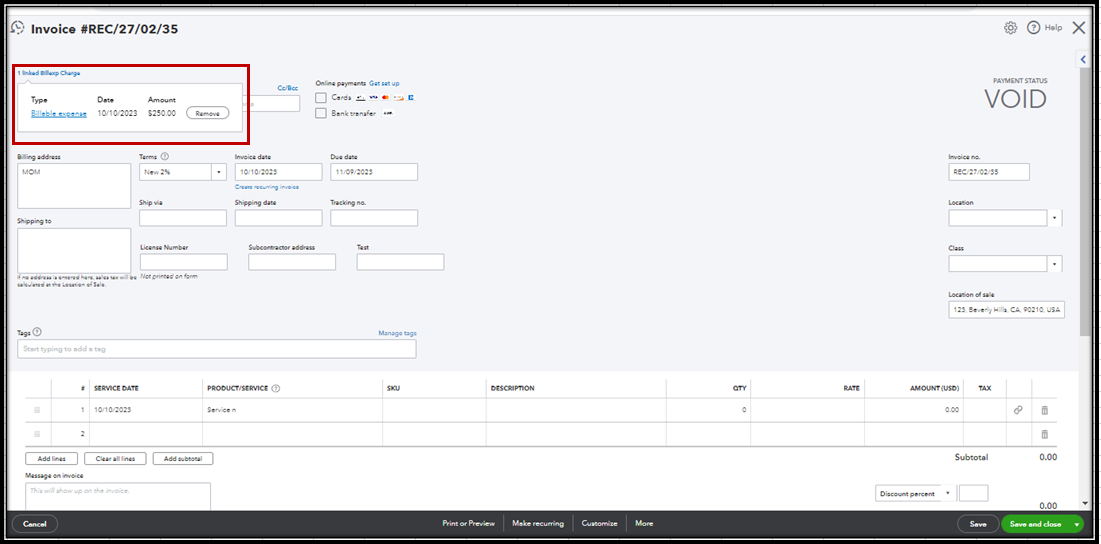
  3. Click Remove.
  4. Add a new line item.
  5. Select Save and close.


Once done, go back to the expense transaction and make the expense non-billable.


For future reference, here's an article in case you'd want to run reports to view a snapshot of your business: Run reports in QuickBooks Online.


That's it! If there's anything else you need help with in managing your transactions in QBO, let me know by commenting below. I'll be more than happy to answer them for you. Have a good day!


1 reply

October 10, 2023

Yes, @RP2522. You'll need to uncheck the Billable option from the expenses manually.


Since you've voided the invoice in QuickBooks Online, it's best to deselect the Billable option from the said expenses. This will remove the charge associated with the transaction from the customer's account.


If you need to track the invoice amount that was denied by your client, you can record them as a bad debt and write them off. This ensures your expenses and net income are correctly updated, and any liability related to the sale is adjusted. Check out this guide to learn more about the process: Write off bad debt in QuickBooks Online.


I’m also adding this reference to get more insights about bad debt and how it impacts the taxpayer: Bad Debt Deduction.


Please drop a reply if you need further assistance or information about operating uncollectible entries. I’ll be here to help you out.

RP2522Author
October 10, 2023

Thank you for your response. This helps. I tried making the expense manually non billable, however it says its linked to the invoice and changes should be done to the invoice 1st. I have already voided the invoice and the values within the invoice are changed to zero.

MirriamMAnswer
October 10, 2023

Welcome back to the thread, RP2522. Thanks for keeping us updated.


I'm here to guide you on how to make the expense non-billable in QuickBooks Online (QBO).


You receive the error message "This transaction is linked to an invoice. Saving this transaction would make the invoice no longer valid. In order to make this change, edit the invoice first, remove this transaction from it and remake this change." since the invoice is linked to the billable expense. 


To make the expense non-billable you'll have to remove the linked billable expense charge first to the invoice before unchecking the billable option on the expense transaction. To do this, here's how.


  1. Locate and open the voided invoice.
  2. In the upper left-hand, click the 1 linked Billexp Charge link.
  3. Click Remove.
  4. Add a new line item.
  5. Select Save and close.


Once done, go back to the expense transaction and make the expense non-billable.


For future reference, here's an article in case you'd want to run reports to view a snapshot of your business: Run reports in QuickBooks Online.


That's it! If there's anything else you need help with in managing your transactions in QBO, let me know by commenting below. I'll be more than happy to answer them for you. Have a good day!