

February 11, 2020
Question

Time in decimal format on printed invoices

  • February 11, 2020
  • 6 replies
  • 0 views

I have been using QuickBooks Online for 3 years now.  I have suggested and posted multiple times that Time entries appearing on printed invoices need to be in Decimal format for accounting reasons.  All my past posts are no where to be found.  I must spend countless hours a week having to manually enter each Billable Time entry (As this is QuickBooks solution….) onto invoices so that they appear properly when sent to customers. 

QuickBooks desktop has the feature I am not sure why it still has not been included into the QuickBooks Online Version.  This appears to be more of a bug in my opinion than an intended feature.


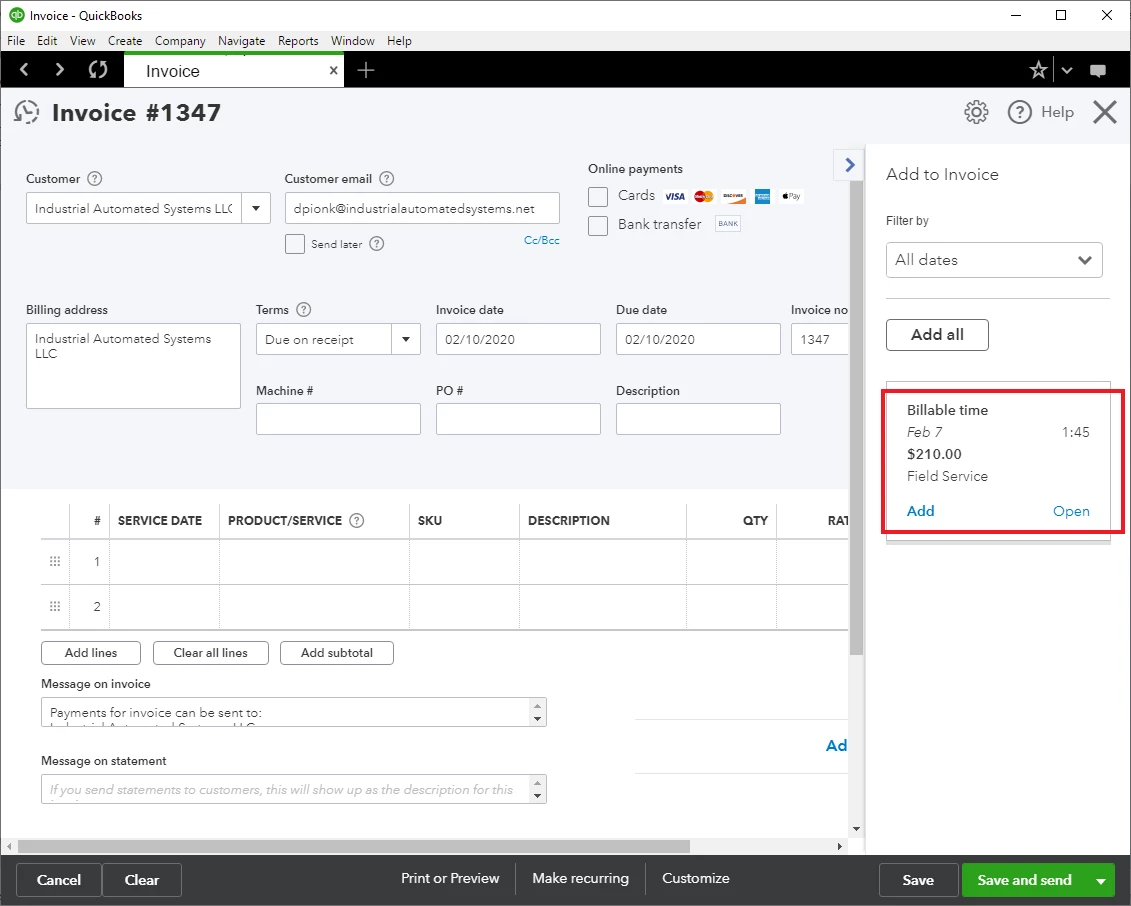
As you can see in this first picture I have a Billable Time that needs to be added to an Invoice.  It is displayed in HH:MM.


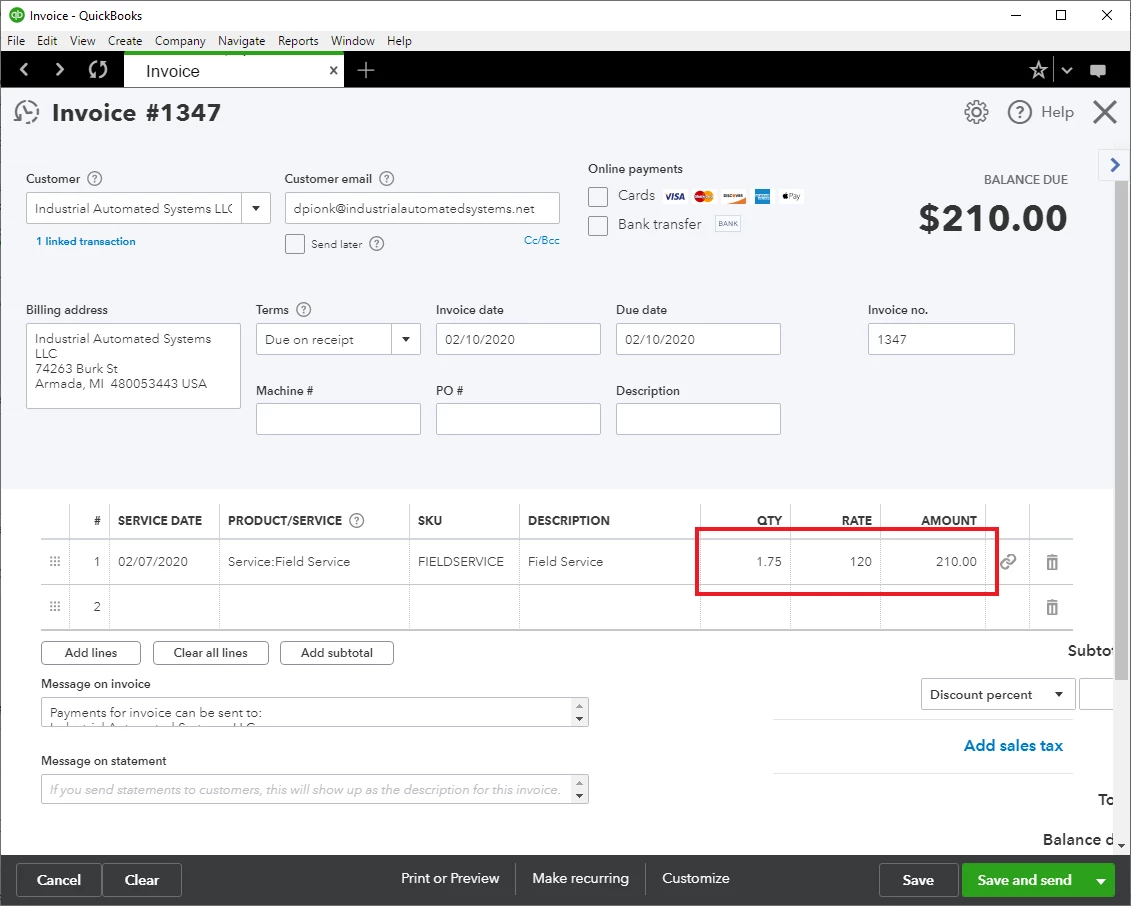
Once added to the invoice it converts it into decimal format.  This is great!
 

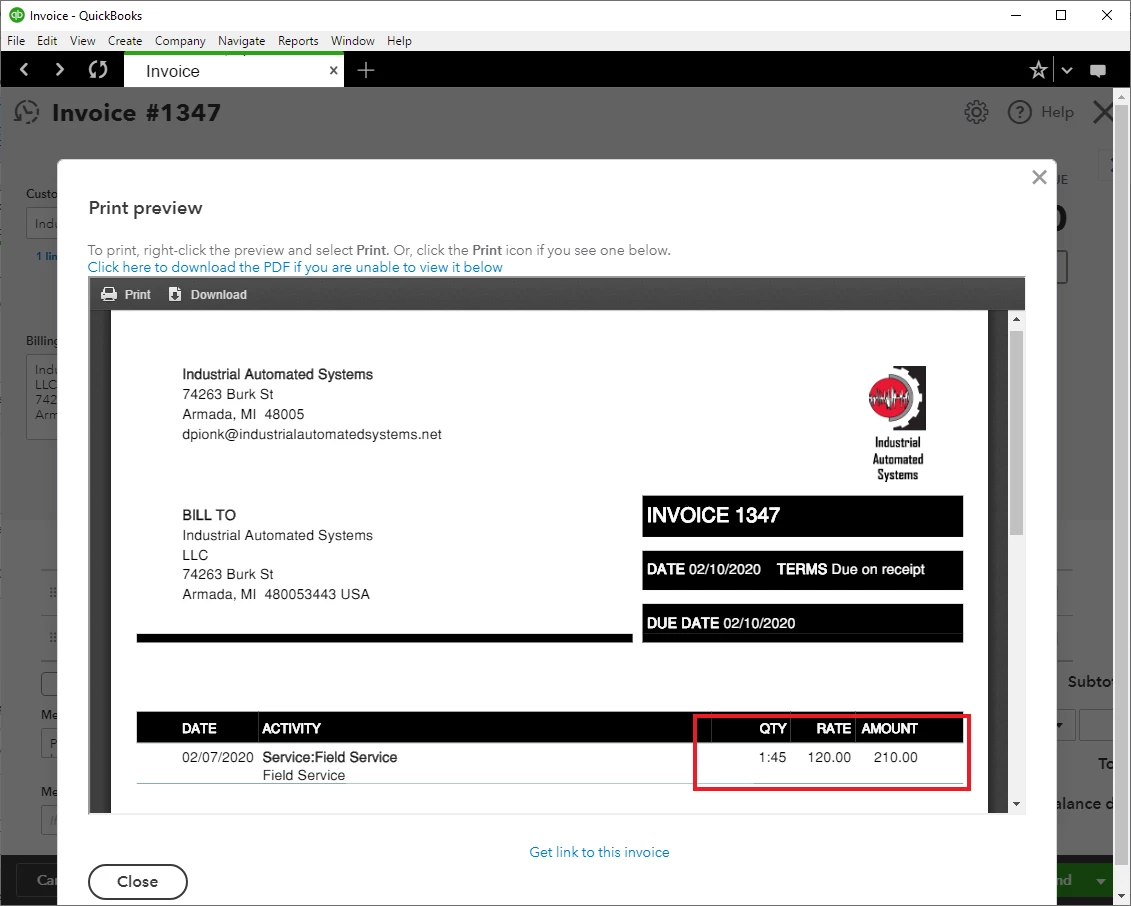
When you actually go to send or print the invoice this format reverts back to HH:MM and not what is displayed on the Invoice editing page..Here is the core of this issue.  I go to a customer and perform a job.  I clock my time activities with TSheets as it is a great and wonderful product.  These time entries get directly imported into QuickBooks as billable time.  I add the billable time onto invoices.  If I send an invoice to a customer with a QTY of 1:45 how do they enter that into a Purchase Order.  I cannot add 1:45 into a purchase order as a QTY in Quickbooks, how is any other software going to allow this.
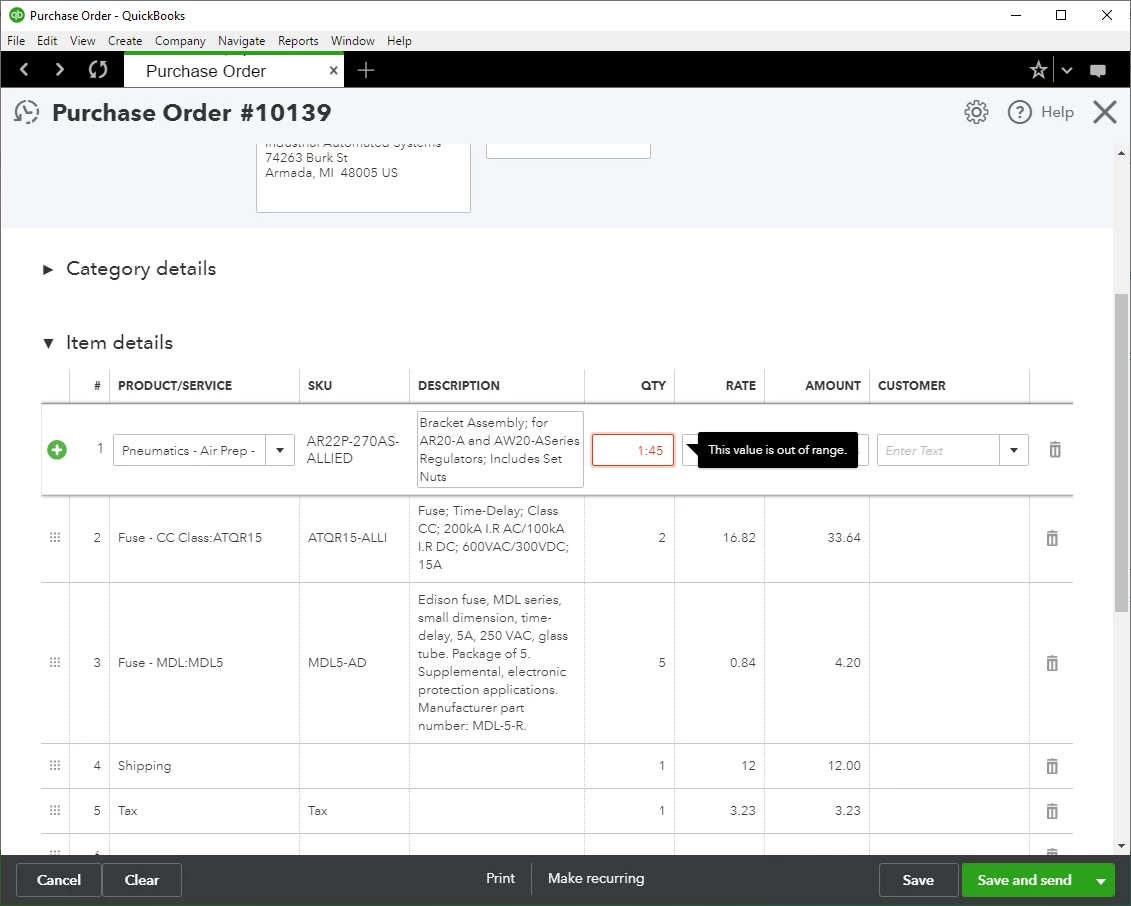
I am pleading once again for this simple change to be made and do not understand how more people do not have this issue.


Thanks for everything else you do QuickBooks but this one issue is a giant thorn in my side and my business.

6 replies

katherinejoyceO
February 11, 2020

I appreciate you for sharing every detail of what you want to achieve today, @IAS. I understand how important and more convenient for you and your business to add or enter the billable hours on to the purchase order. 


I hear your plea about this simple change and I'm taking note of your request to share it with our developers. That way, they can further review about how to add this functionality and consider this matter in the next plan. 


For now, I'm encouraging you to regularly visit our blog to see what's New in QBO. I've also included our QuickBooks Online Help Articles hub in case you need some easy steps for your "How do I?" tasks.


Know that I'm always available here to listen and lend a helping hand, @IAS. Have a great day ahead. 


April 7, 2020

This "plea" has been made in the Community forums for over 2 years, and there has been absolutely no movement on this simple issue that is absolutely necessary to use QBO for professional services. It is obvious based upon the lack of any activity that QBO does not appreciate the needs of professional services. Unfortunately, we are forced to use another solution, as QBO is completely incapable of meeting our needs.

Tori B
April 7, 2020

This is not the impression we wish to leave you with, @dnykanen


As mentioned by my colleague katherinejoyceO, we have submitted feedback to our product developers, so this can be considered in a future update. I appreciate you sharing your concerns with us, and I'll be sure to submit them also. 


Please don't hesitate to let us know if there is anything else that we could assist you with. We are to help you every step of the way. It's our goal to get you back to business. Take care!

August 9, 2022

Add me to the list of people who need this fix.  I bill clients based on 1/10 of an hour increments.  Why would I send an invoice based in minutes?  Quickbooks told me I needed to stop using the Desktop version (which allows billing in decimals) and start using online.  They promised an easy transition.  But now I need to manually create invoices because I cannot send invoices that do not correspond to the billing arrangement I have with clients.  COME ON!  FIX THIS!

August 9, 2022

Hello there, @Thayer2.


I'll help share a few insights about the billable time entry format on printed invoices in QuickBooks Online (QBO). Then, guide you in sending product recommendations to help improve the features of our products and be added to the list of users that needs this specific option.


For the time being, you can set up the time in HH:MM format on fields that require hours, such as timesheets and paychecks in QBO. However, for invoices, the available column is Quantity. That's why when you add time, QuickBooks automatically converts it to decimals.


On the other hand, I can see how the benefit of being able to use and print billable entries in HH:MM format on invoices would aid you in managing your transactions with QBO. With this, I would encourage you to send suggestions or product recommendations. We take your suggestions as opportunities to improve the various features of our products.


Your valuable feedback will be forwarded and reviewed by our Product Development team to help improve your experience while using the program. Here's how:


  1. Go to the Gear icon.
  2. Select Feedback.
  3. Type in your recommendation in the Share your feedback field.
  4. Click Next.
  5. Follow the on-screen instructions to complete the process. 


Also, you may want to check out one of our Help pages as your reference in managing your customers, invoicing, payments, and handling sales transactions using QBO: Customers and income help articles for QuickBooks Online.


On top of that, I'd also recommend visiting this page to keep you updated with the latest software improvements and enhancements with QBO: Customer Feedback for QuickBooks Online.


Let me know if you have other feature concerns or questions about managing invoices and sales transactions in QBO. Please don't hesitate to drop a comment below, and I'll gladly help. Take care, and I wish you continued success, Thayer2.

IASAuthor
August 9, 2022

@Rea_M 


I have probably submitted this with many other people a couple dozen times over the course of the last 3 years. The suggestions feedback system seems to just go right in the trash bin at QuickBooks. 

On the other hand, I can see how the benefit of being able to use and print billable entries in HH:MM format on invoices”

I think you are misunderstanding the problem. The time DOES print on the invoice in HH:MM. this is absolutely useless to literally everyone in the world. The time shows in decimal when editing the invoice line item but then changes to HH:MM when printed/emailed. 

I am 100% this is a bug/glitch but QuickBooks will not fix it. On the desktop version as @Thayer2 @stated, you can select that you want it printed out in decimal but the option does not exist for online version. I spend about 4 hours a week manually creating emails a week losing ~$1000  a month in my time having to do this task instead of it being and automated task. 

ps, how much would it cost for me to just pay one of your programmers to finally just fix this!? 

IASAuthor
November 21, 2022

Have there been anymore updates on this since Feb 10th 2020?


Thank you

November 21, 2022

I appreciate you for getting back here in the thread, @IAS.


Before anything, I recognize the importance of having this feature work in your QuickBooks Online company. As I check here on my end, the feature you're trying to access in QuickBooks Online (QBO) is still unavailable. Please know that due to high volumes of feature suggestions. Our engineers might still haven't reviewed your feedback. With that said, I recommend resending a feature request to our Product Development Team. To begin, here's how:


  1. Access your QuickBooks Online company.
  2. On the top right corner, click the Gear icon.
  3. Under Profile column, select Feedback.
  4. Enter a brief description of your request, and then click Next.


Additionally, I've got you these articles to help you manage your invoices in QBO:


@IAS, if you have any additional QuickBooks-related concerns or need help performing specific tasks in QuickBooks. Feel free to post here in the Community space. I'll be here, and I'll help you. Take care.

January 4, 2023

January 2023 - Issue still not fixed.  I guess the engineers don't give a darn about us!!!!!  I have to print to pdf to change the number format.  Ridiculous for the hundreds of invoices I send out!

January 4, 2023

Count me as another customer that really wants this feature!


Our customers have repeatedly become confused by the HH:MM format, confusing 39:30 with 39.3 hours instead of 39.5 hours. It's way more intuitive for this to be a decimal format. 


It really is disappointing that Intuit, one of the largest software providers in the world, doesn't actually prioritize feedback from its users and has failed to provide a solution for over 4 years on this issues. 

January 4, 2023

Apparently QuickBooks believes that sending me occasional e-mails giving me "Kudos" for expressing my frustration with Quickbooks or congratulating me because someone liked my comment is a substitute for fixing this problem. 


Not helpful!  Fix the problem!

January 27, 2024

Add another one to this list of wanting the change. 


We group the hours by items and then send a copy of the detailed time sheet from QB Time and ones in decimal and invoiced in HH:MM so Customers always come back saying it doesn't match. 


Hope they fix this soon. 

July 3, 2024

This issue had been pointed out for over four years. Intuit obviously doesn't care enough about its customers to fix it.

July 13, 2024

Has anyone figured out how to bill in tenths of an hour on QBO and have the invoices print in tenths of an hour.