Solved
Unpaid Bills Report
Hi All,
I print out the Unpaid Bills Report every month to double check the statements I receive from my suppliers. Is there any way of adding the date the report was generated to the form?
Thanks


Hi All,
I print out the Unpaid Bills Report every month to double check the statements I receive from my suppliers. Is there any way of adding the date the report was generated to the form?
Thanks
Yes, there's a way to add the date the report was generated in QuickBooks Online (QBO), @Boqer JDM and I'd love to guide you on how to do this, so you can have accurate documentation.
To get started, kindly follow these steps:
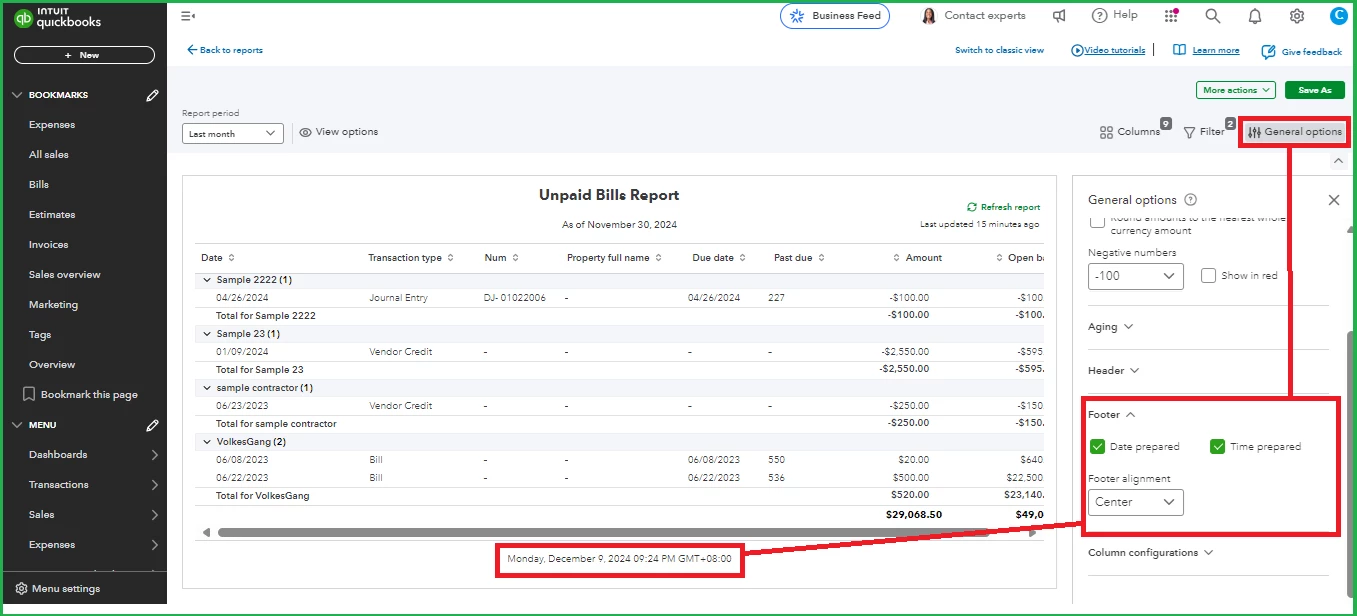
Discover the step-by-step process for establishing an email schedule for your memorized reports in QBO. This feature allows you to automate the delivery of important financial reports directly to your inbox or the inboxes of your team members, ensuring that everyone stays informed without the need for manual intervention.
Maintaining precise documentation allows you to track when each report was created, providing a clear timeline for your financial records. Should you have further questions? I'll be around to lend a hand.
Enter your E-mail address. We'll send you an e-mail with instructions to reset your password.